
Module
Before You Start
- Applies to: Go 1.21+ (examples verified with Go 1.22) · Prerequisites: Get Started · Read time: about 20 min
Every modern language has its own mature dependency management tool, such as Java's Gradle, Python's Pip, NodeJs's Npm, etc. A good dependency management tool can save developers a lot of time and improve development efficiency. However, Go didn't have a mature dependency management solution in the early days. At that time, all code was stored in the GOPATH directory, which was very unfriendly for engineering projects, with chaotic versions and difficult-to-manage dependencies. To solve this problem, developers from various communities competed with each other, and the situation was chaotic for a while. During this period, some outstanding tools emerged, such as Vendor. Until Go 1.11, the official team finally launched Go Mod, the official dependency management tool, ending the previous chaotic situation. It has been continuously improved in subsequent updates, eliminating old tools. Today, at the time of writing, the Go release version has reached 1.20. Almost all Go projects are using Go Mod today, so this article will only introduce Go Mod. The official team has also written very detailed documentation for Go modules: Go Modules Reference.
Writing Modules
Go Module is essentially based on VCS (Version Control System). When you download dependencies, you're actually executing VCS commands, such as git. So if you want to share the library you wrote, you only need to do the following three things:
- Source code repository is publicly accessible, and VCS is one of the following:
- git
- hg (Mercurial)
- bzr (Bazaar)
- svn
- fossil
- Is a compliant go mod project
- Follows semantic versioning specification
So you just need to develop normally using VCS and tag your specific versions with compliant tags. Others can download the library you wrote through the module name. Below, we'll demonstrate several steps for module development through an example.
Example repository: 246859/hello: say hello (github.com)
Preparation
Before starting, make sure your version fully supports go mod (go >= 1.17) and Go Module is enabled. Check if it's enabled with the following command:
$ go env GO111MODULEIf not enabled, enable Go Module with the following command:
$ go env -w GO111MODULE=onCreation
First, you need a publicly accessible source code repository. There are many choices. I recommend Github. Create a new project on it, name it hello. Although there are no special restrictions on repository names, it's recommended not to use special characters as this will affect the module name.
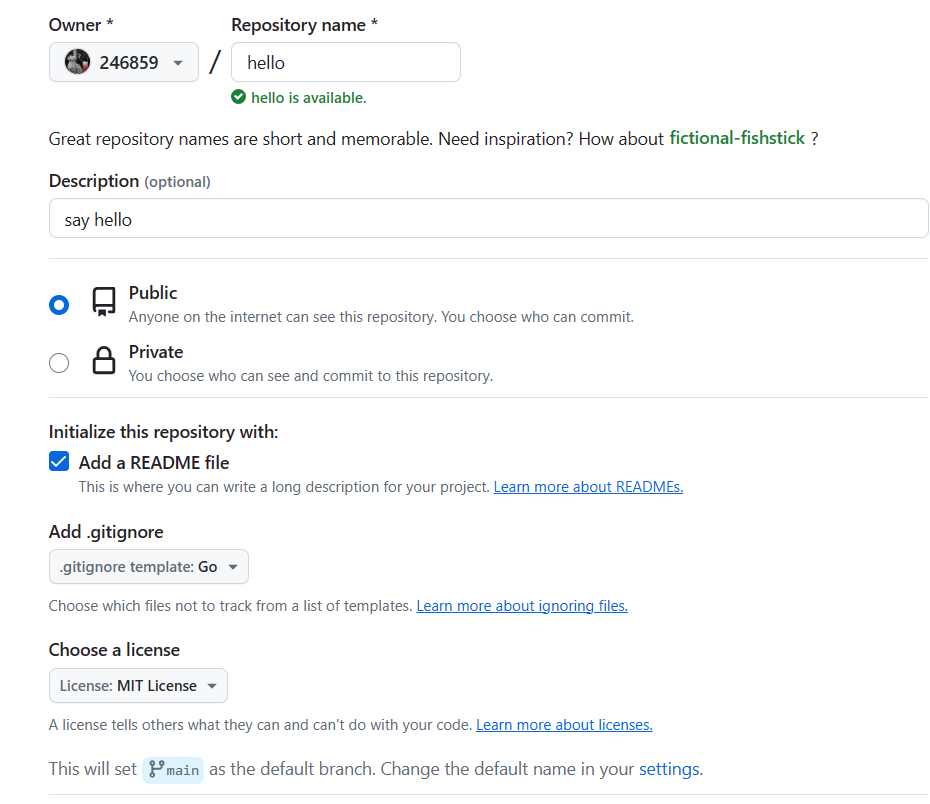
After creation, you can see the repository URL is https://github.com/246859/hello, and the corresponding go module name is github.com/246859/hello.
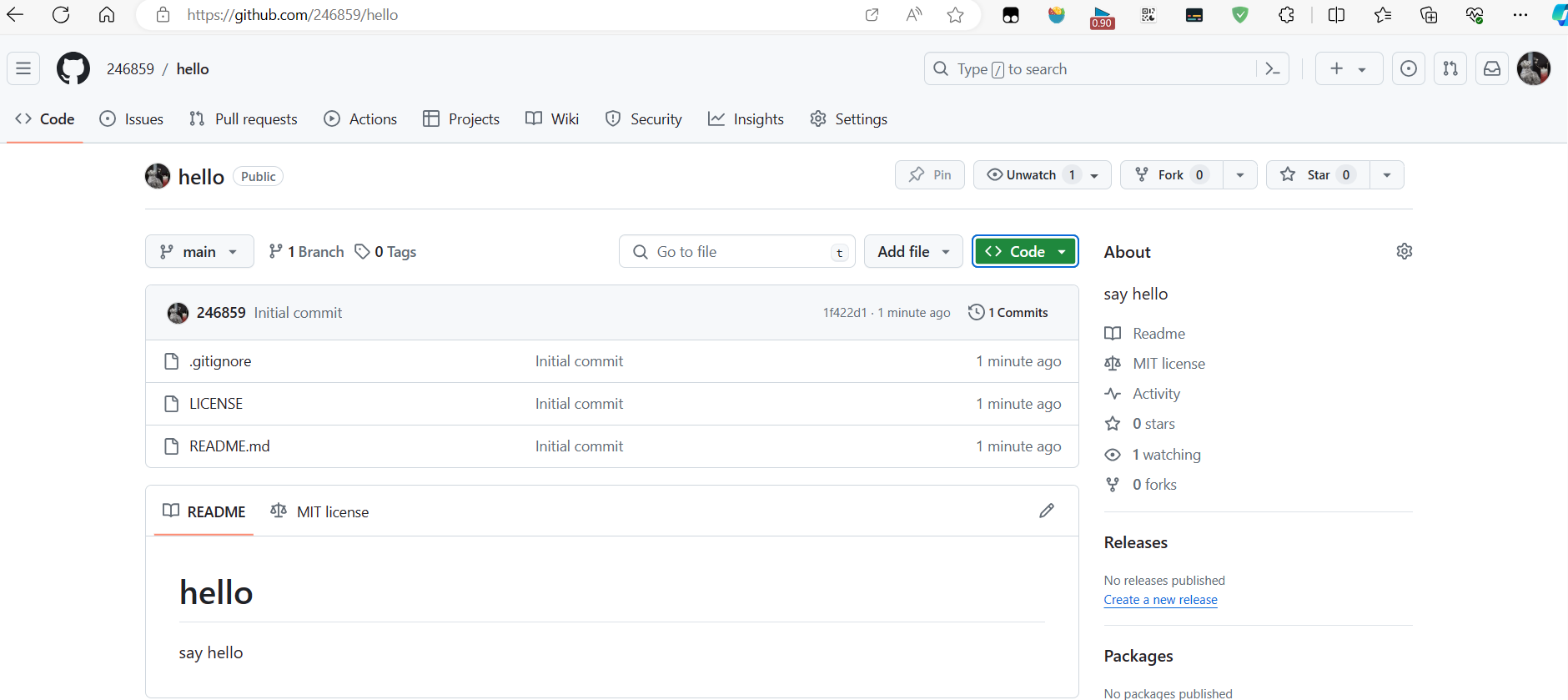
Then clone it locally and initialize the module with the go mod init command:
$ git clone git@github.com:246859/hello.git
Cloning into 'hello'...
remote: Enumerating objects: 5, done.
remote: Counting objects: 100% (5/5), done.
remote: Compressing objects: 100% (4/4), done.
remote: Total 5 (delta 0), reused 0 (delta 0), pack-reused 0
Receiving objects: 100% (5/5), done.

$ cd hello && go mod init github.com/246859/hello
go: creating new go.mod: module github.com/246859/hello
Writing
Then you can start development work. Its function is very simple, with only one function:
// hello.go
package hello

import "fmt"

// Hello returns hello message
func Hello(name string) string {
        if name == "" {
                name = "world"
        }
        return fmt.Sprintf("hello %s!", name)
}
By the way, write a test file for unit testing:
// hello_test.go
package hello_test

import (
        "testing"
        "fmt"
        "github.com/246859/hello"
)

func TestHello(t *testing.T) {
        data := "jack"
        expected := fmt.Sprintf("hello %s!", data)
        result := hello.Hello(data)

        if result != expected {
                t.Fatalf("expected result %s, but got %s", expected, result)
        }

}
Next, continue writing a command-line program to output hello. Its function is equally simple. For command-line programs, according to convention, they are created in cmd/app_name/. So the hello command-line program files are stored in the cmd/hello/ directory, then write the relevant code in it.
// cmd/hello/main.go
package main

import (
  "flag"
  "github.com/246859/hello"
  "os"
)

var name string

func init() {
  flag.StringVar(&name, "name", "world", "name to say hello")
}

func main() {
  flag.Parse()
  msg := hello.Hello(name)
  _, err := os.Stdout.WriteString(msg)
  if err != nil {
    os.Stderr.WriteString(err.Error())
  }
}
Testing
After writing, format the source code and test:
$ go fmt && go vet ./...

$ go test -v .
=== RUN   TestHello
--- PASS: TestHello (0.00s)
PASS
ok      github.com/246859/hello 0.023s
Run the command-line program:
$ go run ./cmd/hello -name jack
hello jack!
Documentation
Finally, you need to write a concise and clear README for this library so other developers can understand how to use it at a glance:
# hello

just say hello

## Install

import code

```bash
go get github.com/246859/hello@latest
```

install cmd

```bash
go install github.com/246859/hello/cmd/hello@latest
```

## Example

Here's a simple example as follows:

```go
package main

import (
  "fmt"
  "github.com/246859/hello"
)

func main() {
  result := hello.Hello("jack")
  fmt.Println(result)
}
```
This is a very simple README document. You can enrich it yourself.
Upload
When all code is written and tested, you can commit the changes and push to the remote repository.
$ git add go.mod hello.go hello_test.go cmd/ example/ README.md

$ git commit -m "chore(mod): mod init" go.mod
[main 5087fa2] chore(mod): mod init
 1 file changed, 3 insertions(+)
 create mode 100644 go.mod

$ git commit -m "feat(hello): complete Hello func" hello.go
[main 099a8bf] feat(hello): complete Hello func
 1 file changed, 11 insertions(+)
 create mode 100644 hello.go

$ git commit -m "test(hello): complete hello testcase" hello_test.go
[main 76e8c1e] test(hello): complete hello testcase
 1 file changed, 17 insertions(+)
 create mode 100644 hello_test.go

$ git commit -m "feat(hello): complete hello cmd" cmd/hello/
[main a62a605] feat(hello): complete hello cmd
 1 file changed, 22 insertions(+)
 create mode 100644 cmd/hello/main.go

$ git commit -m "docs(example): add hello example" example/
[main 5c51ce4] docs(example): add hello example
 1 file changed, 11 insertions(+)
 create mode 100644 example/main.go

$ git commit -m "docs(README): update README" README.md
[main e6fbc62] docs(README): update README
 1 file changed, 27 insertions(+), 1 deletion(-)
A total of six commits, not many. After committing, create a tag for the latest commit:
$ git tag v1.0.0

$ git tag -l
v1.0.0

$ git log --oneline
e6fbc62 (HEAD -> main, tag: v1.0.0, origin/main, origin/HEAD) docs(README): update README
5c51ce4 docs(example): add hello example
a62a605 feat(hello): complete hello cmd
76e8c1e test(hello): complete hello testcase
099a8bf feat(hello): complete Hello func
5087fa2 chore(mod): mod init
1f422d1 Initial commit
Finally, push to the remote repository:
$ git push --tags
Enumerating objects: 23, done.
Counting objects: 100% (23/23), done.
Delta compression using up to 16 threads
Compressing objects: 100% (17/17), done.
Writing objects: 100% (21/21), 2.43 KiB | 1.22 MiB/s, done.
Total 21 (delta 5), reused 0 (delta 0), pack-reused 0
remote: Resolving deltas: 100% (5/5), done.
To github.com:246859/hello.git
   1f422d1..e6fbc62    main -> main
  * [new tag]         v1.0.0 -> v1.0.0
After pushing, create a release for it (a tag is sufficient, release just follows GitHub convention):
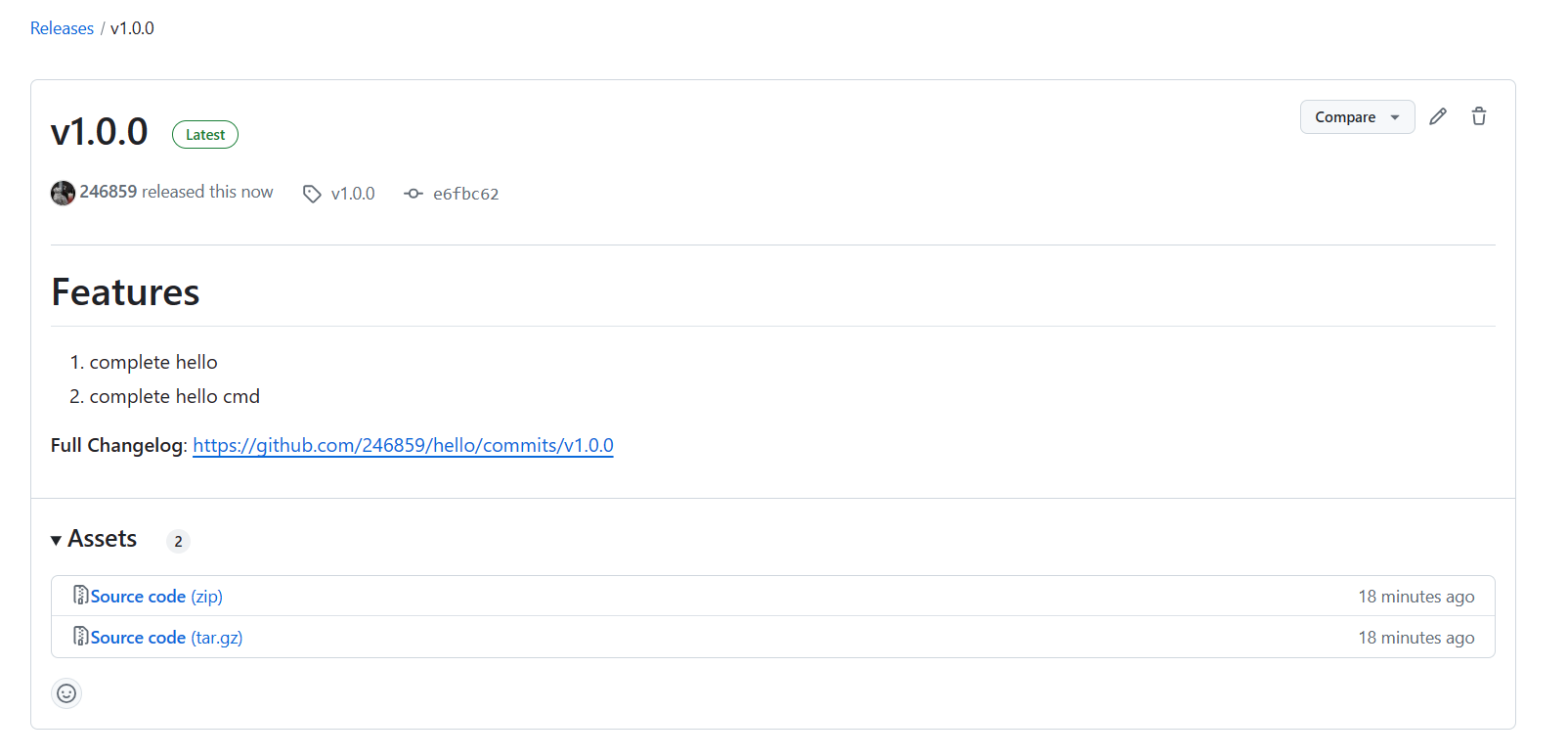
Thus, the module writing is complete. Above is the basic process of module development. Other developers can import code or install command-line tools through the module name.
Reference
Reference the library through go get:
$ go get github.com/246859/hello@latest
go: downloading github.com/246859/hello v1.0.0
go: added github.com/246859/hello v1.0.0
Install command-line program through go install:
$ go install github.com/246859/hello/cmd/hello@latest && hello -name jack
hello jack!
Or use go run to run directly:
$ go run -mod=mod github.com/246859/hello/cmd/hello -name jack
hello jack!
When a library is referenced, Go Package will create a page for it. This process is automatic and doesn't require any work from the developer. For example, the hello library has a dedicated documentation page, as shown below.
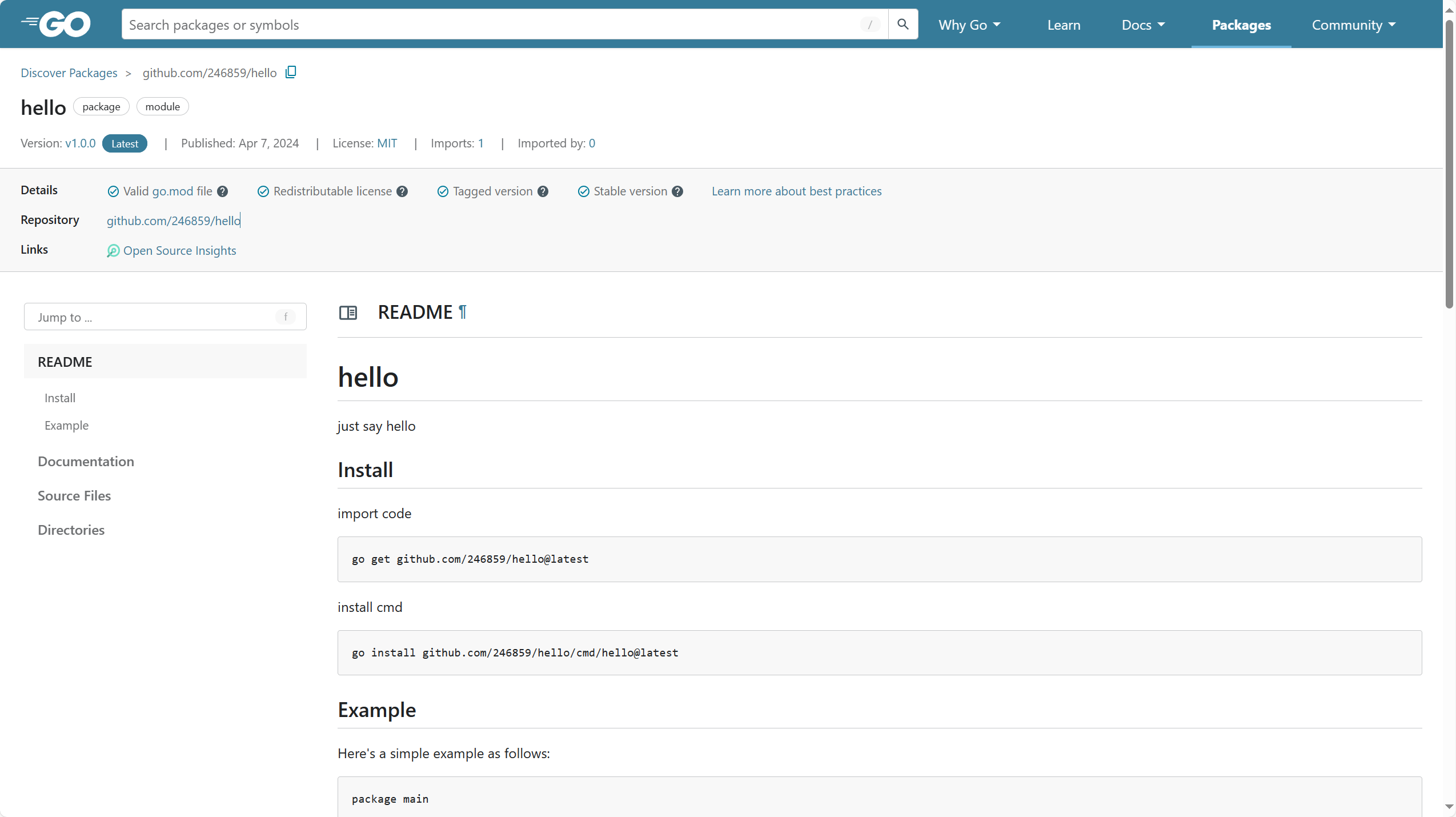
For more details about uploading modules, go to Add a package.
For information on how to delete modules, go to Removing a package.
Setting Proxy
Although Go doesn't have a central repository like Maven Repo, PyPi, or NPM, it has an official proxy repository: Go modules services (golang.org). It caches modules downloaded by developers based on version and module name. However, since its servers are deployed abroad, access speed is not very friendly for domestic users, so we need to modify the default module proxy address. Currently, the following domestic proxies are doing well:
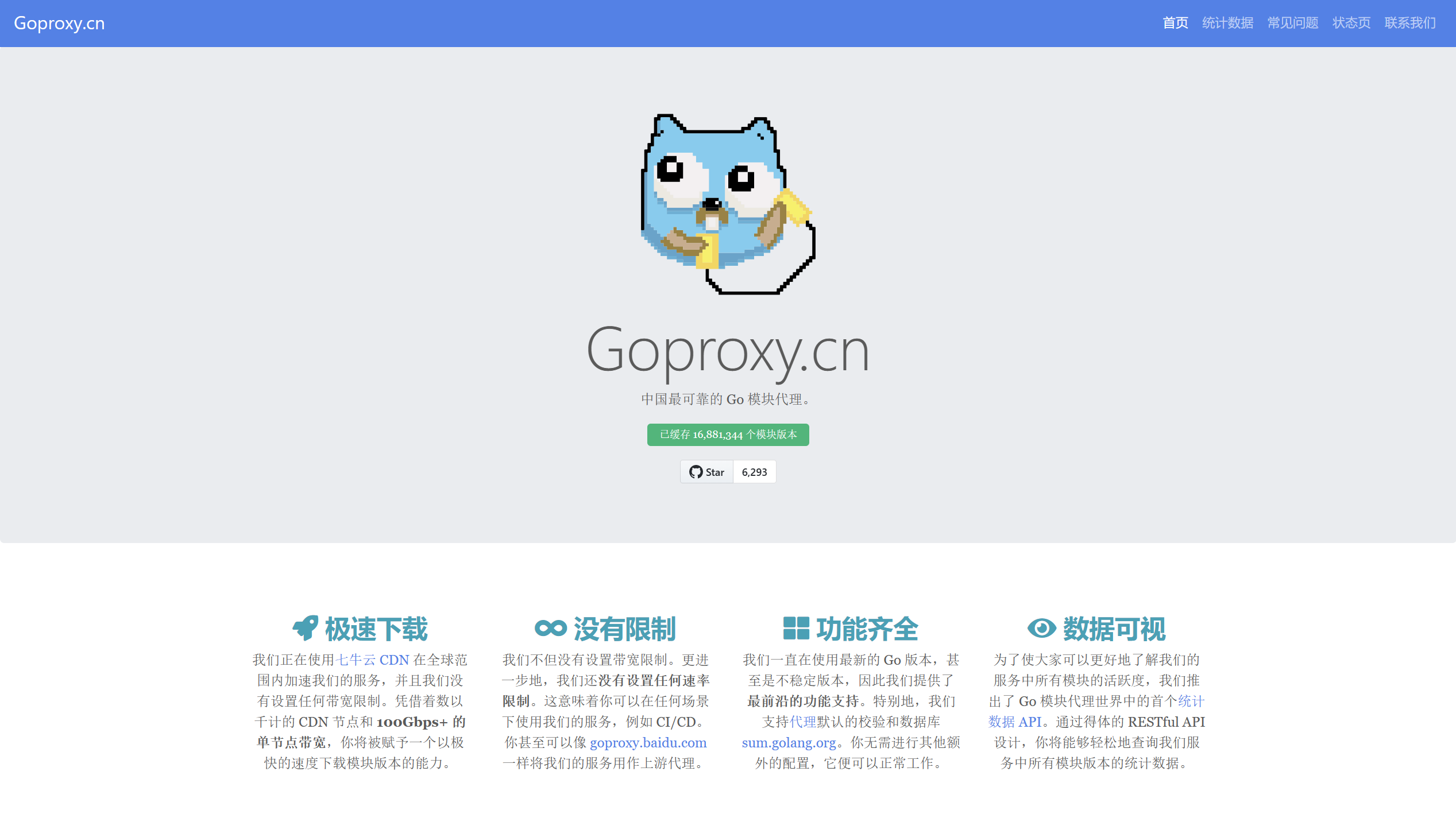
Here we choose Qiniu Cloud's proxy. Execute the following command to modify Go proxy. The direct in it means that if proxy download fails, it bypasses the proxy cache and directly accesses the source code repository.
$ go env -w GOPROXY=https://goproxy.cn,directAfter modifying the proxy, downloading dependencies will be much faster in the future.
Downloading Dependencies
After modifying the proxy, let's try installing a third-party dependency. Go official has a dedicated dependency query website: Go Packages.
Code Reference
Search for the famous web framework Gin in it.
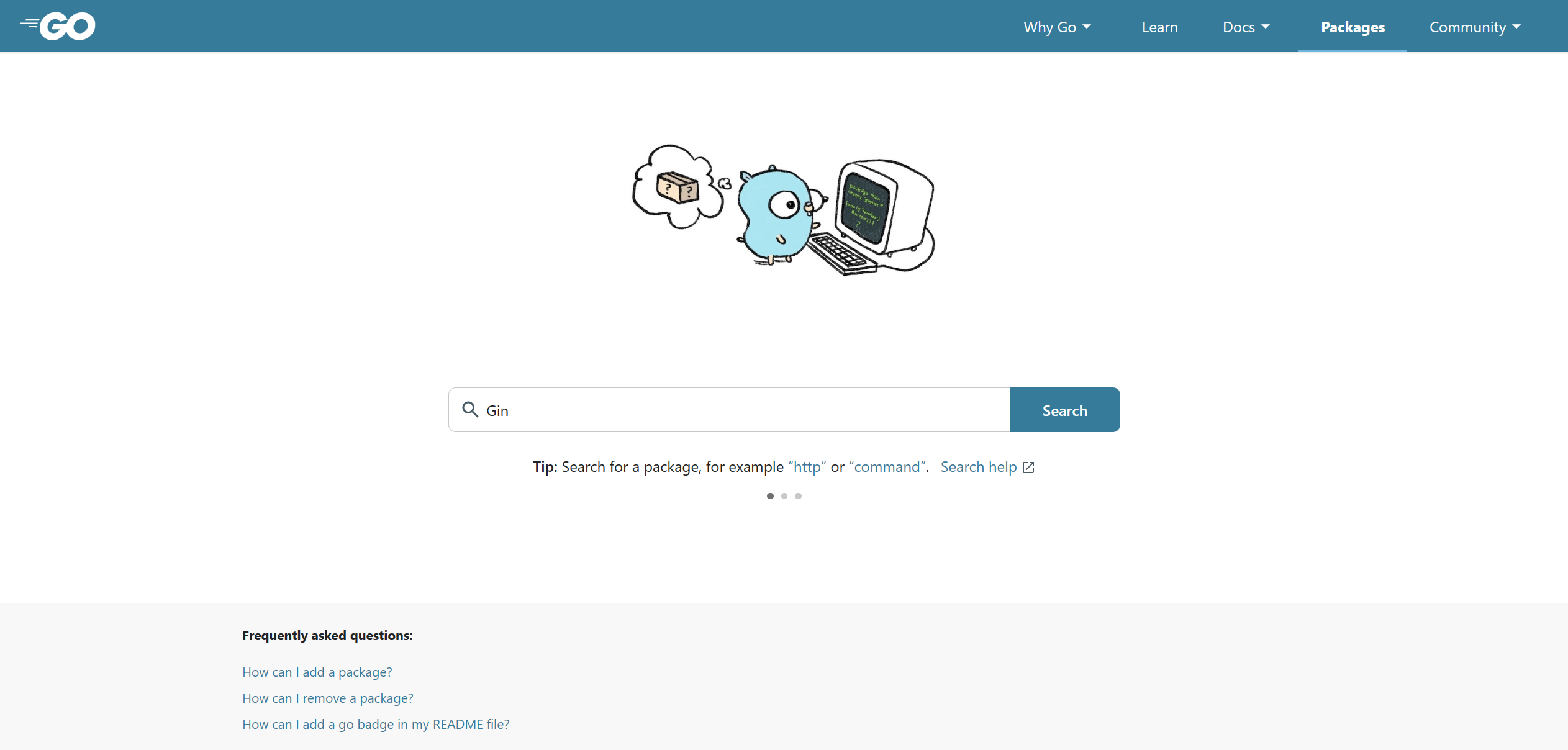
Here will appear many search results. When using third-party dependencies, you need to combine reference count and update time to decide whether to adopt the dependency. Here we directly choose the first one:
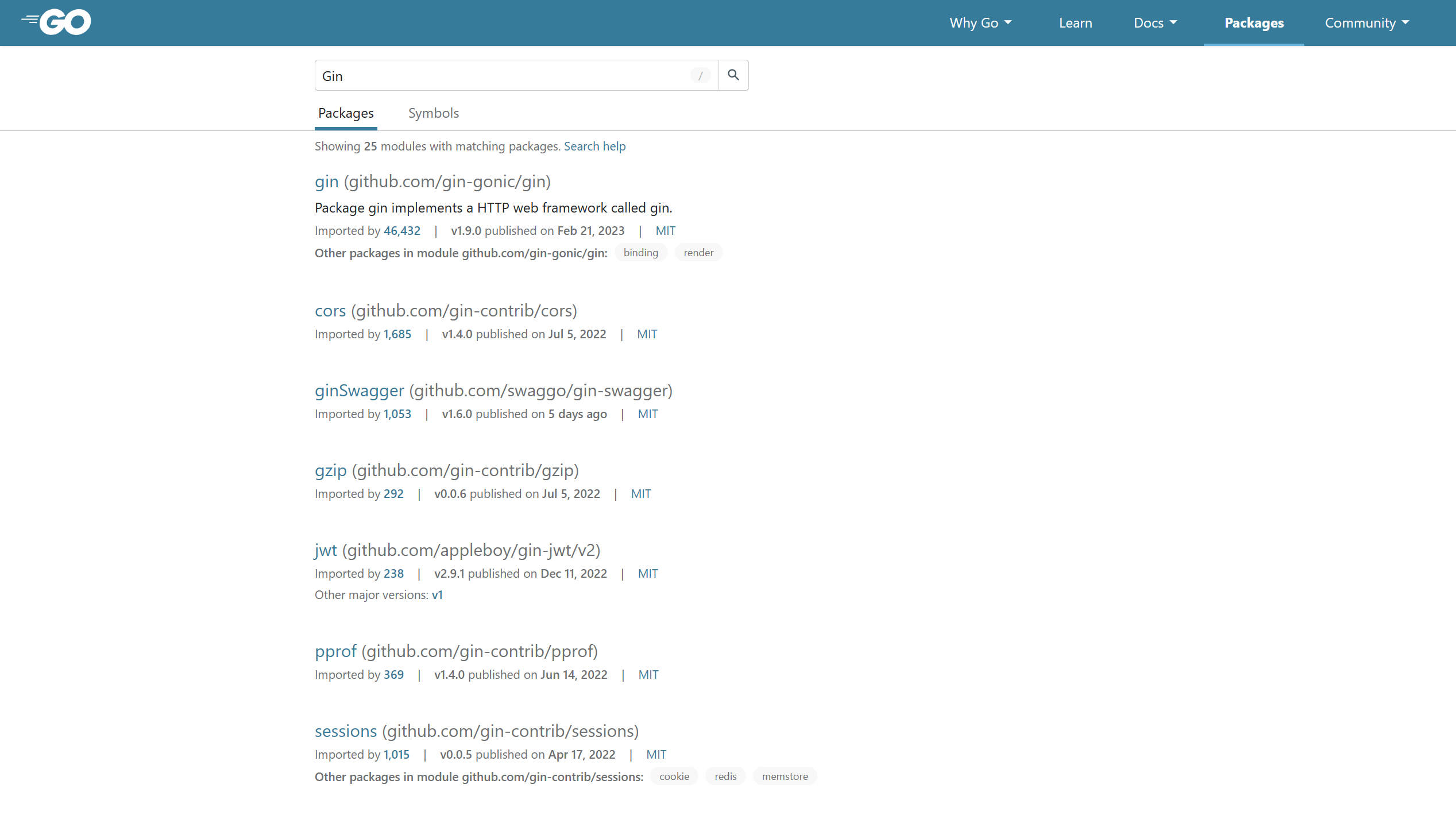
After entering the corresponding page, you can see this is a documentation page for the dependency, with a lot of detailed information about it. You can also come here when consulting documentation later.

Here you just need to copy its address, then use the go get command in the previously created project. The command is as follows:
$ go get github.com/gin-gonic/ginDuring the process, many dependencies will be downloaded. As long as there are no errors, the download is successful.
$ go get github.com/gin-gonic/gin
go: added github.com/bytedance/sonic v1.8.0
go: added github.com/chenzhuoyu/base64x v0.0.0-20221115062448-fe3a3abad311
go: added github.com/gin-contrib/sse v0.1.0
go: added github.com/gin-gonic/gin v1.9.0
go: added github.com/go-playground/locales v0.14.1
go: added github.com/go-playground/universal-translator v0.18.1
go: added github.com/go-playground/validator/v10 v10.11.2
go: added github.com/goccy/go-json v0.10.0
go: added github.com/json-iterator/go v1.1.12
go: added github.com/klauspost/cpuid/v2 v2.0.9
go: added github.com/leodido/go-urn v1.2.1
go: added github.com/mattn/go-isatty v0.0.17
go: added github.com/modern-go/concurrent v0.0.0-20180228061459-e0a39a4cb421
go: added github.com/modern-go/reflect2 v1.0.2
go: added github.com/pelletier/go-toml/v2 v2.0.6
go: added github.com/twitchyliquid64/golang-asm v0.15.1
go: added github.com/ugorji/go/codec v1.2.9
go: added golang.org/x/arch v0.0.0-20210923205945-b76863e36670
go: added golang.org/x/crypto v0.5.0
go: added golang.org/x/net v0.7.0
go: added golang.org/x/sys v0.5.0
go: added golang.org/x/text v0.7.0
go: added google.golang.org/protobuf v1.28.1
go: added gopkg.in/yaml.v3 v3.0.1
After completion, view the go.mod file:
$ cat go.mod
module golearn

go 1.20

require github.com/gin-gonic/gin v1.9.0

require (
  github.com/bytedance/sonic v1.8.0 // indirect
  github.com/chenzhuoyu/base64x v0.0.0-20221115062448-fe3a3abad311 // indirect
  github.com/gin-contrib/sse v0.1.0 // indirect
  github.com/go-playground/locales v0.14.1 // indirect
  github.com/go-playground/universal-translator v0.18.1 // indirect
  github.com/go-playground/validator/v10 v10.11.2 // indirect
  github.com/goccy/go-json v0.10.0 // indirect
  github.com/json-iterator/go v1.1.12 // indirect
  github.com/klauspost/cpuid/v2 v2.0.9 // indirect
  github.com/leodido/go-urn v1.2.1 // indirect
  github.com/mattn/go-isatty v0.0.17 // indirect
  github.com/modern-go/concurrent v0.0.0-20180228061459-e0a39a4cb421 // indirect
  github.com/modern-go/reflect2 v1.0.2 // indirect
  github.com/pelletier/go-toml/v2 v2.0.6 // indirect
  github.com/twitchyliquid64/golang-asm v0.15.1 // indirect
  github.com/ugorji/go/codec v1.2.9 // indirect
  golang.org/x/arch v0.0.0-20210923205945-b76863e36670 // indirect
  golang.org/x/crypto v0.5.0 // indirect
  golang.org/x/net v0.7.0 // indirect
  golang.org/x/sys v0.5.0 // indirect
  golang.org/x/text v0.7.0 // indirect
  google.golang.org/protobuf v1.28.1 // indirect
  gopkg.in/yaml.v3 v3.0.1 // indirect
)
You can find that compared to before, there are many more things. At the same time, you'll find an additional file named go.sum in the directory:
$ ls
go.mod  go.sum  main.go
Let's not discuss this for now. Modify the main.go file with the following code:
package main

import (
  "github.com/gin-gonic/gin"
)

func main() {
  gin.Default().Run()
}
Run the project again:
$ go run golearn
[GIN-debug] [WARNING] Creating an Engine instance with the Logger and Recovery middleware already attached.

[GIN-debug] [WARNING] Running in "debug" mode. Switch to "release" mode in production.
 - using env:   export GIN_MODE=release
 - using code:  gin.SetMode(gin.ReleaseMode)

[GIN-debug] [WARNING] You trusted all proxies, this is NOT safe. We recommend you to set a value.
Please check https://pkg.go.dev/github.com/gin-gonic/gin#readme-don-t-trust-all-proxies for details.
[GIN-debug] Environment variable PORT is undefined. Using port :8080 by default
[GIN-debug] Listening and serving HTTP on :8080
Thus, with one line of code, the simplest web server is running. When you no longer need a dependency, you can also use the go get command to delete it. Here's an example of deleting Gin:
$ go get github.com/gin-gonic/gin@none
go: removed github.com/gin-gonic/gin v1.9.0
Add @none after the dependency address to delete the dependency. The result also indicates successful deletion. At this point, check the go.mod file again and you'll find no Gin dependency.
$ cat go.mod | grep github.com/gin-gonic/ginWhen you need to upgrade to the latest version, you can add the @latest suffix, or you can query available Release version numbers yourself:
$ go get -u github.com/gin-gonic/gin@latestInstalling Command-line Tools
The go install command downloads third-party dependencies to local and compiles them into binary files. Thanks to Go's compilation speed, this process usually doesn't take much time. Then Go stores them in $GOPATH/bin or $GOBIN directory so that the binary file can be executed globally (provided you've added these paths to environment variables).
TIP
When using the install command, you must specify the version number.
For example, downloading the debugger delve written in Go:
$ go install github.com/go-delve/delve/cmd/dlv@latest
go: downloading github.com/go-delve/delve v1.22.1
go: downloading github.com/cosiner/argv v0.1.0
go: downloading github.com/derekparker/trie v0.0.0-20230829180723-39f4de51ef7d
go: downloading github.com/go-delve/liner v1.2.3-0.20231231155935-4726ab1d7f62
go: downloading github.com/google/go-dap v0.11.0
go: downloading github.com/hashicorp/golang-lru v1.0.2
go: downloading golang.org/x/arch v0.6.0
go: downloading github.com/cpuguy83/go-md2man/v2 v2.0.2
go: downloading go.starlark.net v0.0.0-20231101134539-556fd59b42f6
go: downloading github.com/cilium/ebpf v0.11.0
go: downloading github.com/mattn/go-runewidth v0.0.13
go: downloading github.com/russross/blackfriday/v2 v2.1.0
go: downloading github.com/rivo/uniseg v0.2.0
go: downloading golang.org/x/exp v0.0.0-20230224173230-c95f2b4c22f2

$ dlv -v
Error: unknown shorthand flag: 'v' in -v
Usage:
  dlv [command]

Available Commands:
  attach      Attach to running process and begin debugging.
  completion  Generate the autocompletion script for the specified shell
  connect     Connect to a headless debug server with a terminal client.
  core        Examine a core dump.
  dap         Starts a headless TCP server communicating via Debug Adaptor Protocol (DAP).
  debug       Compile and begin debugging main package in current directory, or the package specified.
  exec        Execute a precompiled binary, and begin a debug session.
  help        Help about any command
  test        Compile test binary and begin debugging program.
  trace       Compile and begin tracing program.
  version     Prints version.

Additional help topics:
  dlv backend    Help about the --backend flag.
  dlv log        Help about logging flags.
  dlv redirect   Help about file redirection.

Use "dlv [command] --help" for more information about a command.
Module Management
All the content above only covers the basic usage of Go Mod. In fact, learning Go Mod requires much more than this. The official definition of a module is: a collection of packages marked with versions. In the above definition, packages should be a familiar concept, and versions must follow semantic versioning, defined as: v(major).(minor).(patch) format. For example, Go's version number v1.20.1, major version is 1, minor version is 20, patch version is 1, together it's v1.20.1. Here's a more detailed explanation:
major: When major version changes, it means the project has incompatible changes. Old versions of the project upgrading to the new version probably won't run normally.minor: When minor version changes, it means the project added new features, just adding new functionality on top of previous versions.patch: When patch version changes, it means only bugs were fixed, no new features added.
Common Commands
| Command | Description |
|---|---|
go mod download | Download dependency packages for current project |
go mod edit | Edit go.mod file |
go mod graph | Output module dependency graph |
go mod init | Initialize go mod in current directory |
go mod tidy | Clean up project modules |
go mod verify | Verify project dependency legality |
go mod why | Explain where dependencies are used in project |
go clean -modcache | Delete project module dependency cache |
go list -m | List modules |
Go to go mod cmd to learn more about the commands
Module Storage
When using Go Mod for project management, module cache is stored in $GOPATH/pkg/mod directory by default. You can also modify $GOMODCACHE to specify another location.
$ go env -w GOMODCACHE=your module cache pathAll Go Module projects on the same machine share the cache in this directory. The cache has no size limit and won't be automatically deleted. The decompressed dependency source files in the cache are read-only. To clear the cache, execute the following command:
$ go clean -modcacheIn the $GOMODCACHE/cache/download directory, the original files of dependencies are stored, including hash files, original compressed packages, etc. For example:
$ ls $(go env GOMODCACHE)/cache/download/github.com/246859/hello/@v -1
list
v1.0.0.info
v1.0.0.lock
v1.0.0.mod
v1.0.0.zip
v1.0.0.ziphash
The decompressed dependencies are organized as follows, which is the source code of the specified module:
$ ls $(go env GOMODCACHE)/github.com/246859/hello@v1.0.0 -1
LICENSE
README.md
cmd/
example/
go.mod
hello.go
hello_test.go
Version Selection
When Go selects dependency versions, it follows the minimal version selection principle. Here's an example from the official website: the main module references version 1.2 of module A and version 1.2 of module B. At the same time, version 1.2 of module A references version 1.3 of module C, version 1.2 of module B references version 1.4 of module C, and both versions 1.3 and 1.4 of module C reference version 1.2 of module D. According to the minimal available version principle, Go will finally select versions A1.2, B1.2, C1.4, and D1.2. The light blue ones are loaded by go.mod file, and the boxed ones are the finally selected versions.
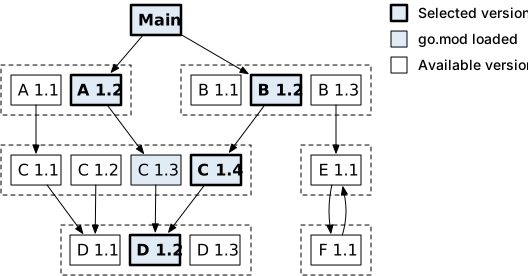
The official website also gives several other examples, with similar meanings.
go.mod
Every Go Mod project generates a go.mod file, so being familiar with the go.mod file is very necessary. However, most of the time you don't need to manually modify the go.mod file.
module golearn

go 1.20

require github.com/gin-gonic/gin v1.9.0

require (
   github.com/bytedance/sonic v1.8.0 // indirect
   github.com/chenzhuoyu/base64x v0.0.0-20221115062448-fe3a3abad311 // indirect
   github.com/gin-contrib/sse v0.1.0 // indirect
   github.com/go-playground/locales v0.14.1 // indirect
   github.com/go-playground/universal-translator v0.18.1 // indirect
   github.com/go-playground/validator/v10 v10.11.2 // indirect
   github.com/goccy/go-json v0.10.0 // indirect
   github.com/json-iterator/go v1.1.12 // indirect
   github.com/klauspost/cpuid/v2 v2.0.9 // indirect
   github.com/leodido/go-urn v1.2.1 // indirect
   github.com/mattn/go-isatty v0.0.17 // indirect
   github.com/modern-go/concurrent v0.0.0-20180228061459-e0a39a4cb421 // indirect
   github.com/modern-go/reflect2 v1.0.2 // indirect
   github.com/pelletier/go-toml/v2 v2.0.6 // indirect
   github.com/twitchyliquid64/golang-asm v0.15.1 // indirect
   github.com/ugorji/go/codec v1.2.9 // indirect
   golang.org/x/arch v0.0.0-20210923205945-b76863e36670 // indirect
   golang.org/x/crypto v0.5.0 // indirect
   golang.org/x/net v0.7.0 // indirect
   golang.org/x/sys v0.5.0 // indirect
   golang.org/x/text v0.7.0 // indirect
   google.golang.org/protobuf v1.28.1 // indirect
   gopkg.in/yaml.v3 v3.0.1 // indirect
)
In the file, you can find that most dependency addresses contain words like github. This is because Go doesn't have a public dependency repository. Most open-source projects are hosted on GitHub. Some are self-hosted repositories, such as google.golang.org/protobuf, golang.org/x/crypto. Usually, this string of URLs is also the module name of the Go project. This creates a problem: URLs are case-insensitive, but folders storing dependencies are case-sensitive. So go get github.com/gin-gonic/gin and go get github.com/gin-gonic/Gin reference the same dependency but are stored in different local paths. When this happens, Go won't directly use uppercase letters as storage paths, but will escape them to !lowercase letter. For example, github.com\BurntSushi will eventually be escaped to github.com\!burnt!sushi.
module
The module keyword declares the module name of the current project. Only one module keyword can appear in a go.mod file. In the example:
module golearnrepresents the current module name as golearn. For example, opening Gin dependency's go.mod file, you can find its module name:
module github.com/gin-gonic/ginGin's module name is the address used when downloading dependencies. This is also the recommended module name format: domain/user/repository.
TIP
One thing to note is that when the major version is greater than 1, the major version number must be reflected in the module name. For example:
github.com/my/exampleIf the version upgrades to v2.0.0, the module name needs to be modified as follows:
github.com/my/example/v2If the original project references an old version and the new version doesn't distinguish, when referencing dependencies, since the paths are the same, users can't distinguish incompatible changes caused by major version changes, which may cause program errors.
Deprecation
Add a comment Deprecated at the beginning of the line above module to indicate that the module is deprecated. For example:
// Deprecated: use example.com/mod/v2 instead.
module example.com/mod
go
The go keyword indicates the Go version used to write the current project. The version number must follow semantic rules. Depending on the Go version, Go Mod will behave differently. Below is a simple example. For available Go version numbers, check the official documentation yourself.
go 1.20require
The require keyword indicates referencing an external dependency. For example:
require github.com/gin-gonic/gin v1.9.0The format is require module_name version_number. When there are multiple references, you can use parentheses:
require (
   github.com/bytedance/sonic v1.8.0 // indirect
)
Those with // indirect comment indicate that the dependency is not directly referenced by the current project. It may be referenced by dependencies directly referenced by the project, so for the current project, it's an indirect reference. As mentioned earlier, when major version changes, it should be reflected in the module name. Modules that don't follow this rule are called non-compliant modules. When require-ing, the incompatible comment will be added.
require example.com/m v4.1.2+incompatiblePseudo-version
In the go.mod file above, you can find that some dependency package versions are not semantic version numbers, but a string of incomprehensible characters. This is actually the corresponding version's CommitID. Semantic versions usually refer to a specific Release. Pseudo-version numbers can be refined to a specific Commit. The usual format is vx.y.z-yyyyMMddHHmmss-CommitId. Since its vx.y.z may not actually exist, it's called a pseudo-version. For example, v0.0.0 in the following example doesn't exist. What's really effective is the 12-digit CommitID after it.
// CommitID generally takes the first 12 digits
github.com/chenzhuoyu/base64x v0.0.0-20221115062448-fe3a3abad311 // indirect
Similarly, when downloading dependencies, you can also specify CommitID to replace semantic version numbers:
go get github.com/chenzhuoyu/base64x@fe3a3abad311exclude
The exclude keyword indicates not to load the specified version of the dependency. If require also references the same version of the dependency, it will also be ignored. This keyword only takes effect in the main module. For example:
exclude golang.org/x/net v1.2.3

exclude (
    golang.org/x/crypto v1.4.5
    golang.org/x/text v1.6.7
)
replace
replace will replace the specified version of the dependency. You can use module path and version to replace, or other platform-specified file paths. Example:
replace golang.org/x/net v1.2.3 => example.com/fork/net v1.4.5

replace (
    golang.org/x/net v1.2.3 => example.com/fork/net v1.4.5
    golang.org/x/net => example.com/fork/net v1.4.5
    golang.org/x/net v1.2.3 => ./fork/net
    golang.org/x/net => ./fork/net
)
Only the version on the left side of => is replaced. Other versions of the same dependency can still be accessed normally. Whether using local path or module path to specify replacement, if the replacement module has a go.mod file, its module directive must match the replaced module path.
retract
The retract directive indicates that the version or version range specified by retract should not be depended upon. For example, after a new version is released, a major problem is discovered. At this time, you can use the retract directive.
Retract some versions:
retract (
    v1.0.0 // Published accidentally.
    v1.0.1 // Contains retractions only.
)
Retract version range:
retract v1.0.0
retract [v1.0.0, v1.9.9]
retract (
    v1.0.0
    [v1.0.0, v1.9.9]
)
go.sum
The go.sum file doesn't exist when creating a project initially. It's only generated after actually referencing external dependencies. The go.sum file is not suitable for human reading, and manual modification of this file is not recommended. Its main purpose is to solve the consistency build problem, that is, when different people use the same project to build in different environments, the referenced dependency packages must be exactly the same. This cannot be guaranteed by a go.mod file alone.
Let's see what Go does from beginning to end when downloading a dependency. First, use the following command to download a dependency:
go get github.com/bytedance/sonic v1.8.0The go get command first downloads the dependency package to the local cache directory, usually $GOMODCACHE/cache/download/. This directory divides dependency packages from different websites by domain name, so you might see the following directory structure:
$ ls
cloud.google.com/      go.opencensus.io/     gopkg.in/          nhooyr.io/
dmitri.shuralyov.com/  go.opentelemetry.io/  gorm.io/           rsc.io/
github.com/            go.uber.org/          honnef.co/         sumdb/
go.etcd.io/            golang.org/           lukechampine.com/
go.mongodb.org/        google.golang.org/    modernc.org/
So the dependency package downloaded in the above example is stored at:
$GOMODCACHE/cache/download/github.com/bytedance/sonic/@v/The possible directory structure is as follows, with several version-named files:
$ ls
list         v1.8.0.lock  v1.8.0.ziphash  v1.8.3.mod
v1.5.0.mod   v1.8.0.mod   v1.8.3.info     v1.8.3.zip
v1.8.0.info  v1.8.0.zip   v1.8.3.lock     v1.8.3.ziphash
Usually, there must be a list file in this directory, used to record known version numbers of the dependency. For each version, there are the following files:
zip: Dependency's source code compressed packageziphash: Hash value calculated from the dependency compressed packageinfo: JSON format version metadatamod: The version'sgo.modfilelock: Temporary file, official didn't say what it's for
Generally, Go calculates the hash values of the compressed package and go.mod files, then queries the hash value of the dependency package from the server specified by GOSUMDB (default is sum.golang.org). If the locally calculated hash value doesn't match the queried result, it won't proceed further. If they match, it updates the go.mod file and inserts two records into the go.sum file, roughly as follows:
github.com/bytedance/sonic v1.8.0 h1:ea0Xadu+sHlu7x5O3gKhRpQ1IKiMrSiHttPF0ybECuA=
github.com/bytedance/sonic v1.8.0/go.mod h1:i736AoUSYt75HyZLoJW9ERYxcy6eaN6h4BZXU064P/U=
TIP
If GOSUMDB is disabled, Go will directly write the locally calculated hash value into the go.sum file. This is generally not recommended.
Normally, each dependency has two records. The first is the hash value of the compressed package, and the second is the hash value of the dependency package's go.mod file. The record format is module_name version_number algorithm_name:hash_value. Some older dependency packages may not have a go.mod file, so there won't be a second hash record. When this project is built in another person's environment, Go calculates the hash value based on the local dependencies specified in go.mod, then compares it with the hash value recorded in go.sum. If the hash values don't match, it means the dependency versions are different, and the build will be refused. When this happens, both local dependencies and go.sum file may have been modified, but since go.sum is queried and recorded through GOSUMDB, it tends to trust the go.sum file more.
Private Modules
Most Go Mod tools are for open-source projects, but Go also supports private modules. For private projects, usually the following environment configurations need to be configured for module private processing:
GOPROXY: Dependency proxy server collectionGOPRIVATE: Glob pattern list of module path prefixes for private modules. If the module name matches the rule, it indicates the module is a private module. Specific behavior is consistent with GONOPROXY and GONOSUMDB.GONOPROXY: Glob pattern list of module path prefixes that won't be downloaded from proxy. If matching the rule, when downloading modules, it won't go through GOPROXY and tries to download directly from version control system.GONOSUMDB: Glob pattern list of module path prefixes that won't undergo GOSUMDB public verification. If matching, when downloading module verification, it won't go through checksum's public database.GOINSECURE: Glob pattern list of module path prefixes that can be retrieved through HTTP and other insecure protocols.
Workspace
Earlier, it was mentioned that the go.mod file supports the replace directive, which allows us to temporarily use some local modifications that haven't been released in time, as shown below:
replace (
  github.com/246859/hello v1.0.1 => ./hello
)
During compilation, go will use the local hello module. After releasing a new version in the future, remove it.
However, if the replace directive is used, it modifies the content of the go.mod file, and this modification might be accidentally committed to the remote repository. This is not what we want to see, because the target specified by the replace directive is a file path rather than a network URL. A path that works on this machine might not work on another machine. File paths can also be a big problem in cross-platform aspects. To solve this kind of problem, workspace came into being.
Workspace is a new solution for multi-module management introduced by Go in 1.18, aimed at better local multi-module development work. Below, we'll explain through an example.
Example repository: 246859/work: go work example (github.com)
Example
First, there are two independent go modules under the project, auth and user:
$ ls -1
LICENSE
README.md
auth
go.work
user
The auth module depends on the user module's struct User, with the following content:
package auth

import (
  "errors"
  "github.com/246859/work/user"
)

// Verify user credentials if is ok
func Verify(user user.User) (bool, error) {
  password, err := query(user.Name)
  if err != nil {
    return false, err
  }
  if password != user.Password {
    return false, errors.New("authentication failed")
  }
  return true, nil
}

func query(username string) (string, error) {
  if username == "jack" {
    return "jack123456", nil
  }
  return "", errors.New("user not found")
}
The user module content is as follows:
package user

type User struct {
  Name     string
  Password string
  Age      int
}
In this project, we can write the go.work file like this:
go 1.22

use (
  ./auth
  ./user
)
Its content is very easy to understand. Use the use directive to specify which modules participate in compilation. Next, run the code in the auth module:
// auth/example/main.go
package main

import (
  "fmt"
  "github.com/246859/work/auth"
  "github.com/246859/work/user"
)

func main() {
  ok, err := auth.Verify(user.User{Name: "jack", Password: "jack123456"})
  if err != nil {
    panic(err)
  }
  fmt.Printf("%v", ok)
}
Run the following command. From the result, we can see the module was successfully imported:
$ go run ./auth/example
true
In previous versions, for these two independent modules, if the auth module wanted to use the code in the user module, there were only two ways:
- Commit the user module's modifications and push to the remote repository, release a new version, then modify the
go.modfile to the specified version - Modify the
go.modfile to redirect the dependency to a local file
Both methods require modifying the go.mod file. The existence of workspace is to be able to import other modules without modifying the go.mod file. However, one thing to understand is that the go.work file is only used during the development process. Its existence is only for more convenient local development, not for dependency management. It just temporarily lets you skip the process from commit to release, allowing you to immediately use new modifications from the user module without waiting. After the user module is tested, you still need to release a new version, and the auth module still needs to modify the go.mod file to reference the latest version (this process can be done with the go work sync command). Therefore, in normal go development process, go.work should not be committed to VCS either (the go.work in the example repository is only for demonstration), because its content depends on local files, and its function is limited to local development.
Commands
Here are some workspace commands:
| Command | Introduction |
|---|---|
| edit | Edit go.work |
| init | Initialize a new workspace |
| sync | Synchronize workspace module dependencies |
| use | Add a new module to go.work |
| vendor | Copy dependencies in vendor format |
Go to go work cmd to learn more about the commands
Directives
The content of the go.work file is very simple, with only three directives:
go, specify go versionuse, specify modules to usereplace, specify modules to replace
Except for the use directive, the other two are basically equivalent to directives in go.mod. However, the replace directive in go.work will apply to all modules. A complete go.work is as follows:
go 1.22

use(
  ./auth
  ./user
)

repalce github.com/246859/hello v1.0.0 => /home/jack/code/hello
Complete Example
The program below runs as-is: copy it into a file and execute go run main.go, or paste it into the Go Playground.
package main

import (
	"fmt"
	"strings"
)

func main() {
	// A module path is the import prefix for every package inside the module.
	module := "example.com/shop"
	pkg := module + "/internal/cart"
	fmt.Println("module:", module)
	fmt.Println("package:", pkg)
	fmt.Println("is internal:", strings.Contains(pkg, "/internal/"))
}
Expected output:
module: example.com/shop
package: example.com/shop/internal/cart
is internal: true
The everyday module workflow:
go mod init example.com/shop   # create go.mod
go get example.com/lib@v1.2.3  # add a dependency at an exact version
go mod tidy                    # remove unused, add missing
go list -m all                 # list the module graph
Common Pitfalls
internal/is not a suggestion. Packages underinternal/can only be imported by code rooted at their parent directory.- The module path is an import prefix, not the repository URL. They often match, but
replaceand private proxies can decouple them. - Commit
go.modandgo.sum. They are the reproducibility contract for everyone building your project. - Use
replacesparingly. Local replacements are great for development, but a leftoverreplacebreaks downstream builds. - Vendoring is a choice.
go mod vendormakes builds offline-reproducible at the cost of keeping the vendored tree in sync.
Change Log
- 2026-10-14: Added "Before You Start" notes, a complete runnable example with expected output, common pitfalls, and this change log.