
string
Before You Start
- Applies to: Go 1.21+ (examples verified with Go 1.22) · Prerequisites: Base: Strings · Read time: about 15 min
string is a very common basic data type in Go, and also the first data type I encountered in Go language.
package main

import "fmt"

func main() {
  fmt.Println("hello,world!")
}
I believe most people have typed this code when first learning Go. In builtin/builtin.go, there's a simple description about string:
// string is the set of all strings of 8-bit bytes, conventionally but not
// necessarily representing UTF-8-encoded text. A string may be empty, but
// not nil. Values of string type are immutable.
type string string
From this passage, we can get the following information:
stringis a collection of 8-bit bytesstringtype is usuallyUTF-8encodedstringcan be empty, but nevernilstringis immutable
These characteristics should already be well known to frequent Go users. Let's look at something different below.
Structure
In Go, strings are represented at runtime by the runtime.stringStruct struct, but it's not exposed externally. As an alternative, you can use reflect.StringHeader.
TIP
Although StringHeader has been deprecated in version go1.21, it's indeed very intuitive, so we'll still use it for the following explanation. This doesn't affect understanding. For details, see Issues · golang/go (github.com).
// runtime/string.go
type stringStruct struct {
  str unsafe.Pointer
  len int
}

// reflect/value.go
type StringHeader struct {
  Data uintptr
  Len  int
}
The field explanations are as follows:
Data: a pointer to the starting address of string memoryLen: number of bytes in the string
Below is an example of accessing string address through unsafe pointer:
func main() {
  str := "hello,world!"
  h := *((*reflect.StringHeader)(unsafe.Pointer(&str)))
  for i := 0; i < h.Len; i++ {
    fmt.Printf("%s ", string(*((*byte)(unsafe.Add(unsafe.Pointer(h.Data), uintptr(i)*unsafe.Sizeof(str[0]))))))
  }
}
However, Go now recommends using unsafe.StringData instead:
func main() {
  str := "hello,world!"
  ptr := unsafe.Pointer(unsafe.StringData(str))
  for i := 0; i < len(str); i++ {
    fmt.Printf("%s ", string(*((*byte)(unsafe.Add(ptr, uintptr(i)*unsafe.Sizeof(str[0]))))))
  }
}
Both outputs are the same:
h e l l o , w o r l d !
A string is essentially a contiguous block of memory, with each address storing a byte. In other words, it's a byte array. The result obtained through len function is the number of bytes, not the number of characters in the string. This is especially true when characters in the string are non-ASCII characters.
string itself occupies very little memory, just a pointer to real data. This makes passing strings very low-cost. Personally, I think that since it only holds a memory reference, if it could be modified arbitrarily, it would be difficult to know whether the original reference still contains the desired data later (either using reflection or unsafe package). Another advantage is that it's naturally concurrency-safe; no one can modify it under normal circumstances.
Concatenation
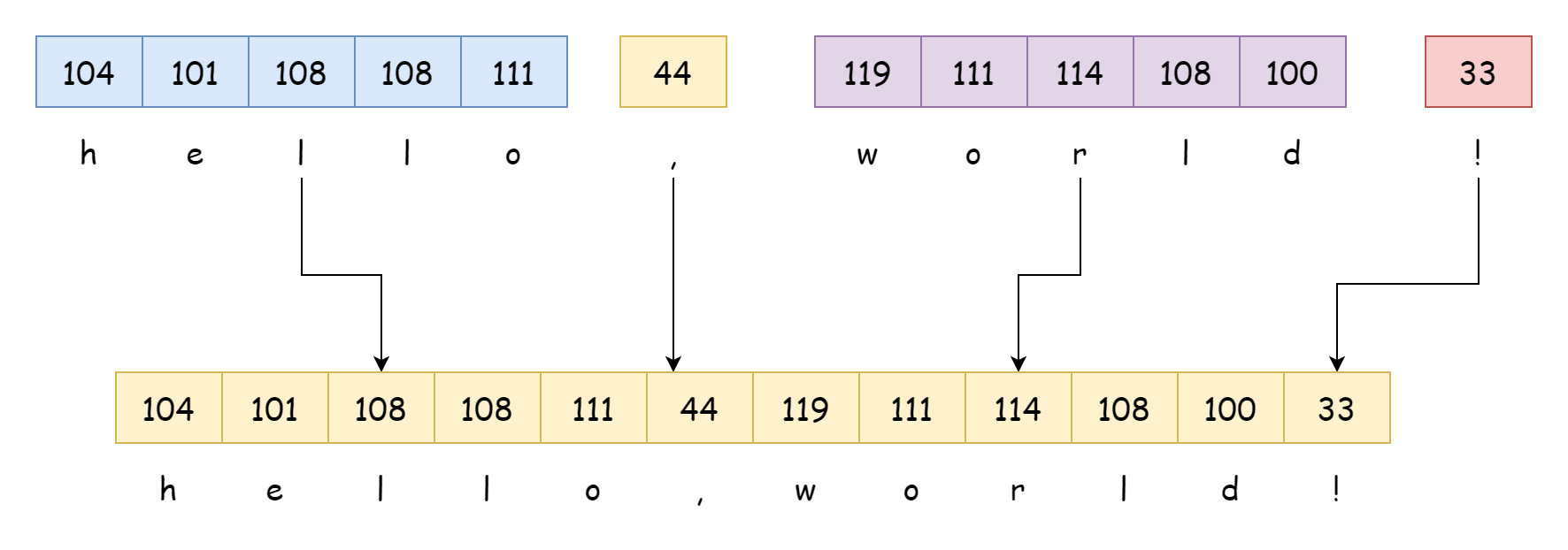
String concatenation syntax is as follows, using the + operator directly:
var (
    hello = "hello"
    dot   = ","
    world = "world"
    last  = "!"
)
str := hello + dot + world + last
The concatenation operation is completed by the runtime.concatstrings function at runtime. For literal concatenation like the following, the compiler directly infers the result:
str := "hello" + "," + "world" + "!"
_ = str
By outputting its assembly code, we can know the result. Part of it is as follows:
LEAQ    go:string."hello,world!"(SB), AX
MOVQ    AX, main.str(SP)
Obviously, the compiler treats it as a complete string, whose value is determined at compile time. It won't be concatenated by runtime.concatstrings at runtime. Only concatenating string variables will be completed at runtime. Its function signature is as follows, receiving a byte array and a string slice:
func concatstrings(buf *tmpBuf, a []string) stringWhen the number of concatenated string variables is less than 5, the following functions are used instead (personal guess: since parameters and anonymous variables are stored on the stack, they're better for GC than slices created at runtime?), although it's still completed by concatstrings:
func concatstring2(buf *tmpBuf, a0, a1 string) string {
  return concatstrings(buf, []string{a0, a1})
}

func concatstring3(buf *tmpBuf, a0, a1, a2 string) string {
  return concatstrings(buf, []string{a0, a1, a2})
}

func concatstring4(buf *tmpBuf, a0, a1, a2, a3 string) string {
  return concatstrings(buf, []string{a0, a1, a2, a3})
}

func concatstring5(buf *tmpBuf, a0, a1, a2, a3, a4 string) string {
  return concatstrings(buf, []string{a0, a1, a2, a3, a4})
}
Let's see what the concatstrings function does:
func concatstrings(buf *tmpBuf, a []string) string {
  idx := 0
  l := 0
  count := 0
  for i, x := range a {
    n := len(x)
    // Skip if length is 0
    if n == 0 {
      continue
    }
    // Numeric calculation overflow
    if l+n < l {
      throw("string concatenation too long")
    }
    l += n
    // Count
    count++
    idx = i
  }
  // Return empty string if no strings
  if count == 0 {
    return ""
  }

  // Return directly if only one string
  if count == 1 && (buf != nil || !stringDataOnStack(a[idx])) {
    return a[idx]
  }
  // Allocate memory for new string
  s, b := rawstringtmp(buf, l)
  for _, x := range a {
    // Copy
    copy(b, x)
    // Truncate
    b = b[len(x):]
  }
  return s
}
The first thing it does is calculate the total length and count of strings to concatenate, then allocate memory based on the total length. The rawstringtmp function returns a string s and byte slice b. Although their lengths are determined, they have no content because they're essentially two pointers to new memory addresses. The memory allocation code is as follows:
func rawstring(size int) (s string, b []byte) {
    // No type specified
  p := mallocgc(uintptr(size), nil, false)
    // Although memory is allocated, there's nothing on it
  return unsafe.String((*byte)(p), size), unsafe.Slice((*byte)(p), size)
}
The returned string s is for convenient representation, and byte slice b is for convenient modification of the string. They both point to the same memory address.
for _, x := range a {
    // Copy
    copy(b, x)
    // Truncate
    b = b[len(x):]
}
The copy function calls runtime.slicecopy at runtime, which directly copies the memory from src to dst address. After all strings are copied, the concatenation process is complete. If the copied string is very large, this process will consume considerable performance.
Conversion
As mentioned earlier, strings themselves cannot be modified. If you try to modify one, it won't even compile. Go will report the following error:
str := "hello" + "," + "world" + "!"
str[0] = '1'
cannot assign to string (neither addressable nor a map index expression)To modify a string, you need to first convert it to byte slice []byte, which is very simple to use:
bs := []byte(str)Internally, it calls the runtime.stringtoslicebyte function, whose logic is very simple:
func stringtoslicebyte(buf *tmpBuf, s string) []byte {
  var b []byte
  if buf != nil && len(s) <= len(buf) {
    *buf = tmpBuf{}
    b = buf[:len(s)]
  } else {
    b = rawbyteslice(len(s))
  }
  copy(b, s)
  return b
}
If the string length is less than the buffer length, it directly returns the byte slice of the buffer, which can save memory for small string conversions. Otherwise, it allocates memory equal to the string length, then copies the string to the new memory address. The rawbyteslice(len(s)) function does something similar to the previous rawstring function, both allocating memory.
Similarly, byte slices can also be easily converted to strings syntactically:
str := string([]byte{'h','e','l','l','o'})Internally, it calls the runtime.slicebytetostring function, which is also easy to understand:
func slicebytetostring(buf *tmpBuf, ptr *byte, n int) string {
  if n == 0 {
    return ""
  }

  if n == 1 {
    p := unsafe.Pointer(&staticuint64s[*ptr])
    if goarch.BigEndian {
      p = add(p, 7)
    }
    return unsafe.String((*byte)(p), 1)
  }

  var p unsafe.Pointer
  if buf != nil && n <= len(buf) {
    p = unsafe.Pointer(buf)
  } else {
    p = mallocgc(uintptr(n), nil, false)
  }
  memmove(p, unsafe.Pointer(ptr), uintptr(n))
  return unsafe.String((*byte)(p), n)
}
First, it handles special cases where slice length is 0 or 1, where no memory copy is needed. Then, if less than buffer length, it uses buffer memory; otherwise, it allocates new memory. Finally, it uses memmove function to directly copy the memory. The copied memory has no association with the source memory, so it can be modified freely.
It's worth noting that both conversion methods above require memory copying. If the memory to be copied is very large, performance consumption will also be significant. When updated to version go1.20, the unsafe package added the following functions:
// Pass type pointer and data length pointing to memory address, return its slice representation
func Slice(ptr *ArbitraryType, len IntegerType) []ArbitraryType

// Pass a slice, get pointer to its underlying array
func SliceData(slice []ArbitraryType) *ArbitraryType

// Return string based on passed address and length
func String(ptr *byte, len IntegerType) string

// Pass a string, return its starting memory address, but returned bytes cannot be modified
func StringData(str string) *byte
Especially the String and StringData functions, they don't involve memory copying and can also complete conversions. However, it should be noted that the prerequisite for using them is to ensure data is read-only and won't be modified later. Otherwise, the string will change. See the following example:
func main() {
  bs := []byte("hello,world!")
  s := unsafe.String((*byte)(unsafe.SliceData(bs)), len(bs))
  bs[0] = 'b'
  fmt.Println(s)
}
First, get the underlying array address of the byte slice through SliceData, then get its string representation through String. After directly modifying the byte slice, the string also changes, which obviously violates the original intention of strings. Let's look at another example:
func main() {
  str := "hello,world!"
  bytes := unsafe.Slice(unsafe.StringData(str), len(str))
  fmt.Println(bytes)
    // fatal
  bytes[0] = 'b'
  fmt.Println(str)
}
After getting the slice representation of a string, if you try to modify the byte slice, it will directly fatal. Let's change the way of declaring a string to see the difference:
func main() {
  var str string
  fmt.Scanln(&str)
  bytes := unsafe.Slice(unsafe.StringData(str), len(str))
  fmt.Println(bytes)
  bytes[0] = 'b'
  fmt.Println(str)
}
hello,world!
[104 101 108 108 111 44 119 111 114 108 100 33]
bello,world!As you can see from the result, the modification was indeed successful. The reason for the previous fatal is that variable str stores a string literal. String literals are stored in read-only data segment, not heap or stack, which fundamentally eliminates the possibility of literals being modified later. For a normal string variable, it can indeed be modified in essence, but the compiler doesn't allow this syntax. In short, using unsafe functions to operate string conversions is not safe unless you can guarantee that data will never be modified.
Iteration
s := "hello world!"
for i, r := range s {
  fmt.Println(i, r)
}
To handle multi-byte character situations, for range loop is usually used to iterate over strings. When using for range to iterate over a string, the compiler expands it during compilation into the following form:
ha := s
for hv1 := 0; hv1 < len(ha); {
    hv1t := hv1
    hv2 := rune(ha[hv1])
    // Check if it's a single-byte character
    if hv2 < utf8.RuneSelf {
        hv1++
    } else {
        hv2, hv1 = decoderune(ha, hv1)
    }
    i, r = hv1t, hv2
  // Loop body
}
In the expanded code, the for range loop is replaced with a classic for loop. In the loop, it checks whether the current byte is a single-byte character. If it's a multi-byte character, it calls the runtime function runtime.decoderune to get its complete encoding, then assigns to i, r. After processing, it executes the loop body defined in the source code.
The work of constructing intermediate code is completed by the walkRange function in cmd/compile/internal/walk/range.go, which is also responsible for handling all types that can be iterated by for range. This won't be expanded here. If interested, you can learn about it yourself.
Complete Example
The program below runs as-is: copy it into a file and execute go run main.go, or paste it into the Go Playground.
package main

import (
	"fmt"
	"strings"
)

func main() {
	s := "hello"

	// []byte(s) makes a copy: modifying it does not change the string
	b := []byte(s)
	b[0] = 'H'
	fmt.Println(s, string(b))

	// Strings are immutable: this allocates a new string
	s2 := s + " world"
	fmt.Println(s2)

	// Join many pieces without O(n^2) copying
	parts := []string{"go", "is", "fast"}
	fmt.Println(strings.Join(parts, " "))
}
Expected output:
hello Hello
hello world
go is fast
Common Pitfalls
- Strings are immutable. Every "modification" allocates a new string;
s[i] = 'x'does not compile. s[i]is a byte, not a rune. Userangeor theutf8package for multi-byte text.- Sub-strings share the backing array. A small
s[:3]keeps the whole original string alive. - Concatenation in loops is O(n²). Use
strings.Builder,strings.Joinorbytes.Bufferinstead. []byte(s)andstring(b)copy. In hot paths, prefer thestrings/byteshelpers that avoid conversions.
Change Log
- 2026-10-14: Added "Before You Start" notes, a complete runnable example with expected output, common pitfalls, and this change log.