
gRPC

Remote Procedure Call (RPC) is an essential topic in microservices. During the learning process, you will encounter various RPC frameworks. However, in the Go ecosystem, almost all RPC frameworks are based on gRPC, and it has become a fundamental protocol in the cloud-native field. Why choose it? Here's the official answer:
gRPC is a modern, open-source, high-performance remote procedure call (RPC) framework that can run anywhere. It can efficiently connect services within and across data centers with pluggable support for load balancing, tracing, health checking, and authentication. It is also applicable in last-mile distributed computing to connect devices, mobile applications, and browsers to backend services.
Official Website: gRPC
Official Documentation: Documentation | gRPC
gRPC Tutorial: Basics tutorial | Go | gRPC
Protobuf Official Website: Reference Guides | Protocol Buffers Documentation (protobuf.dev)
It is also an open-source project under the CNCF Foundation. CNCF stands for Cloud Native Computing Foundation.
Features
Simple Service Definition
Define services using Protocol Buffers, a powerful binary serialization toolset and language.
Fast Startup and Scaling
Install the runtime and development environment with just one line of code, and scale to millions of RPCs per second in seconds.
Cross-Language, Cross-Platform
Automatically generate client and server stubs for different platforms and languages.
Bidirectional Streaming and Integrated Authorization
HTTP/2-based bidirectional streaming with pluggable authentication and authorization.
Although gRPC is language-agnostic, most of the content on this site is Go-related, so this article will also use Go as the primary language for explanation. For users of other languages, the pb compiler and generator used later can be found on the Protobuf official website. For convenience, the project creation process will be omitted in the following.
TIP
This article references the following content:
写给 go 开发者的 gRPC 教程 -protobuf 基础 - 掘金 (juejin.cn)
gRPC 中的 Metadata - 熊喵君的博客 | PANDAYCHEN
Dependency Installation
First, download the Protocol Buffer compiler from: Releases · protocolbuffers/protobuf (github.com)
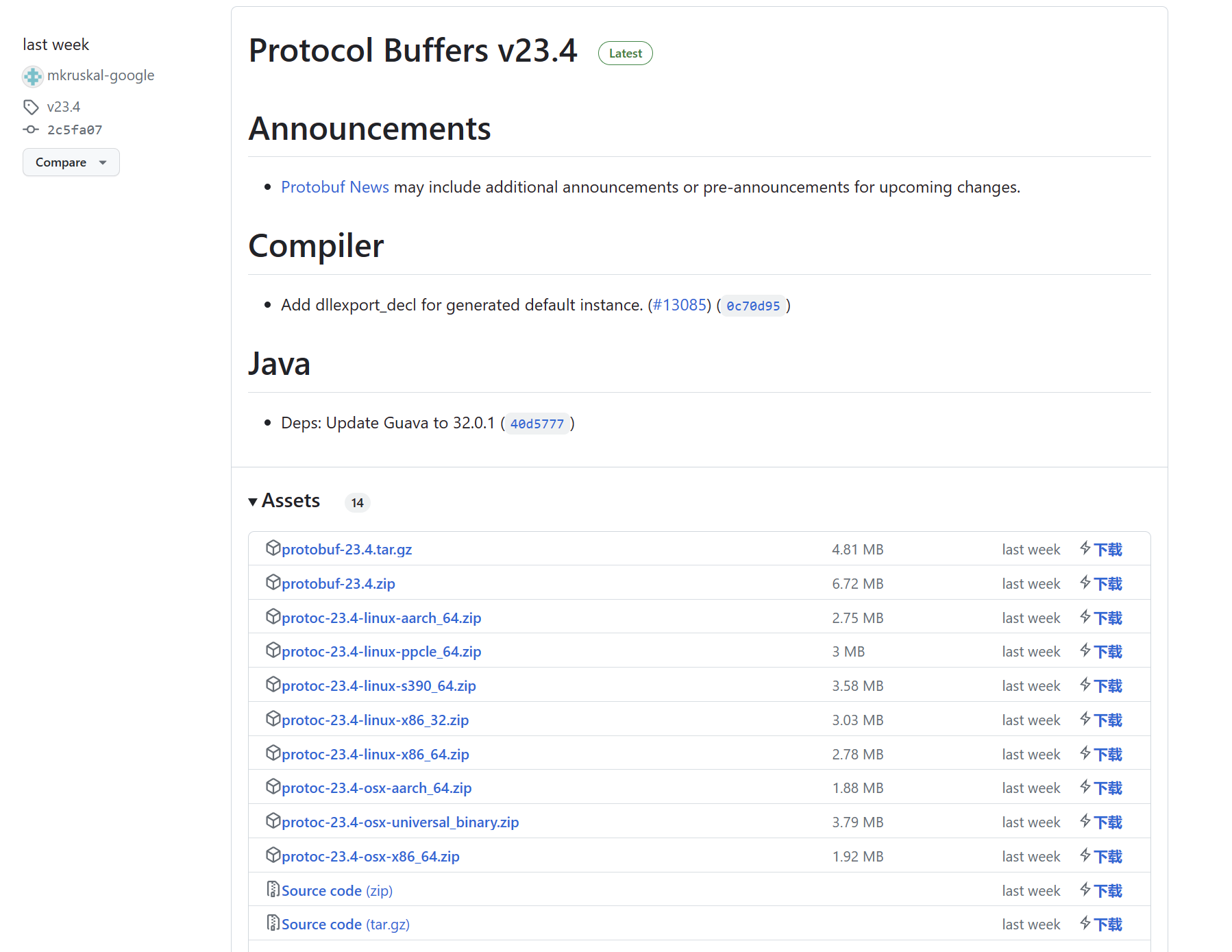
Select the system and version according to your situation. After downloading, add the bin directory to your environment variables.
Then download the code generator. The compiler generates serialization code for the corresponding language from proto files, while the generator is used to generate business code.
$ go install google.golang.org/protobuf/cmd/protoc-gen-go@latest
$ go install google.golang.org/grpc/cmd/protoc-gen-go-grpc@latest
Create an empty project named grpc_learn, then import the following dependency:
$ go get google.golang.org/grpcFinally, check the versions to confirm successful installation:
$ protoc --version
libprotoc 23.4

$ protoc-gen-go --version
protoc-gen-go.exe v1.28.1

$ protoc-gen-go-grpc --version
protoc-gen-go-grpc 1.3.0
Hello World
Project Structure
The following demonstrates a Hello World example. Create the following project structure:
grpc_learn\helloworld
|
+---client
|       main.go
|
+---hello
|
|
+---pb
|       hello.proto
|
\---server
        main.go
Define Protobuf File
In pb/hello.proto, write the following content. This is a very simple example. If you're not familiar with protoc syntax, please refer to the relevant documentation.
syntax = "proto3";

// . means generate directly in the output path, hello is the package name
option go_package = ".;hello";

// Request
message HelloReq {
  string name = 1;


  // Response
  message HelloRep {
    string msg = 1;
  }

  // Define service
  service SayHello {
  rpc Hello(HelloReq) returns (HelloRep) {}
}
Generate Code
After writing, use the protoc compiler to generate data serialization-related code, and use the generator to generate RPC-related code:
$ protoc -I ./pb \
    --go_out=./hello ./pb/*.proto\
    --go-grpc_out=./hello ./pb/*.proto
At this point, you can find hello.pb.go and hello_grpc.pb.go files generated in the hello folder. Browsing hello.pb.go, you can find our defined message:
type HelloReq struct {
  state         protoimpl.MessageState
  sizeCache     protoimpl.SizeCache
  unknownFields protoimpl.UnknownFields

    // Defined fields
  Name string `protobuf:"bytes,1,opt,name=name,proto3" json:"name,omitempty"`
}

type HelloRep struct {
  state         protoimpl.MessageState
  sizeCache     protoimpl.SizeCache
  unknownFields protoimpl.UnknownFields

     // Defined fields
  Msg string `protobuf:"bytes,1,opt,name=msg,proto3" json:"msg,omitempty"`
}
In hello_grpc.pb.go, you can find our defined service:
type SayHelloServer interface {
  Hello(context.Context, *HelloReq) (*HelloRep, error)
  mustEmbedUnimplementedSayHelloServer()
}

// Later if we implement the service interface ourselves, we must embed this struct, so we don't need to implement mustEmbedUnimplementedSayHelloServer method
type UnimplementedSayHelloServer struct {
}

// Returns nil by default
func (UnimplementedSayHelloServer) Hello(context.Context, *HelloReq) (*HelloRep, error) {
  return nil, status.Errorf(codes.Unimplemented, "method Hello not implemented")
}

// Interface constraint
func (UnimplementedSayHelloServer) mustEmbedUnimplementedSayHelloServer() {}

type UnsafeSayHelloServer interface {
  mustEmbedUnimplementedSayHelloServer()
}
Write Server
Write the following code in server/main.go:
package main

import (
  "context"
  "fmt"
  "google.golang.org/grpc"
  pb "grpc_learn/server/protoc"
  "log"
  "net"
)

type GrpcServer struct {
  pb.UnimplementedSayHelloServer
}

func (g *GrpcServer) Hello(ctx context.Context, req *pb.HelloReq) (*pb.HelloRep, error) {
  log.Printf("received grpc req: %+v", req.String())
  return &pb.HelloRep{Msg: fmt.Sprintf("hello world! %s", req.Name)}, nil
}

func main() {
  // Listen on port
  listen, err := net.Listen("tcp", ":8080")
  if err != nil {
    panic(err)
  }
  // Create gRPC server
  server := grpc.NewServer()
  // Register service
  pb.RegisterSayHelloServer(server, &GrpcServer{})
  // Run
  err = server.Serve(listen)
  if err != nil {
    panic(err)
  }
}
Write Client
Write the following code in client/main.go:
package main

import (
  "context"
  "google.golang.org/grpc"
  "google.golang.org/grpc/credentials/insecure"
  pb "grpc_learn/server/protoc"
  "log"
)

func main() {
    // Establish connection, no encryption verification
  conn, err := grpc.Dial("localhost:8080", grpc.WithTransportCredentials(insecure.NewCredentials()))
  if err != nil {
    panic(err)
  }
  defer conn.Close()
  // Create client
  client := pb.NewSayHelloClient(conn)
  // Remote call
  helloRep, err := client.Hello(context.Background(), &pb.HelloReq{Name: "client"})
  if err != nil {
    panic(err)
  }
  log.Printf("received grpc resp: %+v", helloRep.String())
}
Run
Run the server first, then run the client. Server output:
2023/07/16 16:26:51 received grpc req: name:"client"Client output:
2023/07/16 16:26:51 received grpc resp: msg:"hello world! client"In this example, after the client establishes the connection, calling the remote method is just like calling a local method - directly access the Hello method of client and get the result. This is the simplest gRPC example, and many open-source frameworks also encapsulate this process.
bufbuild
In the above example, code is generated directly using commands. If there are many plugins later, the commands will become quite cumbersome. In this case, you can use a tool to manage protobuf files. There happens to be such an open-source management tool: bufbuild/buf.
Open Source Repository: bufbuild/buf: A new way of working with Protocol Buffers. (github.com)
Documentation: Buf - Install the Buf CLI
Features
- BSR Management
- Linter
- Code Generation
- Formatting
- Dependency Management
With this tool, you can conveniently manage protobuf files.
The documentation provides many installation methods; you can choose your own. If you have a Go environment installed locally, you can install directly using go install:
$ go install github.com/bufbuild/buf/cmd/buf@latestAfter installation, check the version:
$ buf --version
1.24.0
Go to the helloworld/pb folder and execute the following command to create a module to manage pb files:
$ buf mod init
$ ls
buf.yaml  hello.proto
The buf.yaml file content defaults to:
version: v1
breaking:
  use:
    - FILE
lint:
  use:
    - DEFAULT
Then go to the helloworld/ directory and create buf.gen.yaml with the following content:
version: v1
plugins:
  - plugin: go
    out: hello
    opt:
  - plugin: go-grpc
    out: hello
    opt:
Then execute the command to generate code:
$ buf generateAfter completion, you can see the generated files. Of course, buf has more features; you can learn them from the documentation.
Streaming RPC
There are two main types of gRPC calls: Unary RPC and Stream RPC. The Hello World example is a typical Unary RPC.
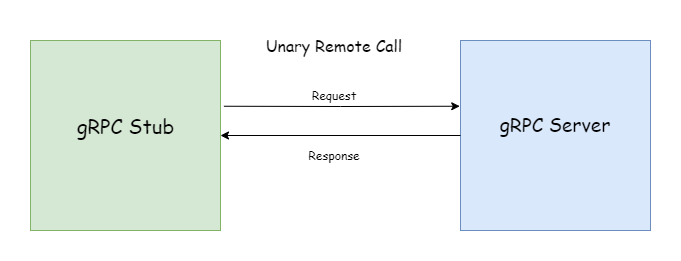
Unary RPC (or ordinary RPC - not sure how to translate unary better) works just like regular HTTP: the client requests, the server returns data, a question-and-answer pattern. In Stream RPC, both requests and responses can be streaming, as shown below:
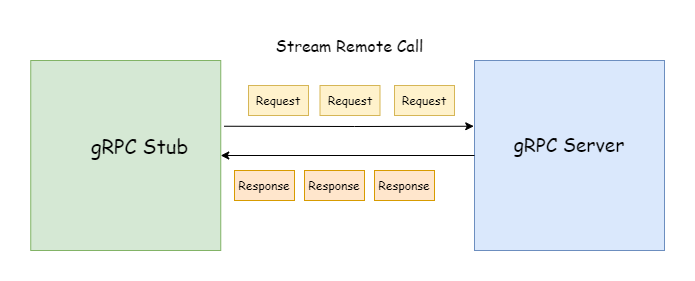
When using streaming requests, only one response is returned. The client can send parameters to the server multiple times through the stream. The server doesn't need to wait until all parameters are received before processing like in Unary RPC; the specific processing logic can be determined by the server. Normally, only the client can actively close a streaming request. Once the stream is closed, the current RPC request ends.
When using streaming responses, only one parameter is sent. The server can send data to the client multiple times through the stream. The client doesn't need to wait until all data is received before processing like in Unary RPC; the specific processing logic can be determined by the client. In normal requests, only the server can actively close a streaming response. Once the stream is closed, the current RPC request ends.
service MessageService {
  rpc getMessage(stream google.protobuf.StringValue) returns (Message);
}
It can also be only response streaming (Server-Streaming RPC):
service MessageService {
  rpc getMessage(google.protobuf.StringValue) returns (stream Message);
}
Or both request and response streaming (Bi-directional-Streaming RPC):
service MessageService {
  rpc getMessage(stream google.protobuf.StringValue) returns (stream Message);
}
Unidirectional Streaming
The following demonstrates unidirectional streaming operations. First, create the following project structure:
grpc_learn\server_client_stream
|   buf.gen.yaml
|
+---client
|       main.go
|
+---pb
|       buf.yaml
|       message.proto
|
\---server
        main.go
message.proto content:
syntax = "proto3";


option go_package = ".;message";

import "google/protobuf/wrappers.proto";

message Message {
  string from = 1;
  string content = 2;
  string to = 3;
}

service MessageService {
  rpc receiveMessage(google.protobuf.StringValue) returns (stream Message);
  rpc sendMessage(stream Message) returns (google.protobuf.Int64Value);
}
Generate code using buf:
$ buf generateThis demonstrates a message service. receiveMessage receives a specified username (string type) and returns a message stream. sendMessage receives a message stream and returns the number of successfully sent messages (64-bit integer type). Next, create server/message_service.go to implement the default generated service:
package main

import (
  "google.golang.org/grpc/codes"
  "google.golang.org/grpc/status"
  "google.golang.org/protobuf/types/known/wrapperspb"
  "grpc_learn/server_client_stream/message"
)

type MessageService struct {
  message.UnimplementedMessageServiceServer
}

func (m *MessageService) ReceiveMessage(user *wrapperspb.StringValue, recvServer message.MessageService_ReceiveMessageServer) error {
  return status.Errorf(codes.Unimplemented, "method ReceiveMessage not implemented")
}
func (m *MessageService) SendMessage(sendServer message.MessageService_SendMessageServer) error {
  return status.Errorf(codes.Unimplemented, "method SendMessage not implemented")
}
You can see that both receive message and send message parameters have a stream wrapper interface:
type MessageService_ReceiveMessageServer interface {
    // Send message
  Send(*Message) error
  grpc.ServerStream
}

type MessageService_SendMessageServer interface {
    // Send return value and close connection
  SendAndClose(*wrapperspb.StringValue) error
    // Receive message
  Recv() (*Message, error)
  grpc.ServerStream
}
Both embed the grpc.ServerStream interface:
type ServerStream interface {
  SetHeader(metadata.MD) error
  SendHeader(metadata.MD) error
  SetTrailer(metadata.MD)
  Context() context.Context
  SendMsg(m interface{}) error
  RecvMsg(m interface{}) error
}
As you can see, streaming RPC doesn't have explicit input parameters and return types in the function signature like Unary RPC. These methods don't immediately reveal what types the input parameters and return values are. You need to use the passed Stream type to complete streaming transmission. Next, start writing the server's specific logic. When writing server logic, a sync.map is used to simulate a message queue. When the client sends a ReceiveMessage request, the server continuously returns messages the client wants through streaming response until the timeout disconnects. When the client requests SendMessage, it continuously sends messages through the streaming request, and the server continuously puts messages into the queue until the client actively disconnects, returning the number of sent messages to the client.
package main

import (
  "errors"
  "google.golang.org/protobuf/types/known/wrapperspb"
  "grpc_learn/server_client_stream/message"
  "io"
  "log"
  "sync"
  "time"
)

// A simulated message queue
var messageQueue sync.Map

type MessageService struct {
  message.UnimplementedMessageServiceServer
}

// ReceiveMessage
// param user *wrapperspb.StringValue
// param recvServer message.MessageService_ReceiveMessageServer
// return error
// Receive messages for specified user
func (m *MessageService) ReceiveMessage(user *wrapperspb.StringValue, recvServer message.MessageService_ReceiveMessageServer) error {
  timer := time.NewTimer(time.Second * 5)
  for {
    time.Sleep(time.Millisecond * 100)
    select {
    case <-timer.C:
      log.Printf("No message from %s for 5 seconds, closing connection", user.GetValue())
      return nil
    default:
      value, ok := messageQueue.Load(user.GetValue())
      if !ok {
        messageQueue.Store(user.GetValue(), []*message.Message{})
        continue
      }
      queue := value.([]*message.Message)
      if len(queue) < 1 {
        continue
      }

      // Get message
      msg := queue[0]
      // Send message to client through streaming
      err := recvServer.Send(msg)
      log.Printf("receive %+v\n", msg)
      if err != nil {
        return err
      }

      queue = queue[1:]
      messageQueue.Store(user.GetValue(), queue)
      timer.Reset(time.Second * 5)
    }
  }
}

// SendMessage
// param sendServer message.MessageService_SendMessageServer
// return error
// Send message to specified user
func (m *MessageService) SendMessage(sendServer message.MessageService_SendMessageServer) error {
  count := 0
  for {
    // Receive message from client
    msg, err := sendServer.Recv()
    if errors.Is(err, io.EOF) {
      return sendServer.SendAndClose(wrapperspb.Int64(int64(count)))
    }
    if err != nil {
      return err
    }
    log.Printf("send %+v\n", msg)

    value, ok := messageQueue.Load(msg.From)
    if !ok {
      messageQueue.Store(msg.From, []*message.Message{msg})
      continue
    }
    queue := value.([]*message.Message)
    queue = append(queue, msg)
    // Put message into message queue
    messageQueue.Store(msg.From, queue)
    count++
  }
}
The client opens two goroutines: one for sending messages and another for receiving messages. Of course, you can also send and receive simultaneously. Code as follows:
package main

import (
  "context"
  "errors"
  "github.com/dstgo/task"
  "google.golang.org/grpc"
  "google.golang.org/grpc/credentials/insecure"
  "google.golang.org/protobuf/types/known/wrapperspb"
  "grpc_learn/server_client_stream/message"
  "io"
  "log"
  "time"
)

var Client message.MessageServiceClient

func main() {
  dial, err := grpc.Dial("localhost:9090", grpc.WithTransportCredentials(insecure.NewCredentials()))
  if err != nil {
    log.Panicln(err)
  }
  defer dial.Close()

  Client = message.NewMessageServiceClient(dial)

  log.SetPrefix("client\t")
  msgTask := task.NewTask(func(err error) {
    log.Panicln(err)
  })

  ctx := context.Background()

  // Receive message request
  msgTask.AddJobs(func() {
    receiveMessageStream, err := Client.ReceiveMessage(ctx, wrapperspb.String("jack"))
    if err != nil {
      log.Panicln(err)
    }
    for {
      recv, err := receiveMessageStream.Recv()
      if errors.Is(err, io.EOF) {
        log.Println("No messages, closing connection")
        break
      } else if err != nil {
        break
      }
      log.Printf("receive %+v", recv)
    }
  })

  msgTask.AddJobs(func() {
    from := "jack"
    to := "mike"

    sendMessageStream, err := Client.SendMessage(ctx)
    if err != nil {
      log.Panicln(err)
    }
    msgs := []string{
      "Are you there",
      "Do you have time to play games this afternoon",
      "Alright, let's play together sometime",
      "This weekend should work",
      "It's settled then",
    }
    for _, msg := range msgs {
      time.Sleep(time.Second)
      sendMessageStream.Send(&message.Message{
        From:    from,
        Content: msg,
        To:      to,
      })
    }
    // Messages sent, actively close request and get return value
    recv, err := sendMessageStream.CloseAndRecv()
    if err != nil {
      log.Println(err)
    } else {
      log.Printf("Sending complete, total %d messages sent\n", recv.GetValue())
    }
  })

  msgTask.Run()
}
After execution, server output:
server  2023/07/18 16:28:24 send from:"jack" content:"Are you there" to:"mike"
server  2023/07/18 16:28:24 receive from:"jack" content:"Are you there" to:"mike"
server  2023/07/18 16:28:25 send from:"jack" content:"Do you have time to play games this afternoon" to:"mike"
server  2023/07/18 16:28:25 receive from:"jack" content:"Do you have time to play games this afternoon" to:"mike"
server  2023/07/18 16:28:26 send from:"jack" content:"Alright, let's play together sometime" to:"mike"
server  2023/07/18 16:28:26 receive from:"jack" content:"Alright, let's play together sometime" to:"mike"
server  2023/07/18 16:28:27 send from:"jack" content:"This weekend should work" to:"mike"
server  2023/07/18 16:28:27 receive from:"jack" content:"This weekend should work" to:"mike"
server  2023/07/18 16:28:28 send from:"jack" content:"It's settled then" to:"mike"
server  2023/07/18 16:28:28 receive from:"jack" content:"It's settled then" to:"mike"
server  2023/07/18 16:28:33 No message from jack for 5 seconds, closing connection
Client output:
client  2023/07/18 16:28:24 receive from:"jack" content:"Are you there" to:"mike"
client  2023/07/18 16:28:25 receive from:"jack" content:"Do you have time to play games this afternoon" to:"mike"
client  2023/07/18 16:28:26 receive from:"jack" content:"Alright, let's play together sometime" to:"mike"
client  2023/07/18 16:28:27 receive from:"jack" content:"This weekend should work" to:"mike"
client  2023/07/18 16:28:28 Sending complete, total 5 messages sent
client  2023/07/18 16:28:28 receive from:"jack" content:"It's settled then" to:"mike"
client  2023/07/18 16:28:33 No messages, closing connection
Through this example, you can find that handling unidirectional streaming RPC requests is more complex for both client and server compared to Unary RPC. However, bidirectional streaming RPC is even more complex.
Bidirectional Streaming
Bidirectional streaming RPC means both request and response are streaming, essentially combining the two services from the previous example into one. For streaming RPC, the first request is always initiated by the client. Then the client can send request parameters through the stream at any time, and the server can return data through the stream at any time. Regardless of which party actively closes the stream, the current request will end.
TIP
Subsequent content will directly omit code descriptions for pb code generation and creating RPC client/server steps unless necessary.
First, create the following project structure:
bi_stream\
|   buf.gen.yaml
|
+---client
|       main.go
|
+---message
|       message.pb.go
|       message_grpc.pb.go
|
+---pb
|       buf.yaml
|       message.proto
|
\---server
        main.go
        message_service.go
message.proto content:
syntax = "proto3";


option go_package = ".;message";

import "google/protobuf/wrappers.proto";

message Message {
  string from = 1;
  string content = 2;
  string to = 3;
}

service ChatService {
  rpc chat(stream Message) returns (stream Message);
}
In server logic, after establishing connection, open two goroutines: one for receiving messages and one for sending messages. The specific processing logic is similar to the previous example, but this time the timeout judgment logic is removed.
package main

import (
  "github.com/dstgo/task"
  "google.golang.org/grpc/metadata"
  "grpc_learn/bi_stream/message"
  "log"
  "sync"
  "time"
)

// MessageQueue simulated message queue
var MessageQueue sync.Map

type ChatService struct {
  message.UnimplementedChatServiceServer
}

// Chat
// param chatServer message.ChatService_ChatServer
// return error
// Chat service, we use multi-goroutine for server logic
func (m *ChatService) Chat(chatServer message.ChatService_ChatServer) error {
  md, _ := metadata.FromIncomingContext(chatServer.Context())
  from := md.Get("from")[0]
  defer log.Println(from, "end chat")

  var chatErr error
  chatCh := make(chan error)

  // Create two goroutines, one for receiving messages, one for sending
  chatTask := task.NewTask(func(err error) {
    chatErr = err
  })

  // Goroutine for receiving messages
  chatTask.AddJobs(func() {
    for {
      msg, err := chatServer.Recv()
      log.Printf("receive %+v err %+v\n", msg, err)
      if err != nil {
        chatErr = err
        chatCh <- err
        break
      }

      value, ok := MessageQueue.Load(msg.To)
      if !ok {
        MessageQueue.Store(msg.To, []*message.Message{msg})
      } else {
        queue := value.([]*message.Message)
        queue = append(queue, msg)
        MessageQueue.Store(msg.To, queue)
      }
    }
  })

  // Goroutine for sending messages
  chatTask.AddJobs(func() {
  Send:
    for {
      time.Sleep(time.Millisecond * 100)
      select {
      case <-chatCh:
        log.Println(from, "close send")
        break Send
      default:
        value, ok := MessageQueue.Load(from)
        if !ok {
          value = []*message.Message{}
          MessageQueue.Store(from, value)
        }

        queue := value.([]*message.Message)
        if len(queue) < 1 {
          continue Send
        }

        msg := queue[0]
        queue = queue[1:]
        MessageQueue.Store(from, queue)
        err := chatServer.Send(msg)
        log.Printf("send %+v\n", msg)
        if err != nil {
          chatErr = err
          break Send
        }
      }
    }
  })

  chatTask.Run()

  return chatErr
}
In client logic, two child goroutines are opened to simulate a chat process between two people. Each child goroutine has two grandchild goroutines responsible for sending and receiving messages (the client logic doesn't guarantee correct message send/receive order between the two people; it's just a simple example of bidirectional sending and receiving):
package main

import (
  "context"
  "github.com/dstgo/task"
  "google.golang.org/grpc"
  "google.golang.org/grpc/credentials/insecure"
  "google.golang.org/grpc/metadata"
  "grpc_learn/bi_stream/message"
  "log"
  "time"
)

var Client message.ChatServiceClient

func main() {
  log.SetPrefix("client ")
  dial, err := grpc.Dial("localhost:9090", grpc.WithTransportCredentials(insecure.NewCredentials()))
  defer dial.Close()

  if err != nil {
    log.Panicln(err)
  }
  Client = message.NewChatServiceClient(dial)

  chatTask := task.NewTask(func(err error) {
    log.Panicln(err)
  })

  chatTask.AddJobs(func() {
    NewChat("jack", "mike", "Hello", "Do you have time to play games?", "Alright")
  })

  chatTask.AddJobs(func() {
    NewChat("mike", "jack", "Hello", "No", "No time, find someone else")
  })

  chatTask.Run()
}

func NewChat(from string, to string, contents ...string) {
  ctx := context.Background()
  mdCtx := metadata.AppendToOutgoingContext(ctx, "from", from)
  chat, err := Client.Chat(mdCtx)
  defer log.Println("end chat", from)

  if err != nil {
    log.Panicln(err)
  }

  chatTask := task.NewTask(func(err error) {
    log.Panicln(err)
  })

  chatTask.AddJobs(func() {
    for _, content := range contents {
      time.Sleep(time.Second)
      chat.Send(&message.Message{
        From:    from,
        Content: content,
        To:      to,
      })
    }
    // Messages sent, close connection
    time.Sleep(time.Second * 5)
    chat.CloseSend()
  })

  // Goroutine for receiving messages
  chatTask.AddJobs(func() {
    for {
      msg, err := chat.Recv()
      log.Printf("receive %+v\n", msg)
      if err != nil {
        log.Println(err)
        break
      }
    }
  })

  chatTask.Run()
}
Under normal circumstances, server output:
server 2023/07/19 17:18:44 server listening on [::]:9090
server 2023/07/19 17:18:49 receive from:"mike" content:"Hello" to:"jack" err <nil>
server 2023/07/19 17:18:49 receive from:"jack" content:"Hello" to:"mike" err <nil>
server 2023/07/19 17:18:49 send from:"jack" content:"Hello" to:"mike"
server 2023/07/19 17:18:49 send from:"mike" content:"Hello" to:"jack"
server 2023/07/19 17:18:50 receive from:"jack" content:"Do you have time to play games?" to:"mike" err <nil>
server 2023/07/19 17:18:50 receive from:"mike" content:"No" to:"jack" err <nil>
server 2023/07/19 17:18:50 send from:"mike" content:"No" to:"jack"
server 2023/07/19 17:18:50 send from:"jack" content:"Do you have time to play games?" to:"mike"
server 2023/07/19 17:18:51 receive from:"jack" content:"Alright" to:"mike" err <nil>
server 2023/07/19 17:18:51 receive from:"mike" content:"No time, find someone else" to:"jack" err <nil>
server 2023/07/19 17:18:51 send from:"jack" content:"Alright" to:"mike"
server 2023/07/19 17:18:51 send from:"mike" content:"No time, find someone else" to:"jack"
server 2023/07/19 17:18:56 receive <nil> err EOF
server 2023/07/19 17:18:56 receive <nil> err EOF
server 2023/07/19 17:18:56 jack close send
server 2023/07/19 17:18:56 jack end chat
server 2023/07/19 17:18:56 mike close send
server 2023/07/19 17:18:56 mike end chat
Under normal circumstances, client output (you can see the message order logic is chaotic):
client 2023/07/19 17:26:24 receive from:"jack"  content:"Hello"  to:"mike"
client 2023/07/19 17:26:24 receive from:"mike"  content:"Hello"  to:"jack"
client 2023/07/19 17:26:25 receive from:"mike"  content:"No"  to:"jack"
client 2023/07/19 17:26:25 receive from:"jack"  content:"Do you have time to play games?"  to:"mike"
client 2023/07/19 17:26:26 receive from:"jack"  content:"Alright"  to:"mike"
client 2023/07/19 17:26:26 receive from:"mike"  content:"No time, find someone else"  to:"jack"
client 2023/07/19 17:26:32 receive <nil>
client 2023/07/19 17:26:32 rpc error: code = Unknown desc = EOF
client 2023/07/19 17:26:32 end chat jack
client 2023/07/19 17:26:32 receive <nil>
client 2023/07/19 17:26:32 rpc error: code = Unknown desc = EOF
client 2023/07/19 17:26:32 end chat mike
Through the example, you can see that bidirectional streaming processing logic is more complex for both client and server compared to unidirectional streaming, requiring multi-goroutine asynchronous tasks for better handling.
Metadata
Metadata is essentially a map where the value is a string slice, similar to HTTP/1 headers, and it plays a similar role in gRPC as HTTP headers, providing information about the RPC call. The lifecycle of metadata follows the entire RPC call process; when the call ends, its lifecycle also ends.
In gRPC, it is mainly transmitted and stored through context. However, gRPC provides a metadata package with many convenience functions to simplify operations, so we don't need to manually operate on context. The type corresponding to metadata in gRPC is metadata.MD, as shown below:
// MD is a mapping from metadata keys to values. Users should use the following
// two convenience functions New and Pairs to generate MD.
type MD map[string][]string
We can directly use the metadata.New function to create it, but before creating, there are a few points to note:
func New(m map[string]string) MDMetadata has restrictions on key names, only allowing characters limited by the following rules:
- ASCII characters
- Numbers: 0-9
- Lowercase letters: a-z
- Uppercase letters: A-Z
- Special characters: - _
TIP
In metadata, uppercase letters will be converted to lowercase, meaning they will occupy the same key, and values will be overwritten.
TIP
Keys starting with grpc- are internal keys reserved by gRPC. Using such keys may cause errors.
Manual Creation
There are many ways to create metadata. Here are the two most common methods for manually creating metadata. The first is using the metadata.New function, directly passing in a map:
func New(m map[string]string) MDmd := metadata.New(map[string]string{
"key": "value",
"key1": "value1",
"key2": "value2",
})The second is metadata.Pairs, passing an even-length string slice, which will automatically parse into key-value pairs:
func Pairs(kv ...string) MDmd := metadata.Pairs("k", "v", "k1", "v1", "k2", "v2")You can also use metadata.Join to merge multiple metadata:
func Join(mds ...MD) MDmd1 := metadata.New(map[string]string{
"key": "value",
"key1": "value1",
"key2": "value2",
})
md2 := metadata.Pairs("k", "v", "k1", "v1", "k2", "v2")
union := metadata.Join(md1,md2)Server Usage
Getting Metadata
The server can use the metadata.FromIncomingContext function to get metadata:
func FromIncomingContext(ctx context.Context) (MD, bool)For Unary RPC, the service parameter will have a context parameter, from which you can directly get metadata:
func (h *HelloWorld) Hello(ctx context.Context, name *wrapperspb.StringValue) (*wrapperspb.StringValue, error) {
  md, b := metadata.FromIncomingContext(ctx)
  ...
}
For streaming RPC, the service parameter will have a stream object, from which you can get the stream's context:
func (m *ChatService) Chat(chatServer message.ChatService_ChatServer) error {
  md, b := metadata.FromIncomingContext(chatServer.Context())
    ...
}
Sending Metadata
You can use the grpc.SendHeader function to send metadata:
func SendHeader(ctx context.Context, md metadata.MD) errorThis function can be called at most once and won't take effect after some events that cause headers to be automatically sent. In some cases, if you don't want to send headers directly, you can use the grpc.SetHeader function:
func SetHeader(ctx context.Context, md metadata.MD) errorIf this function is called multiple times, the metadata passed each time will be merged and sent to the client in the following situations:
- When
grpc.SendHeaderandServerStream.SendHeaderare called - When Unary RPC handler returns
- When calling the stream object's
Stream.SendMsgin streaming RPC - When the RPC request status becomes
send out- either the RPC request succeeded or an error occurred.
For streaming RPC, it is recommended to use the stream object's SendHeader and SetHeader methods:
type ServerStream interface {
  SetHeader(metadata.MD) error
  SendHeader(metadata.MD) error
  SetTrailer(metadata.MD)
  ...
}
TIP
During use, you will find Header and Trailer functions are similar. However, their main difference lies in the timing of sending. You may not feel this in Unary RPC, but this difference is particularly obvious in streaming RPC because Header in streaming RPC can be sent before the request ends. As mentioned earlier, Header will be sent in specific situations, while Trailer will only be sent after the entire RPC request ends. Before that, the obtained trailer is empty.
Client Usage
Getting Metadata
If the client wants to get the response header, it can be achieved through grpc.Header and grpc.Trailer:
func Header(md *metadata.MD) CallOptionfunc Trailer(md *metadata.MD) CallOptionHowever, note that you cannot get them directly. As you can see, the return values of the above two functions are CallOption, meaning they are passed as option parameters when initiating an RPC request:
// Declare md for receiving values
var header, trailer metadata.MD

// Pass option when calling RPC request
res, err := client.SomeRPC(
    ctx,
    data,
    grpc.Header(&header),
    grpc.Trailer(&trailer)
)
After the request completes, values will be written to the passed md. For streaming RPC, you can get them directly through the stream object returned when initiating the request:
type ClientStream interface {
  Header() (metadata.MD, error)
  Trailer() metadata.MD
    ...
}stream, err := client.StreamRPC(ctx)
header, err := stream.Header()
trailer := Stream.Trailer()Sending Metadata
It's simple for the client to send metadata. As mentioned earlier, metadata manifests as valueContext. Combine metadata into context, then pass the context when requesting. The metadata package provides two functions to facilitate context construction:
func NewOutgoingContext(ctx context.Context, md MD) context.Contextmd := metadata.Pairs("k1", "v1")
ctx := context.Background()
outgoingContext := metadata.NewOutgoingContext(ctx, md)
// Unary RPC
res,err := client.SomeRPC(outgoingContext,data)
// Streaming RPC
stream,err := client.StreamRPC(outgoingContext)If the original ctx already has metadata, using NewOutgoingContext will directly overwrite the previous data. To avoid this, you can use the following function, which won't overwrite but merge the data:
func AppendToOutgoingContext(ctx context.Context, kv ...string) context.Contextmd := metadata.Pairs("k1", "v1")
ctx := context.Background()
outgoingContext := metadata.NewOutgoingContext(ctx, md)
appendContext := metadata.AppendToOutgoingContext(outgoingContext, "k2","v2")
// Unary RPC
res,err := client.SomeRPC(appendContext,data)
// Streaming RPC
stream,err := client.StreamRPC(appendContext)Interceptors
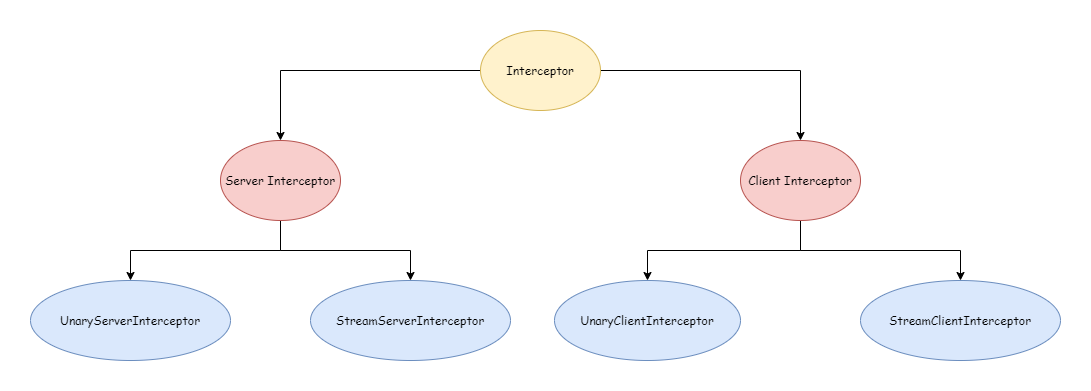
gRPC interceptors are similar to Middleware in gin, both for doing special work before or after requests without affecting the business logic itself. In gRPC, there are two main types of interceptors: server interceptors and client interceptors. According to request type, there are Unary RPC interceptors and Streaming RPC interceptors, as shown below:
To better understand interceptors, the following will describe based on a very simple example:
grpc_learn\interceptor
|   buf.gen.yaml
|
+---client
|       main.go
|
+---pb
|       buf.yaml
|       person.proto
|
+---person
|       person.pb.go
|       person_grpc.pb.go
|
\---server
        main.go
person.proto content:
syntax = "proto3";

option go_package = ".;person";

import "google/protobuf/wrappers.proto";

message personInfo {
  string name = 1;
  int64  age = 2;
  string address = 3;
}

service person {
  rpc getPersonInfo(google.protobuf.StringValue) returns (personInfo);
  rpc createPersonInfo(stream personInfo) returns (google.protobuf.Int64Value);
}
Server code, logic is all from previous content, relatively simple and won't be elaborated:
package main

import (
  "context"
  "errors"
  "google.golang.org/protobuf/types/known/wrapperspb"
  "grpc_learn/interceptor/person"
  "io"
  "sync"
)

// Store data
var personData sync.Map

type PersonService struct {
  person.UnimplementedPersonServer
}

func (p *PersonService) GetPersonInfo(ctx context.Context, name *wrapperspb.StringValue) (*person.PersonInfo, error) {
  value, ok := personData.Load(name.Value)
  if !ok {
    return nil, person.PersonNotFoundErr
  }
  personInfo := value.(*person.PersonInfo)
  return personInfo, nil
}

func (p *PersonService) CreatePersonInfo(personStream person.Person_CreatePersonInfoServer) error {
  count := 0
  for {
    personInfo, err := personStream.Recv()
    if errors.Is(err, io.EOF) {
      return personStream.SendAndClose(wrapperspb.Int64(int64(count)))
    } else if err != nil {
      return err
    }

    personData.Store(personInfo.Name, personInfo)
    count++
  }
}
Server Interceptors
Interceptors for server RPC requests are UnaryServerInterceptor and StreamServerInterceptor, with specific types as shown below:
type UnaryServerInterceptor func(ctx context.Context, req interface{}, info *UnaryServerInfo, handler UnaryHandler) (resp interface{}, err error)

type StreamServerInterceptor func(srv interface{}, ss ServerStream, info *StreamServerInfo, handler StreamHandler) error
Unary RPC
To create a Unary RPC interceptor, you only need to implement the UnaryServerInterceptor type. Below is a simple Unary RPC interceptor example that outputs every RPC request and response:
// UnaryPersonLogInterceptor
// param ctx context.Context
// param req interface{} RPC request data
// param info *grpc.UnaryServerInfo Request information for this Unary RPC
// param unaryHandler grpc.UnaryHandler Specific handler
// return resp interface{} RPC response data
// return err error
func UnaryPersonLogInterceptor(ctx context.Context, req interface{}, info *grpc.UnaryServerInfo, unaryHandler grpc.UnaryHandler) (resp interface{}, err error) {
  log.Println(fmt.Sprintf("before unary rpc intercept path: %s req: %+v", info.FullMethod, req))
  resp, err = unaryHandler(ctx, req)
  log.Println(fmt.Sprintf("after unary rpc intercept path: %s resp: %+v err: %+v", info.FullMethod, resp, err))
  return resp, err
}
For Unary RPC, interceptors intercept every RPC request and response, i.e., intercepting the RPC request phase and response phase. If the interceptor returns an error, the request will end.
Streaming RPC
To create a Streaming RPC interceptor, you only need to implement the StreamServerInterceptor type. Below is a simple Streaming RPC interceptor example:
// StreamPersonLogInterceptor
// param srv interface{} Corresponds to server implemented by server
// param stream grpc.ServerStream Stream object
// param info *grpc.StreamServerInfo Stream information
// param streamHandler grpc.StreamHandler Handler
// return error
func StreamPersonLogInterceptor(srv interface{}, stream grpc.ServerStream, info *grpc.StreamServerInfo, streamHandler grpc.StreamHandler) error {
  log.Println(fmt.Sprintf("before stream rpc interceptor path: %s srv: %+v clientStream: %t serverStream: %t", info.FullMethod, srv, info.IsClientStream, info.IsServerStream))
  err := streamHandler(srv, stream)
  log.Println(fmt.Sprintf("after stream rpc interceptor path: %s srv: %+v clientStream: %t serverStream: %t err: %+v", info.FullMethod, srv, info.IsClientStream, info.IsServerStream, err))
  return err
}
For Streaming RPC, interceptors intercept when each stream object's Send and Recv methods are called. If the interceptor returns an error, it won't cause the RPC request to end; it only indicates that this send or recv encountered an error.
Using Interceptors
To make created interceptors effective, they need to be passed as options when creating a gRPC server. The official also provides related functions for use. As shown below, there are functions for adding single interceptors and functions for adding chained interceptors:
func UnaryInterceptor(i UnaryServerInterceptor) ServerOption

func ChainUnaryInterceptor(interceptors ...UnaryServerInterceptor) ServerOption

func StreamInterceptor(i StreamServerInterceptor) ServerOption

func ChainStreamInterceptor(interceptors ...StreamServerInterceptor) ServerOption
TIP
Repeated use of UnaryInterceptor will throw the following panic:
panic: The unary server interceptor was already set and may not be reset.StreamInterceptor is the same. Chained interceptors, if called repeatedly, will append to the same chain.
Usage example:
package main

import (
  "google.golang.org/grpc"
  "grpc_learn/interceptor/person"
  "log"
  "net"
)

func main() {
  log.SetPrefix("server ")
  listen, err := net.Listen("tcp", "9090")
  if err != nil {
    log.Panicln(err)
  }
  server := grpc.NewServer(
        // Add chained interceptors
    grpc.ChainUnaryInterceptor(UnaryPersonLogInterceptor),
    grpc.ChainStreamInterceptor(StreamPersonLogInterceptor),
  )
  person.RegisterPersonServer(server, &PersonService{})
  server.Serve(listen)
}
Client Interceptors
Client interceptors are similar to server interceptors: one Unary interceptor UnaryClientInterceptor and one Streaming interceptor StreamClientInterceptor, with specific types as shown below:
type UnaryClientInterceptor func(ctx context.Context, method string, req, reply interface{}, cc *ClientConn, invoker UnaryInvoker, opts ...CallOption) error

type StreamClientInterceptor func(ctx context.Context, desc *StreamDesc, cc *ClientConn, method string, streamer Streamer, opts ...CallOption) (ClientStream, error)
Unary RPC
To create a Unary RPC client interceptor, implement UnaryClientInterceptor. Below is a simple example:
// UnaryPersonClientInterceptor
// param ctx context.Context
// param method string Method name
// param req interface{} Request data
// param reply interface{} Response data
// param cc *grpc.ClientConn Client connection object
// param invoker grpc.UnaryInvoker Intercepted specific client method
// param opts ...grpc.CallOption Configuration items for this request
// return error
func UnaryPersonClientInterceptor(ctx context.Context, method string, req, reply interface{}, cc *grpc.ClientConn, invoker grpc.UnaryInvoker, opts ...grpc.CallOption) error {
  log.Println(fmt.Sprintf("before unary request path: %s req: %+v", method, req))
  err := invoker(ctx, method, req, reply, cc, opts...)
  log.Println(fmt.Sprintf("after unary request path: %s req: %+v rep: %+v", method, req, reply))
  return err
}
Through the client's Unary RPC interceptor, you can get local request data, response data, and other request information.
Streaming RPC
To create a Streaming RPC client interceptor, implement StreamClientInterceptor. Below is an example:
// StreamPersonClientInterceptor
// param ctx context.Context
// param desc *grpc.StreamDesc Stream object description
// param cc *grpc.ClientConn Connection object
// param method string Method name
// param streamer grpc.Streamer Object for creating stream objects
// param opts ...grpc.CallOption Connection configuration items
// return grpc.ClientStream Created client stream object
// return error
func StreamPersonClientInterceptor(ctx context.Context, desc *grpc.StreamDesc, cc *grpc.ClientConn, method string, streamer grpc.Streamer, opts ...grpc.CallOption) (grpc.ClientStream, error) {
  log.Println(fmt.Sprintf("before create stream  path: %s name: %+v client: %t server: %t", method, desc.StreamName, desc.ClientStreams, desc.ServerStreams))
  stream, err := streamer(ctx, desc, cc, method, opts...)
  log.Println(fmt.Sprintf("after create stream  path: %s name: %+v client: %t server: %t", method, desc.StreamName, desc.ClientStreams, desc.ServerStreams))
  return stream, err
}
Through the Streaming RPC client interceptor, you can only intercept when the client establishes a connection with the server, i.e., when creating the stream. You cannot intercept every time the client stream object sends or receives messages. However, if we wrap the stream object created in the interceptor, we can achieve interception of sending and receiving messages, like this:
// StreamPersonClientInterceptor
// param ctx context.Context
// param desc *grpc.StreamDesc Stream object description
// param cc *grpc.ClientConn Connection object
// param method string Method name
// param streamer grpc.Streamer Object for creating stream objects
// param opts ...grpc.CallOption Connection configuration items
// return grpc.ClientStream Created client stream object
// return error
func StreamPersonClientInterceptor(ctx context.Context, desc *grpc.StreamDesc, cc *grpc.ClientConn, method string, streamer grpc.Streamer, opts ...grpc.CallOption) (grpc.ClientStream, error) {
  log.Println(fmt.Sprintf("before create stream  path: %s name: %+v client: %t server: %t", method, desc.StreamName, desc.ClientStreams, desc.ServerStreams))
  stream, err := streamer(ctx, desc, cc, method, opts...)
  log.Println(fmt.Sprintf("after create stream  path: %s name: %+v client: %t server: %t", method, desc.StreamName, desc.ClientStreams, desc.ServerStreams))
  return &ClientStreamInterceptorWrapper{method, desc, stream}, err
}

type ClientStreamInterceptorWrapper struct {
  method string
  desc   *grpc.StreamDesc
  grpc.ClientStream
}

func (c *ClientStreamInterceptorWrapper) SendMsg(m interface{}) error {
  // Before message sent
  err := c.ClientStream.SendMsg(m)
  // After message sent
  log.Println(fmt.Sprintf("%s send %+v err: %+v", c.method, m, err))
  return err
}

func (c *ClientStreamInterceptorWrapper) RecvMsg(m interface{}) error {
  // Before message received
  err := c.ClientStream.RecvMsg(m)
  // After message received
  log.Println(fmt.Sprintf("%s recv %+v err: %+v", c.method, m, err))
  return err
}
Using Interceptors
When using, similar to the server, there are four utility functions to add interceptors through options, divided into single interceptors and chained interceptors:
func WithUnaryInterceptor(f UnaryClientInterceptor) DialOption

func WithChainUnaryInterceptor(interceptors ...UnaryClientInterceptor) DialOption

func WithStreamInterceptor(f StreamClientInterceptor) DialOption

func WithChainStreamInterceptor(interceptors ...StreamClientInterceptor) DialOption
TIP
Repeated use of WithUnaryInterceptor on the client won't throw a panic, but only the last one will take effect.
Below is a usage case:
package main

import (
  "context"
  "fmt"
  "google.golang.org/grpc"
  "google.golang.org/grpc/credentials/insecure"
  "google.golang.org/protobuf/types/known/wrapperspb"
  "grpc_learn/interceptor/person"
  "log"
)

func main() {
  log.SetPrefix("client ")
  dial, err := grpc.Dial("localhost:9090",
    grpc.WithTransportCredentials(insecure.NewCredentials()),
    grpc.WithChainUnaryInterceptor(UnaryPersonClientInterceptor),
    grpc.WithChainStreamInterceptor(StreamPersonClientInterceptor),
  )
  if err != nil {
    log.Panicln(err)
  }

  ctx := context.Background()
  client := person.NewPersonClient(dial)

  personStream, err := client.CreatePersonInfo(ctx)
  personStream.Send(&person.PersonInfo{
    Name:    "jack",
    Age:     18,
    Address: "usa",
  })
  personStream.Send(&person.PersonInfo{
    Name:    "mike",
    Age:     20,
    Address: "cn",
  })
  recv, err := personStream.CloseAndRecv()
  log.Println(recv, err)

  log.Println(client.GetPersonInfo(ctx, wrapperspb.String("jack")))
  log.Println(client.GetPersonInfo(ctx, wrapperspb.String("jenny")))
}
So far, the entire case has been written. It's time to run it and see the results. Server output:
server 2023/07/20 17:27:57 before stream rpc interceptor path: /person/createPersonInfo srv: &{UnimplementedPersonServer:{}} clientStream: true serverStream: false
server 2023/07/20 17:27:57 after stream rpc interceptor path: /person/createPersonInfo srv: &{UnimplementedPersonServer:{}} clientStream: true serverStream: false err: <nil>
server 2023/07/20 17:27:57 before unary rpc intercept path: /person/getPersonInfo req: value:"jack"
server 2023/07/20 17:27:57 after unary rpc intercept path: /person/getPersonInfo resp: name:"jack" age:18 address:"usa" err: <nil>
server 2023/07/20 17:27:57 before unary rpc intercept path: /person/getPersonInfo req: value:"jenny"
server 2023/07/20 17:27:57 after unary rpc intercept path: /person/getPersonInfo resp: <nil> err: person not found
Client output:
client 2023/07/20 17:27:57 before create stream  path: /person/createPersonInfo name: createPersonInfo client: true server: false
client 2023/07/20 17:27:57 after create stream  path: /person/createPersonInfo name: createPersonInfo client: true server: false
client 2023/07/20 17:27:57 /person/createPersonInfo send name:"jack" age:18 address:"usa" err: <nil>
client 2023/07/20 17:27:57 /person/createPersonInfo send name:"mike" age:20 address:"cn" err: <nil>
client 2023/07/20 17:27:57 /person/createPersonInfo recv value:2 err: <nil>
client 2023/07/20 17:27:57 value:2 <nil>
client 2023/07/20 17:27:57 before unary request path: /person/getPersonInfo req: value:"jack"
client 2023/07/20 17:27:57 after unary request path: /person/getPersonInfo req: value:"jack" rep: name:"jack" age:18 address:"usa"
client 2023/07/20 17:27:57 name:"jack" age:18 address:"usa" <nil>
client 2023/07/20 17:27:57 before unary request path: /person/getPersonInfo req: value:"jenny"
client 2023/07/20 17:27:57 after unary request path: /person/getPersonInfo req: value:"jenny" rep:
client 2023/07/20 17:27:57 <nil> rpc error: code = Unknown desc = person not found
You can see that both sides' output meets expectations, achieving the interception effect. This case is just a simple example. Using gRPC interceptors, you can do many things like authorization, logging, monitoring, and other functions. You can choose to build your own wheels or use existing wheels from the open-source community. gRPC Ecosystem collects a series of open-source gRPC interceptor middleware. Address: grpc-ecosystem/go-grpc-middleware.
Error Handling
Before starting, let's look at an example. In the previous interceptor case, if a user query fails, an error person not found is returned to the client. The question is: can the client make special handling based on the returned error? Let's try it. In the client code, try using errors.Is to judge the error:
func main() {
  log.SetPrefix("client ")
  dial, err := grpc.Dial("localhost:9090",
    grpc.WithTransportCredentials(insecure.NewCredentials()),
    grpc.WithChainUnaryInterceptor(UnaryPersonClientInterceptor),
    grpc.WithChainStreamInterceptor(StreamPersonClientInterceptor),
  )
  if err != nil {
    log.Panicln(err)
  }

  ctx := context.Background()
  client := person.NewPersonClient(dial)

  personStream, err := client.CreatePersonInfo(ctx)
  personStream.Send(&person.PersonInfo{
    Name:    "jack",
    Age:     18,
    Address: "usa",
  })
  personStream.Send(&person.PersonInfo{
    Name:    "mike",
    Age:     20,
    Address: "cn",
  })
  recv, err := personStream.CloseAndRecv()
  log.Println(recv, err)

  info, err := client.GetPersonInfo(ctx, wrapperspb.String("john"))
  log.Println(info, err)
  if errors.Is(err, person.PersonNotFoundErr) {
    log.Println("person not found err")
  }
}
Result output:
client 2023/07/21 16:46:10 before create stream  path: /person/createPersonInfo name: createPersonInfo client: true server: false
client 2023/07/21 16:46:10 after create stream  path: /person/createPersonInfo name: createPersonInfo client: true server: false
client 2023/07/21 16:46:10 /person/createPersonInfo send name:"jack"  age:18  address:"usa" err: <nil>
client 2023/07/21 16:46:10 /person/createPersonInfo send name:"mike"  age:20  address:"cn" err: <nil>
client 2023/07/21 16:46:10 /person/createPersonInfo recv value:2 err: <nil>
client 2023/07/21 16:46:10 value:2 <nil>
client 2023/07/21 16:46:10 before unary request path: /person/getPersonInfo req: value:"john"
client 2023/07/21 16:46:10 after unary request path: /person/getPersonInfo req: value:"john" rep:
client 2023/07/21 16:46:10 <nil> rpc error: code = Unknown desc = person not found
You can see the error received by the client is like this. You'll find the error returned by the server is in the desc field:
rpc error: code = Unknown desc = person not foundNaturally, the errors.Is logic wasn't executed. Even using errors.As would yield the same result:
if errors.Is(err, person.PersonNotFoundErr) {
    log.Println("person not found err")
}
For this, gRPC provides the status package to solve such problems. This is also why the error received by the client has code and desc fields - because gRPC actually returns a Status to the client. Its specific type is as follows, which is also a message defined by protobuf:
type Status struct {
   state         protoimpl.MessageState
   sizeCache     protoimpl.SizeCache
   unknownFields protoimpl.UnknownFields

   Code int32 `protobuf:"varint,1,opt,name=code,proto3" json:"code,omitempty"`
   Message string `protobuf:"bytes,2,opt,name=message,proto3" json:"message,omitempty"`
   Details []*anypb.Any `protobuf:"bytes,3,rep,name=details,proto3" json:"details,omitempty"`
}message Status {
// The status code, which should be an enum value of
// [google.rpc.Code][google.rpc.Code].
int32 code = 1;
// A developer-facing error message, which should be in English. Any
// user-facing error message should be localized and sent in the
// [google.rpc.Status.details][google.rpc.Status.details] field, or localized
// by the client.
string message = 2;
// A list of messages that carry the error details. There is a common set of
// message types for APIs to use.
repeated google.protobuf.Any details = 3;
}Error Codes
The Code in the Status structure is similar to HTTP Status, used to indicate the state of the current RPC request. gRPC defines 16 codes located in grpc/codes, covering most scenarios, as shown below:
// A Code is an unsigned 32-bit error code as defined in the gRPC spec.
type Code uint32

const (
  // Call succeeded
  OK Code = 0

  // Request canceled
  Canceled Code = 1

  // Unknown error
  Unknown Code = 2

  // Invalid argument
  InvalidArgument Code = 3

    // Request timeout
  DeadlineExceeded Code = 4

  // Resource not found
  NotFound Code = 5

    // Resource already exists (didn't expect this one)
  AlreadyExists Code = 6

  // Permission denied due to insufficient permissions
  PermissionDenied Code = 7

  // Resource exhausted, remaining capacity insufficient, like disk space running out
  ResourceExhausted Code = 8

  // Precondition not met, like using rm to delete a non-empty directory where the deletion condition is that the directory is empty
  FailedPrecondition Code = 9

  // Request aborted
  Aborted Code = 10

  // Operation out of range
  OutOfRange Code = 11

  // Service not implemented
  Unimplemented Code = 12

  // Internal system error
  Internal Code = 13

  // Service unavailable
  Unavailable Code = 14

  // Data loss
  DataLoss Code = 15

  // Authentication failed
  Unauthenticated Code = 16

  _maxCode = 17
)
The grpc/status package provides many functions for converting between status and error. We can directly use status.New to create a Status, or Newf:
func New(c codes.Code, msg string) *Status

func Newf(c codes.Code, format string, a ...interface{}) *Status
For example:
success := status.New(codes.OK, "request success")
notFound := status.Newf(codes.NotFound, "person not found: %s", name)
Through the status err method, you can get the error. When the status is OK, the error is nil:
func (s *Status) Err() error {
  if s.Code() == codes.OK {
    return nil
  }
  return &Error{s: s}
}
You can also directly create errors:
func Err(c codes.Code, msg string) error

func Errorf(c codes.Code, format string, a ...interface{}) errorsuccess := status.Error(codes.OK, "request success")
notFound := status.Errorf(codes.InvalidArgument, "person not found: %s", name)So we can modify the server code as follows:
func (p *PersonService) GetPersonInfo(ctx context.Context, name *wrapperspb.StringValue) (*person.PersonInfo, error) {
  value, ok := personData.Load(name.Value)
  if !ok {
    return nil, status.Errorf(codes.NotFound, "person not found: %s", name.String())
  }
  personInfo := value.(*person.PersonInfo)
  return personInfo, status.Errorf(codes.OK, "request success")
}
Before this, all codes returned by the server were unknown. Now after modification, they have clearer semantics. So on the client, you can use status.FromError or the following functions to get status from error, thereby making corresponding handling based on different codes:
func FromError(err error) (s *Status, ok bool)

func Convert(err error) *Status

func Code(err error) codes.Code
Example:
info, err := client.GetPersonInfo(ctx, wrapperspb.String("john"))
s, ok := status.FromError(err)
switch s.Code() {
case codes.OK:
case codes.InvalidArgument:
    ...
}
However, although gRPC codes cover some general scenarios as much as possible, sometimes they still can't meet developers' needs. At this time, you can use the Details field in Status, which is also a slice that can hold multiple pieces of information. Pass some custom information through Status.WithDetails:
func (s *Status) WithDetails(details ...proto.Message) (*Status, error)Get information through Status.Details:
func (s *Status) Details() []interface{}Note that the passed information should preferably be defined by protobuf so that both server and client can parse it conveniently. The official provides several examples:
message ErrorInfo {
  // Error reason
  string reason = 1;

  // Service subject defining
  string domain = 2;

  // Other information
  map<string, string> metadata = 3;
}

// Retry information
message RetryInfo {
  // Wait interval for same request
  google.protobuf.Duration retry_delay = 1;
}

// Debug information
message DebugInfo {
  // Stack trace
  repeated string stack_entries = 1;

  // Some detail information
  string detail = 2;
}

    ...
    ...
More examples can be found at googleapis/google/rpc/error_details.proto at master · googleapis/googleapis (github.com). If needed, you can import using the following code:
import "google.golang.org/genproto/googleapis/rpc/errdetails"Use ErrorInfo as details:
notFound := status.Newf(codes.NotFound, "person not found: %s", name)
  notFound.WithDetails(&errdetails.ErrorInfo{
    Reason:   "person not found",
    Domain:   "xxx",
    Metadata: nil,
  })
On the client, you can get the data and make handling. However, the above are just some examples recommended by gRPC. Besides, you can also define your own messages to better meet corresponding business needs. If you want to do some unified error handling, you can also put it in the interceptor.
Timeout Control
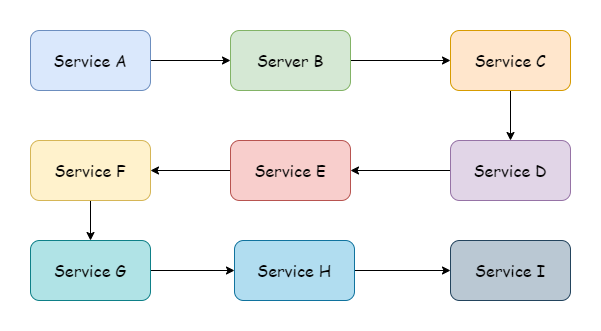
In most cases, there usually isn't just one service, and there may be many upstream services and many downstream services. When a client initiates a request, from the uppermost service to the lowermost, a service call chain is formed, just like in the diagram, perhaps even longer than shown.
With such a long call chain, if one service's logic processing takes a long time, it will cause the upstream to be in a waiting state. To reduce unnecessary resource waste, it is necessary to introduce a timeout mechanism. In this way, the timeout passed by the uppermost call is the maximum allowed execution time for the entire call chain. gRPC can pass timeouts across processes and languages. It puts some data that needs to be passed across processes in the HTTP/2 HEADERS Frame, as shown below:
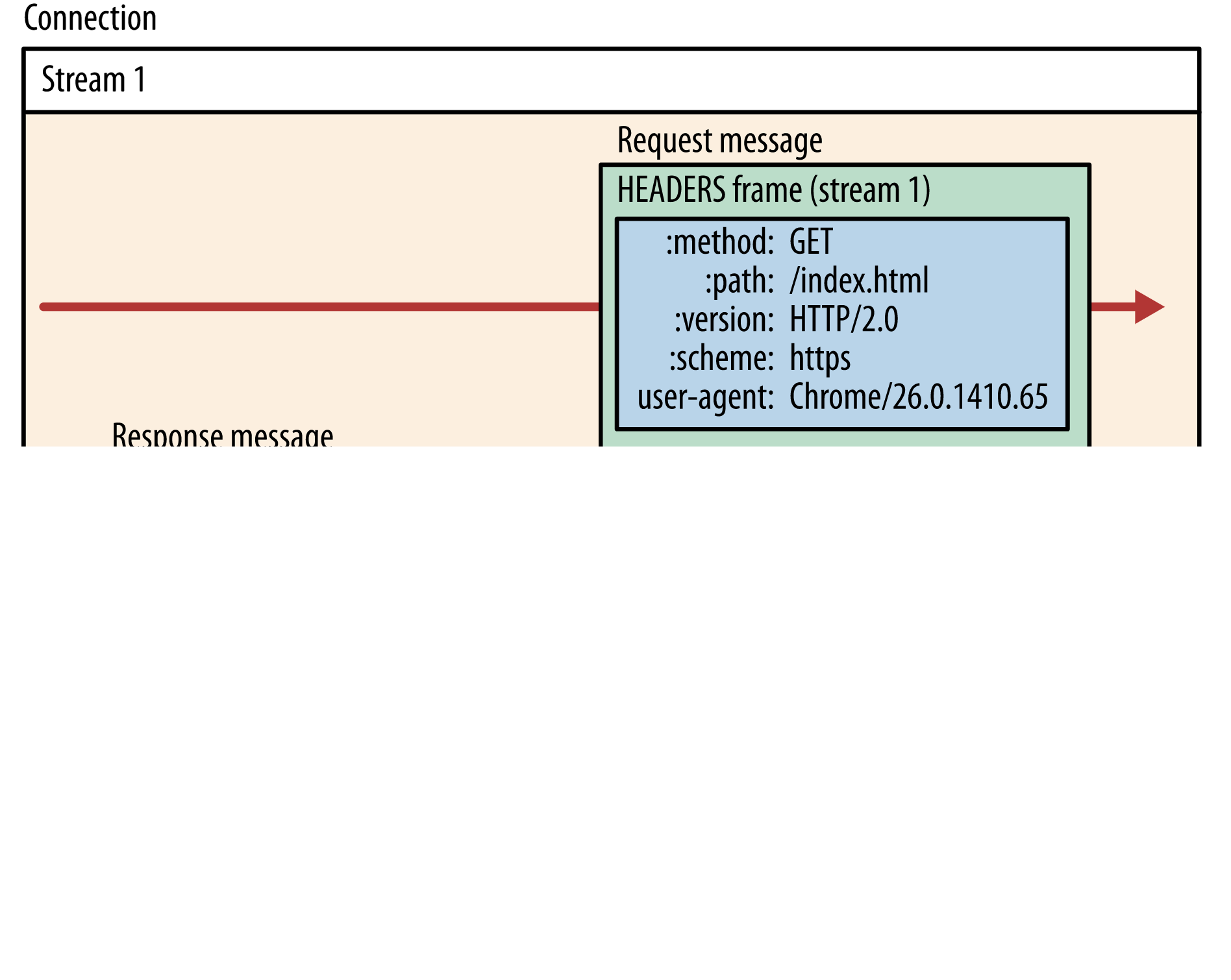
The timeout data in gRPC requests corresponds to the grpc-timeout field in HEADERS Frame. Note that not all gRPC libraries implement this timeout passing mechanism, but gRPC-go definitely supports it. If using libraries in other languages and using this feature, you need to pay extra attention to this point.
Connection Timeout
When a gRPC client establishes a connection to the server, it defaults to asynchronous establishment. If the connection fails, it only returns an empty Client. If you want the connection to be synchronous, you can use grpc.WithBlock() to block while waiting for the connection to be established:
dial, err := grpc.Dial("localhost:9091",
    grpc.WithBlock(),
    grpc.WithTransportCredentials(insecure.NewCredentials()),
    grpc.WithChainUnaryInterceptor(UnaryPersonClientInterceptor),
    grpc.WithChainStreamInterceptor(StreamPersonClientInterceptor),
)
If you want to set a timeout, you only need to pass in a TimeoutContext, using grpc.DialContext instead of grpc.Dial to pass the context:
timeout, cancelFunc := context.WithTimeout(context.Background(), time.Second)
defer cancelFunc()
dial, err := grpc.DialContext(timeout, "localhost:9091",
    grpc.WithBlock(),
    grpc.WithTransportCredentials(insecure.NewCredentials()),
    grpc.WithChainUnaryInterceptor(UnaryPersonClientInterceptor),
    grpc.WithChainStreamInterceptor(StreamPersonClientInterceptor),
)
In this way, if the connection establishment times out, an error will be returned:
context deadline exceededOn the server side, you can also set a connection timeout, setting a timeout when establishing a new connection with the client. The default is 120 seconds. If the connection is not successfully established within the specified time, the server will actively disconnect.
server := grpc.NewServer(
    grpc.ConnectionTimeout(time.Second*3),
)
TIP
grpc.ConnectionTimeout is still in the experimental stage, and the API may be modified or deleted in the future.
Request Timeout
When a gRPC client initiates a request, the first parameter is of type Context. Similarly, if you want to add a timeout to an RPC request, you only need to pass in a TimeoutContext:
timeout, cancel := context.WithTimeout(ctx, time.Second*3)
defer cancel()
info, err := client.GetPersonInfo(timeout, wrapperspb.String("john"))
switch status.Code(err) {
case codes.DeadlineExceeded:
    // Timeout logic handling
}
Through gRPC processing, the timeout is passed to the server. During transmission, it exists in the frame field. In Go, it exists in the form of a context, thus passing through the entire link. During link transmission, it is not recommended to modify the timeout. How long to set the timeout during requests should be a consideration for the uppermost level.
Authentication and Authorization
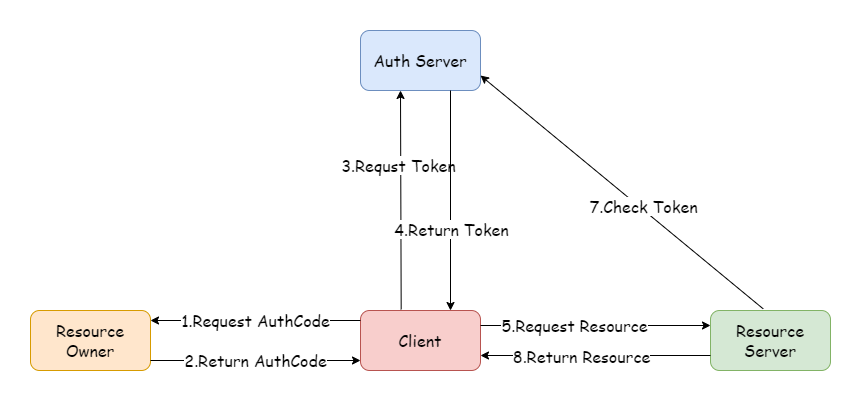
In the microservices field, every service needs to verify user identity and permissions for requests. If each service implements its own authentication logic like in monolithic applications, this is obviously unrealistic. Therefore, a unified authentication and authorization service is needed. Common solutions include OAuth2, distributed sessions, and JWT. Among these, OAuth2 is the most widely used and has become an industry standard. The most common token type for OAuth2 is JWT. Below is a flowchart of the OAuth2 authorization code mode, with the basic process as shown.
Secure Transmission
Service Registration and Discovery
Before a client can call a specific service on the server, it needs to know the server's IP and port. In previous cases, server addresses were hardcoded. In actual network environments, it's not always that stable. Some services may go offline due to failures and become inaccessible, or addresses may change due to business development and machine migration. In these cases, static addresses cannot be used to access services. These dynamic issues are what service discovery and registration solve. Service discovery is responsible for monitoring service address changes and updating, while service registration is responsible for telling the outside world its address. In gRPC, basic service discovery functionality is provided, and it supports extension and customization.
Instead of static addresses, you can use some specific names to replace them. For example, browsers obtain addresses through DNS resolution of domain names. Similarly, gRPC's default service discovery is through DNS. Modify your local host file and add the following mapping:
127.0.0.1 example.grpc.comThen change the client Dial address in the helloworld example to the corresponding domain name:
func main() {
  // Establish connection, no encryption verification
  conn, err := grpc.Dial("example.grpc.com:8080",
    grpc.WithTransportCredentials(insecure.NewCredentials()),
  )
  if err != nil {
    panic(err)
  }
  defer conn.Close()
  // Create client
  client := hello2.NewSayHelloClient(conn)
  // Remote call
  helloRep, err := client.Hello(context.Background(), &hello2.HelloReq{Name: "client"})
  if err != nil {
    panic(err)
  }
  log.Printf("received grpc resp: %+v", helloRep.String())
}
You can still see normal output:
2023/08/26 15:52:52 received grpc resp: msg:"hello world! client"In gRPC, such names must comply with the URI syntax defined in RFC 3986, with the format:
                   hierarchical part
        ┌───────────────────┴─────────────────────┐
                    authority               path
        ┌───────────────┴───────────────┐┌───┴────┐
  abc://username:password@example.com:123/path/data?key=value&key2=value2#fragid1
  └┬┘   └───────┬───────┘ └────┬────┘ └┬┘           └─────────┬─────────┘ └──┬──┘
scheme  user information     host     port                  query         fragment
The URI in the above example is in the following form. Since DNS is supported by default, the scheme prefix is omitted:
dns:example.grpc.com:8080In addition, gRPC also supports Unix domain sockets by default. For other methods, we need to implement custom extensions according to gRPC. For this, we need to implement a custom resolver resolver.Resolver. The resolver is responsible for monitoring target address and service configuration updates:
type Resolver interface {
    // gRPC will call ResolveNow to try to resolve the target name again. This is just a hint, and the resolver can ignore it if not needed. The method may be called concurrently.
  ResolveNow(ResolveNowOptions)
  Close()
}
gRPC requires us to pass in a Resolver builder, which is resolver.Builder, responsible for constructing Resolver instances:
type Builder interface {
  Build(target Target, cc ClientConn, opts BuildOptions) (Resolver, error)
  Scheme() string
}
The Builder's Scheme method returns the Scheme type it is responsible for parsing. For example, the default dnsBuilder returns dns. The builder should be registered to the global Builder using resolver.Register during initialization, or passed as options using grpc.WithResolver internally to ClientConn. The latter has higher priority than the former.
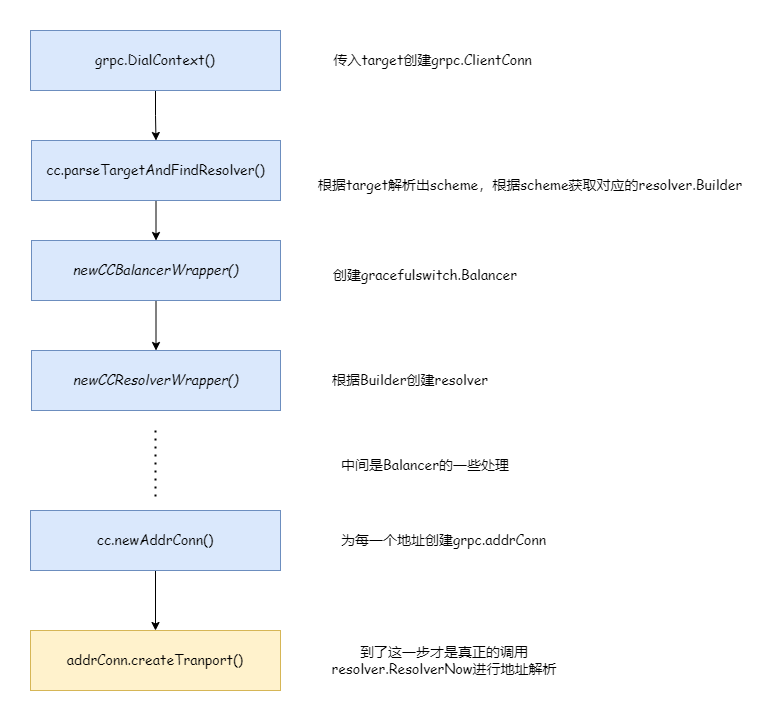
The above diagram simply describes the resolver's workflow. Next, let's demonstrate how to customize a resolver.
Custom Service Resolution
The following writes a custom resolver, which needs a custom resolver builder for construction:
package myresolver

import (
  "fmt"
  "google.golang.org/grpc/resolver"
)

func NewBuilder(ads map[string][]string) *MyBuilder {
  return &MyBuilder{ads: ads}
}

type MyBuilder struct {
  ads map[string][]string
}

func (c *MyBuilder) Build(target resolver.Target, cc resolver.ClientConn, opts resolver.BuildOptions) (resolver.Resolver, error) {
  if target.URL.Scheme != c.Scheme() {
    return nil, fmt.Errorf("unsupported scheme: %s", target.URL.Scheme)
  }
  m := &MyResolver{ads: c.ads, t: target, cc: cc}
    // Must update state here, otherwise deadlock will occur
  m.start()
  return m, nil
}

func (c *MyBuilder) Scheme() string {
  return "hello"
}

type MyResolver struct {
  t   resolver.Target
  cc  resolver.ClientConn
  ads map[string][]string
}

func (m *MyResolver) start() {
  addres := make([]resolver.Address, 0)
  for _, ad := range m.ads[m.t.URL.Opaque] {
    addres = append(addres, resolver.Address{Addr: ad})
  }

  err := m.cc.UpdateState(resolver.State{
    Addresses: addres,
        // Configuration, loadBalancingPolicy refers to load balancing strategy
    ServiceConfig: m.cc.ParseServiceConfig(
      `{"loadBalancingPolicy":"round_robin"}`),
  })

  if err != nil {
    m.cc.ReportError(err)
  }
}

func (m *MyResolver) ResolveNow(_ resolver.ResolveNowOptions) {}

func (m *MyResolver) Close() {}
The custom resolver passes the matched addresses from the map to updateState and also specifies the load balancing strategy. round_robin refers to round-robin.
// service config structure is as follows
type jsonSC struct {
    LoadBalancingPolicy *string
    LoadBalancingConfig *internalserviceconfig.BalancerConfig
    MethodConfig        *[]jsonMC
    RetryThrottling     *retryThrottlingPolicy
    HealthCheckConfig   *healthCheckConfig
}
Client code is as follows:
package main

import (
  "context"
  "google.golang.org/grpc"
  "google.golang.org/grpc/credentials/insecure"
  "google.golang.org/grpc/resolver"
  "grpc_learn/helloworld/client/myresolver"
  hello2 "grpc_learn/helloworld/hello"
  "log"
  "time"
)

func init() {
  // Register builder
  resolver.Register(myresolver.NewBuilder(map[string][]string{
    "myworld": {"127.0.0.1:8080", "127.0.0.1:8081"},
  }))
}

func main() {

  // Establish connection, no encryption verification
  conn, err := grpc.Dial("hello:myworld",
    grpc.WithTransportCredentials(insecure.NewCredentials()),
  )
  if err != nil {
    panic(err)
  }
  defer conn.Close()
  // Create client
  client := hello2.NewSayHelloClient(conn)
     // Call once per second
  for range time.Tick(time.Second) {
    // Remote call
    helloRep, err := client.Hello(context.Background(), &hello2.HelloReq{Name: "client"})
    if err != nil {
      panic(err)
    }
    log.Printf("received grpc resp: %+v", helloRep.String())
  }

}
Normally, the process should be: the server registers its service with the registry, then the client gets the service list from the registry and performs matching. The map passed in here is a simulated registry. Since the data is static, the service registration step is omitted, leaving only service discovery. The target used by the client is hello:myworld, where hello is the custom scheme and myworld is the service name. After parsing by the custom resolver, the real address 127.0.0.1:8080 is obtained. In actual situations, to achieve load balancing, a service name may match multiple real addresses, which is why the service name corresponds to a slice. Here, two servers are started, occupying different ports. The load balancing strategy is round-robin. Server outputs are as follows. From the request times, you can see the load balancing strategy is indeed working. If no strategy is specified, only the first service is selected by default:
// server01
2023/08/29 17:32:21 received grpc req: name:"client"
2023/08/29 17:32:23 received grpc req: name:"client"
2023/08/29 17:32:25 received grpc req: name:"client"
2023/08/29 17:32:27 received grpc req: name:"client"
2023/08/29 17:32:29 received grpc req: name:"client"

// server02
2023/08/29 17:32:20 received grpc req: name:"client"
2023/08/29 17:32:22 received grpc req: name:"client"
2023/08/29 17:32:24 received grpc req: name:"client"
2023/08/29 17:32:26 received grpc req: name:"client"
2023/08/29 17:32:28 received grpc req: name:"client"
The registry essentially stores a mapping collection of service registration names and real service addresses. Any middleware capable of data storage can meet the requirements. Even using MySQL as a registry is possible (though probably no one would do that). Generally, registries use KV storage. Redis is a good choice, but if using Redis as a registry, we need to implement many logics ourselves, such as service heartbeat checks, service offline handling, service scheduling, etc., which is quite troublesome. Although Redis has certain applications in this area, they are relatively few. As the saying goes, let professionals handle professional tasks. There are many well-known solutions in this area: ZooKeeper, Consul, Eureka, ETCD, Nacos, etc.
You can visit 注册中心对比和选型:Zookeeper、Eureka、Nacos、Consul 和 ETCD - 掘金 (juejin.cn) to learn about the differences between these middlewares.
Combining with Consul
For cases combining with Consul, visit consul
Load Balancing
Before You Start
- Applies to: Go 1.21+ (examples verified with Go 1.22) · Prerequisites: Protobuf · Read time: about 25 min
Complete Example
The program below runs as-is: copy it into a file and execute go run main.go, or paste it into the Go Playground.
package main

import (
	"encoding/binary"
	"fmt"
)

func main() {
	payload := []byte("ping")

	// gRPC messages are length-prefixed: 1 byte compressed flag + 4 byte length
	frame := make([]byte, 5+len(payload))
	frame[0] = 0
	binary.BigEndian.PutUint32(frame[1:5], uint32(len(payload)))
	copy(frame[5:], payload)

	fmt.Println("frame length:", len(frame))
	fmt.Println("not compressed:", frame[0] == 0)
	fmt.Println("declared payload length:", binary.BigEndian.Uint32(frame[1:5]))
	fmt.Println("payload:", string(frame[5:]))
}
Expected output:
frame length: 9
not compressed: true
declared payload length: 4
payload: ping
Common Pitfalls
- The
.protofile is the contract. Never reuse or renumber a field; reserve removed numbers instead. - Use interceptors for cross-cutting concerns. Logging, auth and retries belong in interceptors, not in every handler.
- Set deadlines via context. Streaming RPCs must also handle
io.EOFand client cancellation. - Errors need status codes. Return
status.Error(codes.InvalidArgument, ...)so clients can react programmatically. - The default LB is
pick_first. Configure a resolver plusround_robin(or another policy) for multi-backend deployments.
Change Log
- 2026-10-14: Added "Before You Start" notes, a complete runnable example with expected output, common pitfalls, and this change log.