
Basic Syntax
Before You Start
- Applies to: Go 1.21+ (examples verified with Go 1.22) · Prerequisites: none · Read time: about 10 min
Go's basic syntax is very simple and easy to understand. Let's start with the simplest example.
package main

import "fmt"

func main() {
   fmt.Println("Hello 世界!")
}
The
packagekeyword declares which package the current go file belongs to. The entry file must declare themainpackage, and the entry function is themainfunction. When naming custom packages and functions, you should try to avoid duplicating these.importis the import keyword, followed by the name of the package to be imported.funcis the function declaration keyword, used to declare a function.fmt.Println("Hello 世界!")is a statement that calls thePrintlnfunction from thefmtpackage to output.
The above is a simple syntax introduction. Now let's take a closer look at the concepts inside.
Package
In Go, programs are built by linking packages together. The most basic unit of importation in Go is a package, not .go files. A package is essentially a folder, English name package, within which variables, constants, and all defined types are shared. Package naming conventions suggest all lowercase letters and should be as concise as possible.
Visibility
As mentioned earlier, packages share all variables, constants, and all defined types within the package, but this is not the case for code outside the package. Sometimes you don't want others to access a certain type, so you need to control visibility. You may have seen keywords like Public and Private in other OOP languages, but Go doesn't have these. The way to control visibility is very simple, with the following rules:
- Names starting with uppercase letters are public types/variables/constants
- Names starting with lowercase letters or underscores are private types/variables/constants
For example, in the following code, the constant MyName is public, while the constant mySalary is private.
package example

// Public
const MyName = "jack"

// Private
const mySalary = 20_000
This visibility rule applies everywhere in Go.
Import
Import a package to use its types/methods/functions/variables. The import syntax is import followed by the package name.
package main

import "example"
When importing multiple packages, you can write it like this:
package main

import "example"
import "example1"
Or use parentheses. This method is more commonly used in practice.
package main

import (
  "example"
  "example1"
)
If there are duplicate package names or the package name is complex, you can also give them aliases.
package main

import (
  e "example"
  e1 "example1"
)
When the alias is an underscore _, it's an anonymous import. Anonymously imported packages cannot be used directly. This is usually done to load the package's init function without needing to use types from the package. A common example is registering a database driver without manually using the driver.
package main

import (
  e "example"
  _ "mysql-driver-go"
)
After importing, to access types in the package, use packageName.identifier. For example, in the code below, if you try to access a private type, the compiler will tell you it's inaccessible.
package main

import (
  "example"
   "fmt"
)

func main() {
    fmt.Println(example.MyName)
}
One special import method is to import all types from a package into the current package scope. With this method, imported types no longer need the . operator to access, but if there are duplicate type names, the code will fail to compile.
package main

import (
  . "example"
)
WARNING
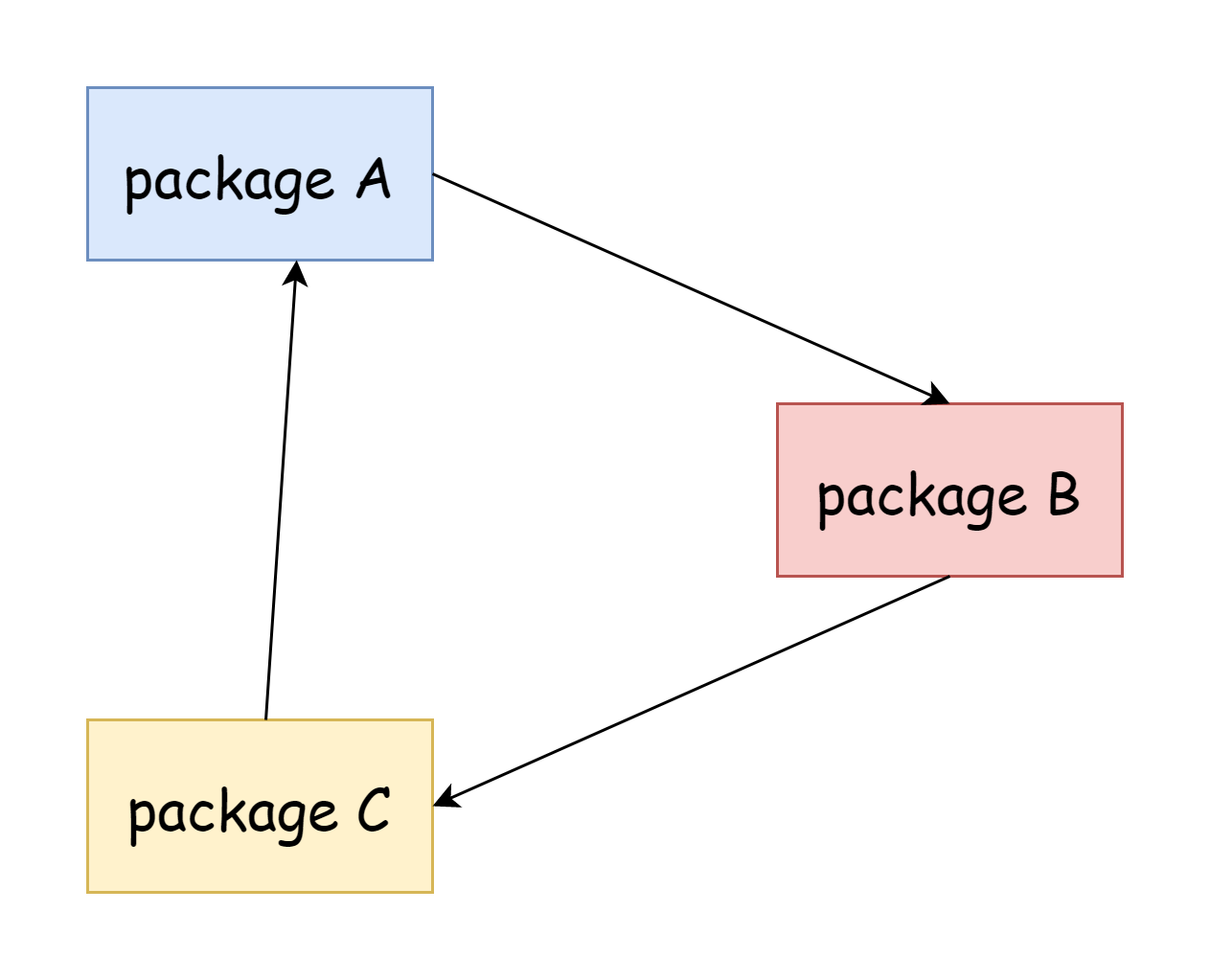
Go does not allow circular imports, whether direct or indirect. For example, if package A imports package B, and package B also imports package A, that's a direct circular import. If package A imports package C, package C imports package B, and package B imports package A, that's an indirect circular import. Having circular imports will fail to compile.
Internal Package
In Go, a package named internal is an internal package. External packages cannot access any content in the internal package, otherwise compilation will fail. Let's look at an example.
/home/user/go/
    src/
        crash/
            bang/              (go code in package bang)
                b.go
        foo/                   (go code in package foo)
            f.go
            bar/               (go code in package bar)
                x.go
            internal/
                baz/           (go code in package baz)
                    z.go
            quux/              (go code in package main)
                y.go
From the file structure, the crash package cannot access types in the baz package.
Comments
Go supports single-line and multi-line comments. It is recommended to leave a space between comments and content.
// This is the main package
package main

// Import the fmt package
import "fmt"

/*
*
This is the main function
*/
func main() {
  // This is a statement
  fmt.Println("Hello 世界!")
}
Identifiers
An identifier is a name used for package naming, function naming, variable naming, etc. The naming rules are as follows:
- Can only consist of letters, numbers, and underscores
- Can only start with letters and underscores
- Case-sensitive
- Cannot duplicate any existing identifier, i.e., must be unique within the package
- Cannot conflict with any built-in keywords in Go
All built-in keywords are listed below. For more details, you can also visit Reference Manual - Identifiers
break        default      func         interface    select
case         defer        go           map          struct
chan         else         goto         package      switch
const        fallthrough  if           range        type
continue     for          import       return       var
Operators
The following is the precedence of operators supported in Go. For more details, you can also visit Reference Manual - Operators.
Precedence    Operator
    5             *  /  %  <<  >>  &  &^
    4             +  -  |  ^
    3             ==  !=  <  <=  >  >=
    2             &&
    1             ||
One thing to note is that Go does not use ~ as the bitwise NOT operator. Instead, it reuses the ^ symbol. When two numbers use ^, for example a^b, it's the XOR operator. When used on a single number, for example ^a, it's the bitwise NOT operator. Go also supports augmented assignment operators:
a += 1
a /= 2
a &^= 2
TIP
Go does not have increment and decrement operators. They have been demoted to statements and can only appear after the operand, so you don't need to worry about i++ vs ++i.
a++ // Correct
++a // Wrong
a-- // Correct
Another point is that they no longer have return values, so statements like a = b++ are invalid.
Literals
In computer science terminology, a literal is a notation for representing a fixed value in source code. Both names mean the same thing - what you write is the value, the value is the "literal" value.
Integer Literals
For readability, underscores _ can be used for digit grouping, but only after the prefix symbol and between digits.
24 // 24
024 // 24
2_4 // 24
0_2_4 // 24
10_000 // 10k
100_000 // 100k
0O24 // 20
0b00 // 0
0x00 // 0
0x0_0 // 0
Floating Point Literals
Different prefixes can express floating point numbers in different bases.
0.
72.40
072.40       // == 72.40
2.71828
1.e+0
6.67428e-11
1E6
.25
.12345E+5
1_5.         // == 15.0
0.15e+0_2    // == 15.0

0x1p-2       // == 0.25
0x2.p10      // == 2048.0
0x1.Fp+0     // == 1.9375
0X.8p-0      // == 0.5
0X_1FFFP-16  // == 0.1249847412109375
0x15e-2      // == 0x15e - 2 (integer subtraction)
Complex Literals
0i
0123i         // == 123i
0o123i        // == 0o123 * 1i == 83i
0xabci        // == 0xabc * 1i == 2748i
0.i
2.71828i
1.e+0i
6.67428e-11i
1E6i
.25i
.12345E+5i
0x1p-2i       // == 0x1p-2 * 1i == 0.25i
Rune Literals
Rune literals must be enclosed in single quotes ''. Characters in Go are fully compatible with utf8.
'a'
'ä'
'你'
'\t'
'\000'
'\007'
'\377'
'\x07'
'\xff'
'\u12e4'
'\U00101234'
Escape Characters
Available escape characters in Go:
\a   U+0007 Bell character
\b   U+0008 Backspace character
\f   U+000C Form feed character
\n   U+000A Newline character
\r   U+000D Carriage return character
\t   U+0009 Horizontal tab character
\v   U+000B Vertical tab character
\\   U+005C Backslash escape
\'   U+0027 Single quote escape (only valid within characters)
\"   U+0022 Double quote escape (only valid within strings)
String Literals
String literals must be enclosed in double quotes "" or backticks ` (raw strings do not allow escapes)
`abc`                // "abc"
`\n
\n`                  // "\\n\n\\n"
"\n"
"\""                 // `"`
"Hello, world!\n"
"今天天气不错"
"日本語"
"\u65e5本\U00008a9e"
"\xff\u00FF"
Functions
Functions in Go are declared using the func keyword, similar to most languages.
func main() {
  println(1)
}
However, there are two different aspects of functions in Go. The first is that parameter types come after the parameter name, like this:
func Hello(name string) {
  fmt.Println(name)
}
The second difference is multiple return values, which can also be named.
func Pos() () (x, y float64) {
    ...
}
Style
Regarding coding style, Go enforces everyone to use the same style. Go provides a formatting tool called gofmt, which can be used from the command line. This formatting tool has no formatting parameters to pass. The only parameters are for output control, so it doesn't support customization at all. This means all code formatted by this tool follows the same style, which greatly reduces the mental burden on maintainers. Therefore, pursuing personalization in this area is not a wise choice.
Below are some simple rules. You can also pay attention to these when writing code.
Function Braces Newlines
Whether function braces should be on a new line is something every programmer has their own opinion about. In Go, all braces should not be on a new line.
// Correct example
func main() {
  fmt.Println("Hello 世界!")
}
If you really do this:
// Wrong example
func main()
{
  fmt.Println("Hello 世界!")
}
This code won't even compile, so Go forces all programmers to not put braces on a new line.
Code Indentation
Go uses Tab (tab characters) for indentation by default, only using spaces in some special cases.
Code Spacing
In Go, most spacing is meaningful. To some extent, this represents how the compiler views your code. For example, in the following arithmetic:
2*9 + 1/3*2As we know, multiplication has higher precedence than addition. After formatting, the spacing around * symbols will be tighter, meaning they are calculated first, while the spacing around + will be larger, meaning they are calculated later.
Brace Omission
In other languages, if and for statements can often be abbreviated:
for (int i=0; i < 10; i++) printf("%d", i)But this doesn't work in Go. You can write it on one line, but you must include braces.
for i := 0; i < 10; i++ {fmt.Println(i)}Ternary Expression
Go doesn't have a ternary expression, so the following code won't compile:
var c = a > b ? a : bThrough this article, you can have a preliminary understanding of Go's syntax. The following content will provide more detailed explanations.
Complete Example
The program below runs as-is: copy it into a file and execute go run main.go, or paste it into the Go Playground.
package main

import "fmt"

const Pi = 3.14159

func area(r float64) float64 {
	return Pi * r * r
}

func main() {
	r := 2.5
	fmt.Printf("radius=%.1f area=%.2f\n", r, area(r))
}
Expected output:
radius=2.5 area=19.63Common Pitfalls
- Every file starts with a package clause. Executables use
package mainand must definefunc main(). - The opening brace must stay on the same line. Go inserts semicolons at line ends, so a brace on the next line is a syntax error.
- Unused imports and variables fail the build. Remove them or use
_. - There is no ternary operator. Write a full
if/else— the compiler will keep it readable. gofmtdecides the style. Tabs, spacing and alignment are automatic; rungofmt -w .before committing.
Change Log
- 2026-10-14: Added "Before You Start" notes, a complete runnable example with expected output, common pitfalls, and this change log.