
Go Getting Started Guide
Before You Start
- Applies to: Go 1.21+ (examples verified with Go 1.22) · Prerequisites: Introduction · Read time: about 10 min
This article will guide you on how to get started with Go language. In terms of syntax alone, it is not difficult to learn. You can get started in a few days. However, as usual, before officially starting, we need to first understand its background and origins.
Background
Go language was created by three big shots together. They are:
- Ken Thompson, Turing Award winner, Unix system founder, B language founder, C language founder
- Rob Pike, one of the Plan9 operating system authors, one of the UTF-8 inventors, Go language design leader
- Robert Griesemer, JS V8 engine developer, the youngest of the three
There is also one person, Rob Pike's wife Renee French, who designed Go language's logo, which is a blue groundhog.

On a certain day, the three engineers felt very bored during the long C++ project compilation waiting process. It was at this moment that Rob Pike suddenly had a novel idea in his mind: he hoped to design a concise, small, fast-compiling programming language with good performance, so they would no longer need to face long waiting times during each compilation. After a brief brainstorming, the three held a short meeting on September 20, 2007, to start discussing and designing the preliminary prototype of this language. It was from this moment that Go language was officially born. Subsequently, this small team attracted more and more like-minded developers. Finally, on November 10, 2009, Google officially open-sourced Go language under BSD-3-Clause license and released the first preview version, and formed the official development team.
Tip
It is worth mentioning that you may see people call it Golang in other places, including this site's Github repository name is also called Golang-Doc, but its official name has always been Go. In the early days, because the go domain was registered, the official website domain used golang.org, so newcomers later mistakenly thought it was called Golang.
After that, the Go team spent three years on design and development, and released the first official version Go 1.0 in March 2012 (at this time, Go's toolchain and runtime were still written in C language, and it was not until Go 1.5 that self-hosting was completed). Since then, two minor version updates have been released every year, and it has been operating and maintained until now.
The three founders actually retired very early. For most of the time, the team leader was Russ Cox, who had been involved in development work even before Go language was publicly released. He then managed the Go team for 12 years until stepping down in August 2024, and was succeeded by Austin Clements to lead the subsequent development work.
If you want to deeply understand Go language's history, go to Go History to learn more content.
Features
- Simple syntax Go language makes trade-offs in freedom and flexibility, in exchange for better maintainability and a gentle learning curve.
- Deployment-friendly Go's statically compiled binary files do not depend on additional runtime environments, and compilation speed is also very fast.
- Cross-compilation Go only needs to simply set two parameters during compilation to compile programs that can run on other platforms
- Native concurrency Go language's support for concurrency is purely native. Only one keyword is needed to start an asynchronous coroutine.
- Garbage collection Go has excellent GC performance. In most cases, GC latency will not exceed 1 millisecond.
- Rich standard library From string processing to source code AST parsing, the powerful and rich standard library is Go language's solid foundation.
- Complete toolchain Go has a complete development toolchain, covering compilation, testing, dependency management, performance analysis, and many other aspects.
Go language abandoned inheritance, weakened OOP, classes, metaprogramming, generics, Lambda expressions and other features. It has good performance and low difficulty to get started. It is suitable for cloud service development, application server-side development, and network programming. It comes with GC, so developers do not need to manually manage memory. Static compilation and cross-compilation are also very friendly for operations.
Go language also has many shortcomings, such as the criticized error handling, incomplete generics, although the standard library is very rich, there are not many built-in data structures, interface{} type is everywhere, there is no enumeration type. In addition, the Go development team is very stubborn and not good at listening to community opinions, etc. (In contrast, Rust does much better in error handling, generics, dependency management, enumeration, interfaces, etc.)
Overall, we need to look at a language dialectically. As an engineering language, Go can greatly improve the team's lower limit. Even if the developer level is poor, it can also provide a bottom line. It rarely happens that one rat ruins a pot of porridge. At the same time, because of simple syntax and low learning difficulty, people can quickly get started on a project. Although Go has been released for only a little more than ten years, many companies have already taken Go as their first language, which can also illustrate from the side that Go is gradually becoming popular.
By the way, Go is also a completely open-source language, jointly maintained by the community and Google for Go language's development. The official address is in Google's repository, and there is a same mirror repository on Github. If you are interested, you can also participate in language design.
Official website: The Go Programming Language
Google open-source repository: google/go: Google Open Source
Github repository: golang/go: The Go programming language
TIP
The author once submitted a PR to Go. If you want to understand how to contribute code to Go, you can look at the article I wrote: How to contribute code to Go.
I believe many people should have more or less heard of Rust, which is a high-performance general-purpose programming language. Its birth time is one year earlier than Go. Go 1 was officially released in 2012, and Rust's official version release time was 2015. They are both relatively modern languages. The author likes both of these languages very much. Their development fields are different. If you are not satisfied with Go's runtime efficiency and expressiveness, you might as well try Rust, but its learning difficulty is far not as simple as Go.
Installation
Go language download: Downloads - The Go Programming Language
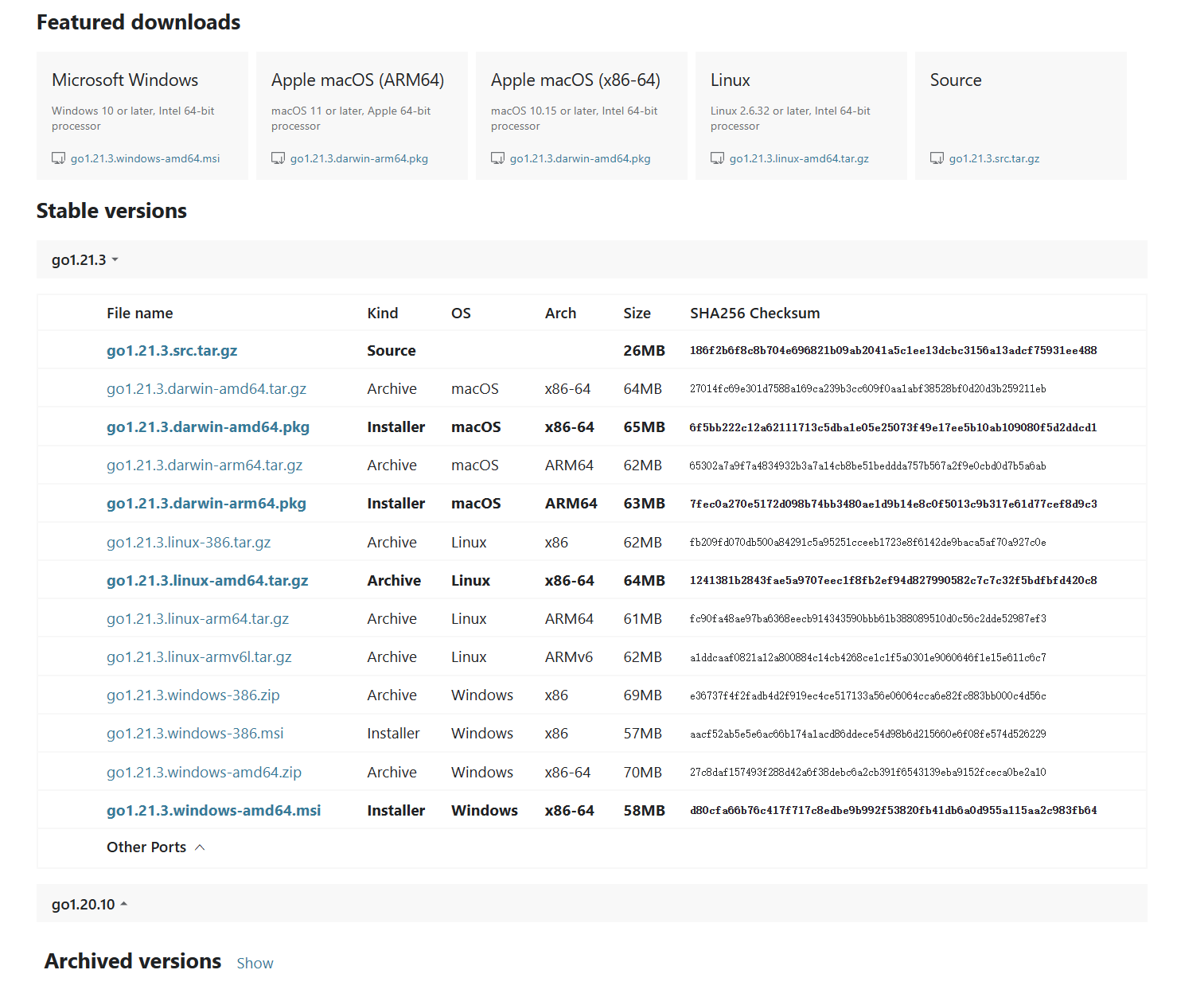
Stable Version refers to the two stable versions currently in maintenance state. Archived Version refers to historical versions no longer in maintenance. Go to Release Notes to learn more about maintenance rules and historical versions.
windows
For windows platform, there are two types available: installer and archive. The former is the installation package, you only need to click and click. The latter is recommended, which will make you more familiar with Go language's directory structure, so you won't be at a loss when problems occur in the future. Choose to download zip file. The compressed file contains Go language's source code as well as toolchain and some documents. Unzip it to a specified path, then you need to configure two system environment variables.
- GOROOT - Go language installation path
- GOPATH - Go language dependency storage path
After setting, add two new items to the system environment variable PATH
%GOROOT%\bin: This is the go binary program address%GOPATH%\bin: This is the address where third-party dependency binary files downloaded in the future will be stored
In powershell, execute the go version command. Finally, if the version is displayed normally, it means the installation is correct.
PS C:\user\username> go version
go version go1.21.3 windows/amd64
For updates, you only need to download the new zip to overwrite the original installation directory.
linux
Take ubuntu as an example, copy the link of the version you want, download it locally
$ wget https://golang.google.cn/dl/go1.21.1.linux-amd64.tar.gzUnzip to the specified directory
$ tar -C ~/go -xzf go1.21.1.linux-amd64.tar.gzSet environment variables in the $HOME/.bashrc file
export GOROOT=$HOME/go
export GOPATH=$HOME/gopath
export PATH=$PATH:$GOROOT/bin:$GOPATH/bin
After completion, view the installation version to confirm correct installation
$ go version
go version go1.21.1 linux/amd64
For updates, you only need to download the new tar.gz to overwrite the original installation directory.
Installation Management
The above installation method is already enough for basic use. Personally, I recommend using the following directory structure to store Go language and its derived files
go/
|
|--root/
|  |
|  |--go1.21.3/
|  |
|  |--go1.20.10/
|
|--mod/
|  |
|  |--bin/
|  |
|  |--libs/
|
|--cache/
|
|--temp/
|
|--env
Explanation is as follows
go/rootdirectory is used to store Go language source files of each versiongo/modcorresponds toGOAPTHgo/mod/libscorresponds toGOMODCACHE, which is the storage address for downloaded third-party dependenciesgo/mod/bincorresponds toGOBIN, the storage address for third-party dependency binary filesgo/cache, corresponds toGOCACHE, stores cache filesgo/temp, corresponds toGOTMPDIR, stores temporary filesgo/env, corresponds toGOENV, global environment variable configuration file
With this method, when updating, you do not need to overwrite the original installation directory. You only need to store it in the go/root directory, then modify the GOROOT system environment variable to be the folder of the specified version under that directory. By default, the env file is read from the path GOROOT/env. By setting the GOENV system variable to separate it from GOROOT, it avoids changes in Go environment variable configuration when the version changes. Below is the initial setting of the env file.
GO111MODULE=on
GOCACHE=go/cache
GOMODCACHE=go/mod/libs
GOBIN=go/mod/bin
GOTMPDIR=go/temp
This is just a directory style I personally prefer. Go to Commands - Environment Variables to learn more about environment variables. You can completely customize according to personal preferences.
Multi-version Management
I wrote a multi-version management tool govm, which works best when combined with the above directory structure. It can manage multiple Go versions locally, can switch versions at any time, and can also search and download other Go versions and install them locally.
$ govm search 1.22 -n 10
go1.22.6           76 MB
go1.22.5           76 MB
go1.22.4           76 MB
go1.22.3           76 MB
go1.22.2           76 MB
go1.22.1           76 MB
go1.22.0           76 MB

$ govm install 1.22.4
Fetch go1.22.4 from https://dl.google.com/go/go1.22.4.windows-amd64.zip
Downloading go1.22.4.windows-amd64.zip 100% |████████████████████████████████████████| (76/76 MB, 32 MB/s) [2s]
Extract go1.22.4.windows-amd64.zip to local store
Remove archive from cache
Version go1.22.4 installed

$ govm use 1.22.4
Use go1.22.4 now

# Re-login to shell
$ go version
go version go1.22.4 windows/amd64
If you want to understand how to write command line tools with Go, if you don't mind, you can take govm as a project reference. It is also written in Go.
Editor
Currently, personally, I only recommend the following two for mainstream Go language IDEs
- goland: Produced by JetBrains, powerful features, comprehensive support, but requires payment. You can consider IDEA community version with plugins
- vscode: No payment required, universal editor, with plugins it can write any language
If there are other editors that better fit your usage habits, you can also use them. What editor to use doesn't matter much. If you just want to write some short practice code, you can try the official provided goplay, which can run Go code online.
TIP
If you are using JetBrains Toolbox, you can try a command line tool I wrote AutoToolBox, which can generate Windows right-click menu for Toolbox. The effect diagram is as follows.

Encouragement
Go language's overall difficulty is not high. If you have other language foundations, it will be very simple to learn. In the learning process, if you encounter difficulties that you can't figure out, you can skip them first. Learning any language is to first roughly understand the language's general syntax and structure, then delve into some features and details. The documentation's concept is also the same, suitable for getting started learning. The author himself is also just an ordinary student, so there will inevitably be omissions and errors. If you find any errors, you can submit PR on Github. If you think the documentation is not bad, you can click a Star on Github.
If you are a strong OOP language developer, such as Java, C#, etc., please do not bring OOP thinking to pre-judge, otherwise you will feel many of Go's designs are inexplicable, and it will be very painful when writing code. The author was also like this at the beginning.
Overview
Below is a simple introduction to the content of this site, so that everyone can read on demand. Some pages are blank representing that they have not been updated yet.
- Language Getting Started: Mainly explains content about Go language itself, leaning towards theory.
- Syntax Basics: Mainly explains some very basic syntax, such as syntax rules like
if,for, etc. - Syntax Advanced: Explains some Go-unique things, about modules, testing, coroutines, etc.
- Standard Library: A simple introduction to Go's own standard library. Because the standard library's content is really too huge, so updates are as they come.
- Implementation Principles: Mainly explains some internal design principles of Go language, such as coroutine scheduling, memory management, garbage collection, etc.
- Syntax Basics: Mainly explains some very basic syntax, such as syntax rules like
- Community Ecosystem: Mainly explains the ecosystem around Go, leaning towards application.
- Databases: Operating mainstream databases through Go.
- Microservices: Introducing some microservice tools related to Go.
- Third-party Libraries: Introducing some third-party libraries written in Go. Updates are as they come. You can also directly view in Dependency Navigation.
Go to Ready to Start for getting started learning
Complete Example
The program below runs as-is: copy it into a file and execute go run main.go, or paste it into the Go Playground.
package main

import (
	"fmt"
	"strings"
)

func main() {
	const greeting = "hello"
	fmt.Println(strings.ToUpper(greeting) + ", Go!")
	fmt.Println(len(greeting), "letters")
}
Expected output:
HELLO, Go!
5 letters
Common Pitfalls
- All
.gofiles in one directory must share one package. Mixingpackage mainand another package in the same folder fails to build. go run main.gocompiles only the listed files. Usego run .for a multi-file program in the current directory.- Dependencies need a module. Run
go mod init example.com/hellofirst, otherwisego getand imports of third-party packages fail with "go.mod file not found". - Configure a module proxy if downloads time out. For example:
go env -w GOPROXY=https://goproxy.cn,direct(append your private proxy orGOPRIVATEfor company repos). - Check the toolchain version with
go version. Go 1 promises backward compatibility for existing code across 1.x releases.
Change Log
- 2026-10-14: Added "Before You Start" notes, a complete runnable example with expected output, common pitfalls, and this change log.