
Protobuf
Before You Start
- Applies to: Go 1.21+ (examples verified with Go 1.22) · Prerequisites: Std: encode · Read time: about 20 min
Official Website: Protocol Buffers | Google Developers
Introduction
Official Tutorial: Protocol Buffer Basics: Go | Protocol Buffers | Google Developers
Protocol Buffers is a language-agnostic, protocol-agnostic, extensible structured data serialization mechanism open-sourced by Google in 2008. It provides faster unpacking and packing, commonly used in RPC communication fields. It can define the structured way of data, and then use specially generated source code to easily write and read structured data from various data streams, and use it in various languages. Protocol Buffers is referred to as protobuf in the following text.
protobuf is quite popular, especially in the Go ecosystem, where gRPC uses it as the serialization mechanism for protocol transmission.
Syntax
First, let's look at an example to see what a protobuf file generally looks like. Overall, its syntax is very simple and can be mastered in about ten minutes. Below is an example of a file named search.proto. The file extension for protobuf is .proto.
syntax = "proto3";

message SearchRequest {
  string query = 1;
  string number = 2;
}

message SearchResult {
  string data = 1;
}

service SearchService {
  rpc Search(SearchRequest) returns(SearchResult);
}- The first line
syntax = "proto3";indicates usingproto3syntax, which is the default. messagedeclaration is similar to a struct and is the basic structure inproto.SearchRequestdefines three fields, each with a name and type.servicedefines a service, which contains one or more RPC interfaces.- RPC interfaces must have exactly one parameter and one return value, and their types must be
message, not basic types.
Additionally, note that each line in a proto file must end with a semicolon.
Comments
Comment style is exactly the same as Go.
syntax = "proto3";

/* Comment
 * Comment */
message SearchRequest {
  string query = 1; // Comment
  string number = 2;
}
Types
Type modifiers can only appear in message and cannot appear alone.
Basic Types
| proto Type | Go Type |
|---|---|
| double | float64 |
| float | float32 |
| int32 | int32 |
| int64 | int64 |
| uint32 | uint32 |
| uint64 | uint64 |
| sint32 | int32 |
| sint64 | int64 |
| fixed32 | uint32 |
| fixed64 | uint64 |
| sfixed32 | int32 |
| sfixed64 | int64 |
| bool | bool |
| string | string |
| bytes | []byte |
Arrays
Adding the repeated modifier before a basic type indicates an array type, corresponding to a slice in Go.
message Company {
  repeated string employee = 1;
}
Map
The format for defining a map type in protobuf is as follows:
map<key_type, value_type> map_field = N;key_type must be numeric or string, and value_type has no type restrictions. Here's an example:
message Person {
  map<string, int64> cards = 1;
}
Fields
In fact, proto is not a traditional key-value type. In the declared proto file, specific data does not appear. After each field's =, there should be a unique number in the current message. These numbers are used to identify and define these fields in binary messages. Numbers start from 1, with numbers 1-15 occupying 1 byte, and 16-2047 occupying 2 bytes. Therefore, frequently appearing fields should be assigned numbers 1-15 to save space, and some space should be reserved for fields that may frequently appear in the future.
Fields in a message should follow these rules:
singular: This is the default type of field. In a well-structuredmessage, there can only be 0 or 1 of this field, meaning the same field cannot exist repeatedly. The following declaration will report an error.protobufsyntax = "proto3"; message SearchRequest { string query = 1; string number = 2; string number = 3; // Field duplicate }optional: Similar tosingular, but allows explicit checking of whether a field value has been set. There may be the following two cases:set: Will be serializedunset: Will not be serialized
repeated: This type of field can appear 0 or multiple times. Repeated values will be preserved in order (simply put, it's an array that allows the same type of value to appear multiple times and preserves them in the order they appear, which is the index).map: Key-value pair type field, declared as follows:protobufmap<string,int32> config = 3;
Reserved Fields
The reserve keyword can declare reserved fields. After declaring a reserved field number, it cannot be used as the number and name of other fields, and compilation will also fail. Google's official answer is: if a proto file deletes some numbers in a new version, other users may reuse these deleted numbers in the future. However, if reverting to the old version's numbers, it will cause inconsistency between fields and their corresponding numbers, resulting in errors. Reserved fields can serve as a reminder at compile time, reminding you that you cannot use these reserved fields, otherwise compilation will fail.
syntax = "proto3";

message SearchRequest {
  string query = 1;
  string number = 2;
  map<string, int32> config = 3;
  repeated string a = 4;
  reserved "a"; // Declare specific name field as reserved field
  reserved 1 to 2; // Declare a number sequence as reserved field
  reserved 3,4; // Declare
}
With this, the file will not pass compilation.
Deprecated Fields
If a field is deprecated, it can be written as follows:
message Body {
  string name = 1 [deprecated = true];
}
Enums
You can declare enum constants and use them as field types. Note that the first element of an enum must be zero because the default value of an enum is the first element.
syntax = "proto3";

enum Type {
  GET = 0;
  POST = 1;
  PUT = 2;
  DELETE = 3;
}

message SearchRequest {
  string query = 1;
  string number = 2;
  map<string, int32> config = 3;
  repeated string a = 4;
  Type type = 5;
}
When there are enum items with the same value inside an enum, you can use enum aliases:
syntax = "proto3";

enum Type {
  option allow_alias = true; // Need to enable alias configuration
  GET = 0;
  GET_ALIAS = 0; // Alias for GET enum item
  POST = 1;
  PUT = 2;
  DELETE = 3;
}

message SearchRequest {
  string query = 1;
  string number = 2;
  map<string, int32> config = 3;
  repeated string a = 4;
  Type type = 5;
}
Nested Messages
message Outer {                  // Level 0
  message MiddleAA {  // Level 1
    message Inner {   // Level 2
      int64 ival = 1;
      bool  booly = 2;
    }
  }
  message MiddleBB {  // Level 1
    message Inner {   // Level 2
      int32 ival = 1;
      bool  booly = 2;
    }
  }
}
message can nest message declarations, just like nested structs.
Package
You can add an optional package modifier to protobuf files to prevent name conflicts between protocol message types.
package foo.bar;
message Open { ... }
Then you can use the package name when defining fields in message types:
message Foo {
  ...
  foo.bar.Open open = 1;
  ...
}
Import
Importing allows multiple protobuf files to share definitions. The syntax is as follows, and file extensions cannot be omitted when importing.
import "a/b/c.proto";Imports use relative paths, but this relative path is not the relative path between the importing file and the imported file. It depends on the scan path specified when the protoc compiler generates code. Suppose there is the following file structure:
pb_learn
│  common.proto
│
├─monster
│      monster.proto
│
└─player
        health.proto
        player.proto
If we only need to generate code for the player directory part and only specify the player directory when scanning paths, then mutual imports between health.proto and player.proto can directly write single filenames. For example, player.proto imports health.proto:
import "health.proto";If at this point player.proto imports files in the common.proto or monster directory, compilation will fail, so the following写法 is completely wrong because the compiler cannot find these files:
import "../common.proto"; // Wrong写法TIP
By the way, .., . these symbols are not allowed to appear in import paths.
Suppose pb_learn is specified as the scan path during compilation, then you can import files from other directories through relative paths. The actual import path is the relative address of the file's absolute address relative to pb_learn. Look at the following example of player.proto importing other files:
import "common.proto";
import "monster/monster.proto";
import "player/health.proto";
Even health.proto in the same directory must now use relative paths. Therefore, in a project, we generally create a separate folder to store all protobuf files and specify it as the scan path during compilation. All import behaviors in that directory are also based on its relative path.
TIP
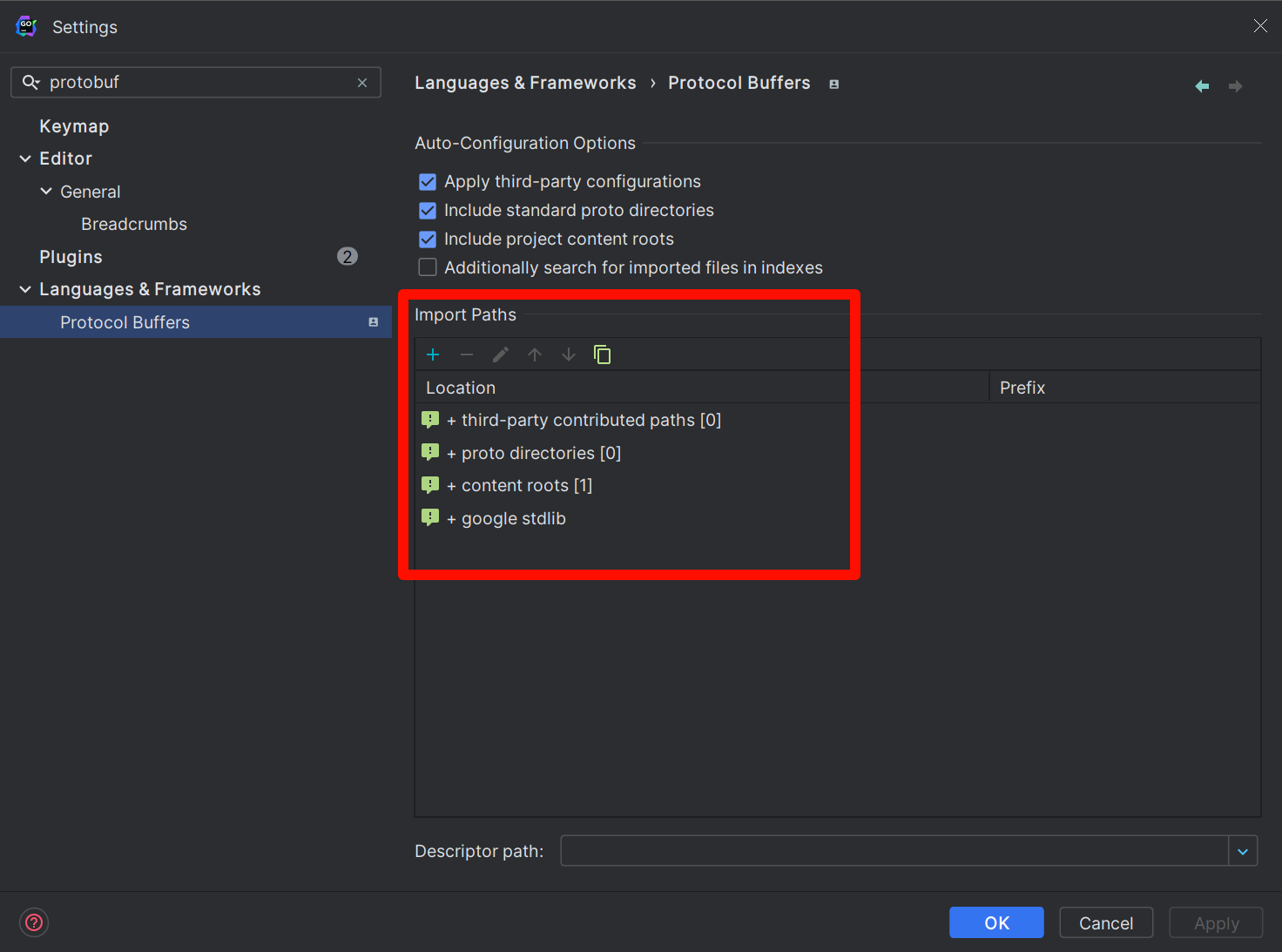
If you use the GoLand editor, for protobuf directories you create, it cannot be resolved by default, resulting in red highlights. To make GoLand recognize it, you need to manually set the scan path. The principle is exactly the same as described above. The setting method is as follows: open the following settings:
File | Settings | Languages & Frameworks | Protocol BuffersManually add the scan path in Import Paths, which should be consistent with the path specified during compilation.
Any
The Any type allows you to use messages as embedded types without needing their proto definitions. You can directly import Google-defined types, which come built-in and don't need to be written manually.
import "google/protobuf/any.proto";

message ErrorStatus {
  string message = 1;
  repeated google.protobuf.Any details = 2;
}
Google has also predefined many other types. Visit protobuf/ptypes at master · golang/protobuf (github.com) to see more, mainly including:
- Basic type wrappers
- Time types
- Duration types
Their protobuf definitions should be in the include directory of the protoc compiler.
OneOf
The official documentation's explanation here is too verbose. Simply put, it means a field can have multiple possible types during transmission, but ultimately only one type will be used. Its interior cannot contain fields modified with repeated, just like a union in C.
message Stock {
    // Stock-specific data
}

message Currency {
    // Currency-specific data
}

message ChangeNotification {
  int32 id = 1;
  oneof instrument {
    Stock stock = 2;
    Currency currency = 3;
  }
}
Service
The service keyword can define an RPC service. An RPC service contains several RPC interfaces, which are divided into unary interfaces and streaming interfaces.
message Body {
  string name = 1;
}

service ExampleService {
  rpc DoSomething(Body) returns(Body);
}
Streaming interfaces are further divided into unidirectional streaming and bidirectional streaming, usually modified with the stream keyword. Look at the following example:
message Body {
  string name = 1;
}

service ExampleService {
  // Client streaming
  rpc DoSomething(stream Body) returns(Body);
  // Server streaming
  rpc DoSomething1(Body) returns(stream Body);
  // Bidirectional streaming
  rpc DoSomething2(stream Body) returns(stream Body);
}
Streaming means long-term mutual data sending in a connection, no longer as simple question-and-answer as unary interfaces.
Empty
Empty is actually an empty message, corresponding to an empty struct in Go. It is rarely used to modify fields and is mainly used to indicate that an RPC interface doesn't need parameters or has no return value.
syntax = "proto3";

import "google/protobuf/empty.proto";

service EmptyService {
  rpc Do(google.protobuf.Empty) returns(google.protobuf.Empty);
}
Option
Options are usually used to control some behaviors of protobuf. For example, to control the package generated for Go language source code, you can declare as follows:
option go_package = "github/jack/sample/pb_learn;pb_learn"Before the semicolon is the import path for other source files after code generation, and after the semicolon is the package name for the corresponding generated file.
It can do some optimizations with the following available values, which cannot be declared repeatedly:
SPEED: Highest optimization level, largest generated code volume, this is the default.CODE_SIZE: Reduces generated code volume but relies on reflection for serialization.LITE_RUNTIME: Smallest code volume but lacks some features.
Here's a usage example:
option optimize_for = SPEED;Besides, options can also add some metadata to message and enum. You can get this information through reflection, which is particularly useful for parameter validation.
Compilation
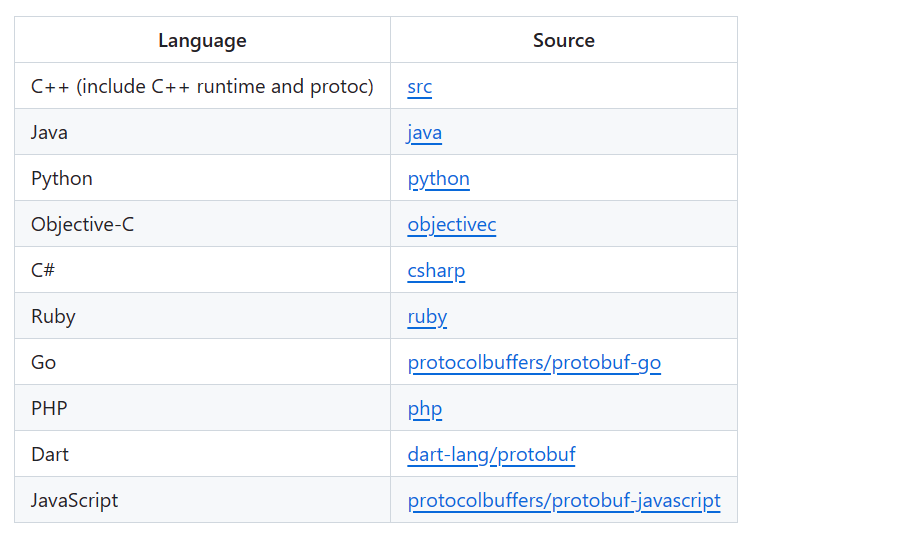
Compilation is code generation. Above we only defined protobuf files. In actual use, they need to be converted into source code of a specific language to be used. We complete this through the protoc compiler, which supports multiple languages.
Installation
To download the compiler, go to protocolbuffers/protobuf: Protocol Buffers - Google's data interchange format (github.com) to download the latest Release, generally a compressed file:
protoc-25.1-win64
│  readme.txt
│
├─bin
│      protoc.exe
│
└─include
    └─google
        └─protobuf
            │  any.proto
            │  api.proto
            │  descriptor.proto
            │  duration.proto
            │  empty.proto
            │  field_mask.proto
            │  source_context.proto
            │  struct.proto
            │  timestamp.proto
            │  type.proto
            │  wrappers.proto
            │
            └─compiler
                    plugin.proto
After downloading, add the bin directory to environment variables to use the protoc command. After completion, check the version. Normal output indicates successful installation:
$ protoc --version
libprotoc 25.1
The downloaded compiler doesn't support Go language by default because Go language code generation is a separate executable, while other languages are combined together. So install the Go language plugin to translate protobuf definitions into Go language source code:
$ go install google.golang.org/protobuf/cmd/protoc-gen-go@latestIf you also need to generate gRPC service code, install the following plugin:
$ go install google.golang.org/grpc/cmd/protoc-gen-go-grpc@latestAfter installation, check their versions:
$ protoc-gen-go-grpc --version
protoc-gen-go-grpc 1.3.0

$ protoc-gen-go --version
protoc-gen-go.exe v1.31.0
These plugins are also separate binary files, but can only be called through protoc and cannot be executed independently:
(this program should be run by protoc, not directly)Besides, there are many other plugins, such as plugins for generating openapi interface documentation, etc. If interested, you can search yourself.
Generation
Still using the previous example, the structure is as follows:
pb_learn
│  common.proto
│
├─monster
│      monster.proto
│
└─player
        health.proto
        player.proto
For code generation, three parameters need to be specified in total:
- Scan path: tells the compiler where to look for
protobuffiles and how to resolve import paths. - Generation path: where the compiled files are placed.
- Target files: specifies which target files need to be compiled.
Before starting, ensure the go_package in protobuf files is set correctly. Use protoc -h to check its supported parameters. The most commonly used are -I or --proto_path, which can be used multiple times to specify multiple scan paths, for example:
$ protoc --proto_path=./pb_learn --proto_path=./third_partyJust specifying scan paths is not enough; you also need to specify the generation path and target protobuf files. Here we're generating Go files, so use the --go_out parameter, supported by the previously downloaded protoc-gen-go plugin:
$ cd pb_learn

$ protoc --proto_path=. --go_out=. common.proto

$ ls
common.pb.go  common.proto  monster/  player/
The --go_out parameter specifies the generation path. . means the current path, and common.proto specifies the file to compile. If you want to generate grpc code (prerequisite: grpc plugin installed), you can add the --go-grpc_out parameter (if the protobuf file doesn't define service, the corresponding file won't be generated):
$ protoc --proto_path=. --go_out=. --go-grpc_out=. common.proto

$ ls
common.pb.go  common.proto  common_grpc.pb.go  monster/  player/
common.pb.go is the generated protobuf type definition, and common_grpc.pb.go is the generated gRPC code, which is based on the former. If the language definition is not generated, gRPC code cannot be generated.
If you want to compile all protobuf files in the directory, you can use the wildcard *, like *.proto:
$ protoc --proto_path=. --go_out=. --go-grpc_out=. ./*.protoIf you want to include all files, you can use the ** wildcard, like ./**/*.proto:
$ protoc --proto_path=. --go_out=. --go-grpc_out=. ./**/*.protoHowever, this method only applies to shells that support this wildcard. For example, in Windows, cmd or powershell don't support this写法:
D> protoc --proto_path=. --go_out=. --go-grpc_out=. ./**/*.proto
Invalid file name pattern or missing input file "./**/*.proto"
Fortunately, gitbash supports many Linux commands and can also make Windows support this syntax. To avoid writing repetitive commands every time, you can put them in a makefile:
.PHONY: all

proto_gen:
  protoc --proto_path=. \
       --go_out=paths=source_relative:. \
       --go-grpc_out=paths=source_relative:. \
       ./**/*.proto ./*.proto
You can notice there's an added paths=source_relative:, which sets the file generation path mode. There are the following options:
paths=import: This is the default. Files are generated in the directory specified byimport. It can also be a module path. For example, if there's a fileprotos/buzz.protoand you specifypaths=example.com/project/protos/fizz, it will finally generateexample.com/project/protos/fizz/buzz.pb.go.module=$PREFIX: During generation, the path prefix will be deleted. In the above example, if you specify the prefixexample.com/project, it will finally generateprotos/fizz/buzz.pb.go. This mode is mainly used to generate directly in the module (feels like no difference).paths=source_relative: Generated files maintain the same relative structure asprotobuffiles in the specified directory.
After the colon : is the specified generation path:
|  common.proto
|  common.pb.go
│
├─monster
│      monster.pb.go
│      monster.proto
│
└─player
        health.pb.go
        health.proto
        health_grpc.pb.go
        player.pb.go
        player.proto
Reflection
You can extend enum and message through options. First, import "google/protobuf/descriptor.proto":
import "google/protobuf/descriptor.proto";

extend google.protobuf.EnumValueOptions {
  optional string string_name = 123456789;
}

enum Integer {
  INT64 = 0[
    (string_name) = "int_64"
  ];
}
This is equivalent to adding metadata to the enum value. The same applies to message:
import "google/protobuf/descriptor.proto";

extend google.protobuf.MessageOptions {
  optional string my_option = 51234;
}

message MyMessage {
  option (my_option) = "Hello world!";
}
This is equivalent to having reflection about protobuf. After generating code, you can access it through Descriptor:
func main() {
  message := pb_learn.MyMessage{}
  message.ProtoReflect().Descriptor().Options().ProtoReflect().Range(func(descriptor protoreflect.FieldDescriptor, value protoreflect.Value) bool {
    fmt.Println(descriptor.FullName(), ":", value)
    return true
  })
}
Output:
my_option:"Hello world!"This approach can be compared to adding tags to structs in Go; they feel similar. Based on this approach, you can also implement parameter validation functionality. You just need to write rules in options and check through Descriptor.
Complete Example
The program below runs as-is: copy it into a file and execute go run main.go, or paste it into the Go Playground.
package main

import "fmt"

func main() {
	v := uint64(300)

	// Protobuf encodes integers as variable-length values.
	// Each byte carries 7 bits; the high bit signals "more bytes follow".
	fmt.Println("varint bytes:")
	for v >= 0x80 {
		fmt.Printf("%d ", byte(v)|0x80)
		v >>= 7
	}
	fmt.Println(byte(v))
}
Expected output:
varint bytes:
172 2
Common Pitfalls
- Field numbers are forever. Adding fields is compatible; renaming is fine on the wire; reusing a field number breaks every stored message.
- proto3 does not send default values. Use
optional(or wrapper types) when you must distinguish "unset" from zero. - Reserve removed fields.
reserved 4, 6 to 8;prevents accidental reuse. - Do not mix the two Go APIs.
google.golang.org/protobufand the legacygithub.com/golang/protobuftypes are incompatible in the same message. - JSON output is not protobuf.
protojsonuses camelCase by default and encodes 64-bit integers as strings.
Change Log
- 2026-10-14: Added "Before You Start" notes, a complete runnable example with expected output, common pitfalls, and this change log.